If you’ve ever stared at a blank page trying to write your homepage, about page, or service pages — you know how painful website copywriting can be.
ChatGPT changes that. With the right prompts, you can generate solid first drafts in minutes instead of days.
But here’s the catch: most people use weak, vague prompts and get generic output they can’t actually use. This guide fixes that.
You’ll get ready-to-use ChatGPT prompts for every major type of website content — homepage, about page, service pages, landing pages, ecommerce, SEO content, and CTAs — along with frameworks, examples, and pro tips that make each prompt work better.
Can ChatGPT Create Website Content?
Yes. ChatGPT can write most types of website content surprisingly well when given clear instructions.
What it handles well:
- Homepage headlines and hero copy
- About page brand and founder stories
- Service page descriptions
- Landing page copy and CTAs
- Product descriptions
- Meta titles and meta descriptions
- FAQ sections
- Internal linking suggestions
Where it needs human editing:
- Brand voice that’s truly distinctive
- Industry-specific claims that need fact-checking
- Local references and hyper-specific details
- Conversion optimization based on your actual customer data
Think of ChatGPT as a skilled content collaborator, not a fully automated writer. It gets you 70–80% of the way there. Your job is to personalize, fact-check, and add the nuance that makes your content actually yours.
If you’re starting from scratch and need help planning pages, structure, and UX — not just copy — our ChatGPT prompt to build a website guide covers the full site-building workflow.
The Best ChatGPT Prompt to Create Website Content
Here’s a universal prompt you can adapt for almost any website content task:
Act as an expert website copywriter and conversion strategist.

Write [content type] for [business name], a [brief business description] that serves [target audience].

Our core offer is: [describe what you sell or do]

Brand voice: [e.g., professional but approachable / bold and direct / warm and empathetic]

Key goals for this content:
- [Goal 1, e.g., build trust]
- [Goal 2, e.g., generate leads]
- [Goal 3, e.g., rank for [keyword]]

Include:
- A headline that speaks directly to [target audience]'s main pain point or desire
- Supporting subheadline
- Body copy that highlights benefits over features
- A clear call-to-action: [describe CTA]

Format: [e.g., homepage hero section / 3 short paragraphs / bullet point list]
Tone: [e.g., confident, direct, friendly]
Length: [e.g., under 150 words / 300–400 words]
Why It Works
This prompt gives ChatGPT the four things it needs to produce usable output: role, context, goals, and format. Most prompts fail because they skip two or three of these.
When to Use It
Use this as your starting point for any website page — then layer in the page-specific prompts below for better results.
How to Customize It
Replace the bracketed placeholders with your actual business details. The more specific you are, the less editing you’ll need afterward. Don’t write “marketing agency” — write “B2B SaaS marketing agency that helps software companies generate leads through content and paid ads.”
The Website Content Prompt Formula Professionals Use
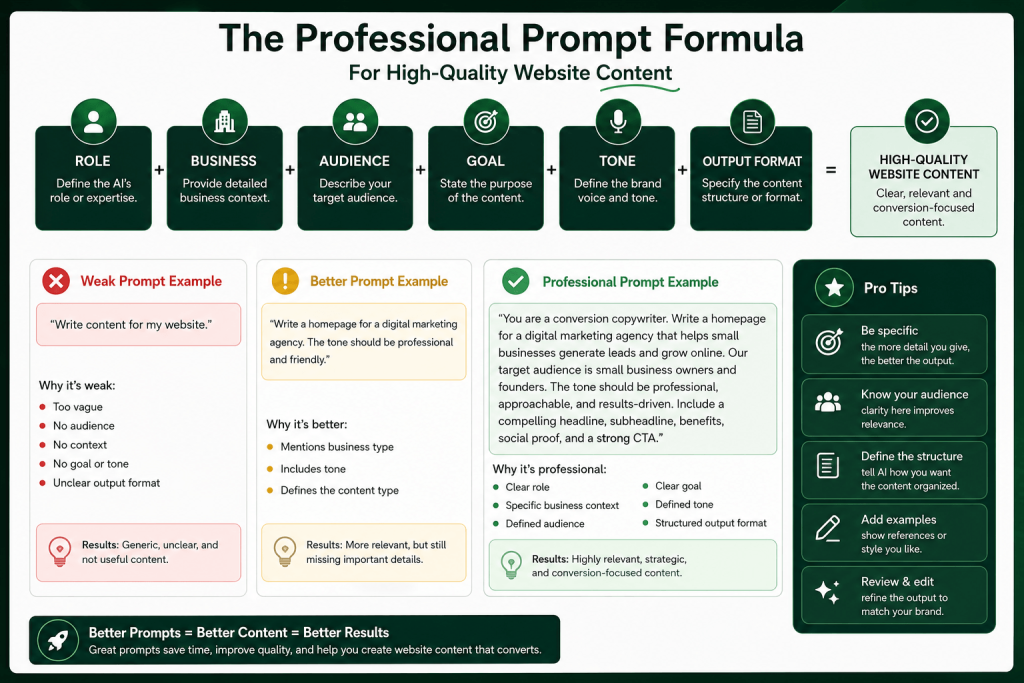
Professional copywriters who use ChatGPT don’t just describe what they want. They structure prompts using a reliable formula:
ROLE + BUSINESS + AUDIENCE + GOAL + TONE + OUTPUT FORMAT
Each element does specific work:
- Role — tells ChatGPT what expertise to apply (“Act as a conversion copywriter”)
- Business — sets context for the content (“a boutique law firm specializing in startup contracts”)
- Audience — defines who’s reading (“early-stage founders who’ve never hired a lawyer before”)
- Goal — specifies what the content should achieve (“build trust and generate consultation bookings”)
- Tone — shapes the writing style (“approachable but authoritative, not corporate”)
- Output format — controls the structure (“write a 3-section homepage: hero, benefits, CTA”)
Weak Prompt Example
Write website content for my business.
ChatGPT has no idea what your business does, who you’re talking to, or what the content should accomplish. You’ll get something generic you can’t use.
Better Prompt Example
Write homepage copy for a digital marketing agency.
Include a headline, some benefits, and a CTA.
Better, but still missing audience insight, tone, and conversion goals. The output will be passable but forgettable.
Professional Prompt Example
Act as a conversion copywriter with 10 years of B2B experience.

Write homepage hero copy for GrowthStack, a digital marketing agency
that helps SaaS companies grow from $1M to $10M ARR through
performance marketing and content.

Target audience: SaaS founders and marketing directors
frustrated with agencies that don't understand their product.

Goal: Build credibility and get them to book a free strategy call.

Tone: Direct, confident, results-focused. No fluff. No buzzwords.

Output:
- H1 headline (max 10 words)
- Subheadline (1-2 sentences)
- 3 benefit bullets
- CTA button text
The difference is dramatic. This prompt gives ChatGPT everything it needs to produce copy that actually converts.
ChatGPT Prompts for Homepage Content
Small Business Homepage
Prompt:
Act as a website copywriter specializing in local businesses.

Write homepage copy for [Business Name], a [type of business] in [city]
serving [customer type].

What we do: [describe your service or product]
What makes us different: [your key differentiator]
Tone: [friendly / professional / community-focused]

Include:
- Hero headline (problem or desire-focused)
- One-sentence subheadline
- 3-4 benefit statements
- Social proof placeholder (e.g., "Trusted by 500+ homeowners in [city]")
- Primary CTA (e.g., "Get a Free Quote")
What It Does: Produces locally-relevant homepage copy with a structure proven to convert for service-based businesses.
Example Use Case: A plumbing company in Austin needing a homepage refresh that speaks to homeowners dealing with emergency plumbing issues.
Pro Tip: Add a line like “avoid mentioning competitors” and “never use the word ‘passionate'” to filter out the most common AI clichés.
Agency Homepage
Prompt:
Act as a B2B conversion copywriter.

Write homepage copy for [Agency Name], a [agency type] that helps
[target client type] achieve [core outcome].

Our positioning: [one sentence unique positioning]
Proof points: [any results, clients, or credentials to include]
Tone: [confident / authoritative / creative]

Sections needed:
1. Hero (headline + subheadline + CTA)
2. Social proof bar (client logos placeholder)
3. Services overview (3 services, one line each)
4. Why us (3 differentiators)
5. CTA section
What It Does: Structures a full agency homepage in one prompt with all the sections that agency sites typically need.
Example Use Case: A branding agency launching a new website targeting DTC consumer brands.
Pro Tip: Paste in 2–3 testimonials and ask ChatGPT to extract proof points and weave them into the copy naturally.
SaaS Homepage
Prompt:
Act as a SaaS copywriter who specializes in product-led growth.

Write homepage copy for [Product Name], a [category] tool that helps
[user type] [achieve outcome] without [common pain or obstacle].

Primary use case: [describe what users do with the product]
Key differentiator vs competitors: [describe what makes it better]
Pricing model: [free trial / freemium / demo]
Tone: [clean / technical / friendly]

Output:
- Hero headline (outcome-focused, max 8 words)
- Subheadline (what it does + who it's for, 1–2 sentences)
- 3 feature → benefit pairs
- Social proof line (e.g., "Join 12,000 teams who...")
- Primary CTA: "[Your CTA text]"
What It Does: Creates SaaS homepage copy that focuses on outcomes over features — the format that converts best for software products.
Example Use Case: A project management SaaS targeting remote marketing teams.
Pro Tip: Ask ChatGPT to “write the headline in the Jobs-to-be-Done format: ‘When [situation], I want to [motivation] so I can [outcome].'” Then rewrite the headline using that insight.
Ecommerce Homepage
Prompt:
Act as an ecommerce copywriter.

Write homepage copy for [Brand Name], an online store selling [product category]
to [customer type].

Brand personality: [e.g., bold and minimal / warm and organic / fun and colorful]
Hero offer: [seasonal promotion, bestseller, or brand statement]
Tone: [describe tone]

Include:
- Hero banner headline and subline
- Collection teaser copy (2–3 collections, one line each)
- Brand story paragraph (3–4 sentences)
- Trust signals section (free shipping, returns policy, etc.)
What It Does: Creates conversion-focused ecommerce homepage copy that balances brand voice with selling.
Example Use Case: A sustainable skincare brand launching a new website.
Pro Tip: Tell ChatGPT the one product or collection you most want to feature and ask it to build the hero section around that specifically.
ChatGPT Prompts for About Page Content
Brand Story
Prompt:
Act as a brand storytelling expert.

Write an About page brand story for [Company Name], a [business type]
founded in [year] in [location].

Origin story: [why was the company started? what problem were you solving?]
What we believe: [core belief or philosophy]
Who we serve: [describe your customer]
Where we are today: [brief update on company size or impact]
Tone: [authentic / warm / inspiring]

Length: 200–300 words. First person plural ("we").
Avoid clichés like "passion" or "journey."
What It Does: Creates an authentic-sounding brand narrative that connects emotionally with readers without sounding generic.
Example Use Case: A family-run food brand wanting to explain why they started the business.
Pro Tip: Write 3–4 bullet points of raw facts about your story first, then paste them into this prompt. ChatGPT will shape them into a narrative — and you maintain control over accuracy.
Founder Story
Prompt:
Act as a personal brand copywriter.

Write a founder story for [Founder Name], founder of [Company Name].

Background: [relevant background, career history, or expertise]
Turning point: [what moment or insight led to starting this business?]
Mission: [what are they trying to change or build?]
Tone: [personal / honest / inspirational — not self-congratulatory]

Length: 150–200 words. First person ("I").
Make it feel real, not like a LinkedIn bio.
What It Does: Humanizes the business through the founder’s personal motivation — which builds trust faster than company credentials.
Example Use Case: A solo consultant launching a new website who wants clients to connect with them personally.
Pro Tip: Add: “Avoid making me sound like a hero. Make me sound like someone who figured something out and wants to share it.”
Mission Statement
Prompt:
Write 3 versions of a mission statement for [Company Name].

We help [audience] achieve [outcome] by [method].
Our core belief is: [belief]
Tone: [simple and direct / bold / values-driven]

Version 1: One sentence, max 20 words.
Version 2: Two sentences, focusing on impact.
Version 3: More detailed, 3–4 sentences, suitable for an About page.
What It Does: Gives you three options at different lengths so you can pick what works for your context.
Example Use Case: A nonprofit needing website copy that clearly communicates its purpose.
Pro Tip: Run this prompt, then ask: “Which of these would resonate most with [target audience] and why?” The critique is often more useful than the output.
Company Values
Prompt:
Write 4–5 company values for [Company Name] with short descriptions.

What we stand for: [describe your philosophy in a few sentences]
What we avoid: [describe behaviors or attitudes that clash with your culture]
Tone: [human / direct / no corporate speak]

Format: Value name (2–3 words) + 1–2 sentence description.
Make each value feel specific to us, not like generic corporate values.
What It Does: Generates specific-sounding values that differentiate your brand rather than the usual “Integrity. Innovation. Excellence.”
Example Use Case: A growing startup building their first culture page.
Pro Tip: Ask ChatGPT to “write values that sound nothing like a bank or consulting firm.” The constraint produces better results.
ChatGPT Prompts for Service Pages
Consulting Services
Prompt:
Act as a B2B copywriter.

Write a service page for [Consultant/Firm Name]'s [Service Name] offering.

What it is: [describe the service]
Who it's for: [describe ideal client — their role, company stage, problem]
What's included: [list 3–5 deliverables or components]
Outcome: [what will clients achieve?]
Engagement model: [retainer / project / hourly]
Tone: [expert / approachable / direct]

Sections:
1. Headline (outcome-focused)
2. Short intro paragraph (who this is for + what they get)
3. What's included (bullet list)
4. How it works (3 steps)
5. CTA (e.g., "Book a Discovery Call")
What It Does: Structures a complete consulting service page that answers the questions buyers ask before committing.
Example Use Case: An HR consultant launching a leadership coaching service for mid-market companies.
Pro Tip: Add: “Anticipate and address 2 common objections buyers have about [service type]” to get built-in trust-building copy.
Agency Services
Prompt:
Act as an agency copywriter.

Write service page copy for [Agency Name]'s [Service Name].

Client type: [describe your ideal client]
The problem we solve: [describe the pain]
Our approach: [brief description of methodology]
Proof: [results, case study snippets, or client types]
Tone: [confident / creative / strategic]

Output:
- H1 headline
- Intro paragraph (1–2 sentences)
- Our approach (3 phases or steps)
- Results we deliver (3 outcomes with metrics if possible)
- Client testimonial placeholder
- CTA
What It Does: Produces agency service pages that sell the process and outcomes rather than just describing the service.
Example Use Case: A paid media agency creating a Google Ads management service page.
Pro Tip: Paste in a real client result (e.g., “Increased ROAS by 3.2x in 90 days”) and ask ChatGPT to build the proof section around that specific number.
Local Services
Prompt:
Act as a local SEO copywriter.

Write a service page for [Business Name] offering [Service] in [City/Area].

Target customer: [homeowner / small business / etc.]
Key pain points: [what problems bring them to this service?]
What makes us different: [e.g., licensed, insured, 20 years experience]
Service areas: [list cities or neighborhoods]
Tone: [trustworthy / professional / friendly]

Include:
- H1 with location keyword (e.g., "[Service] in [City]")
- Intro paragraph
- What's included
- Why choose us (3–4 points)
- FAQ (3 questions customers commonly ask)
- CTA with phone number placeholder
What It Does: Creates locally-optimized service page copy that ranks for “[service] + [city]” searches.
Example Use Case: A gutter cleaning company in Phoenix creating pages for each service area.
Pro Tip: Create one page first, then ask ChatGPT to “rewrite this for [different city] while keeping the structure identical.” You’ll populate location pages in minutes.
Freelancer Services
Prompt:
Act as a personal brand copywriter for freelancers.

Write a services page for [Your Name], a freelance [your specialty]
who helps [client type] with [what you do].

Your experience: [relevant background]
Your approach: [how you work]
Your packages or services: [list 2–3 service offerings]
Tone: [professional but personal / confident / no hype]

Output:
- Intro paragraph (who you are + who you help)
- Services overview (each with name, description, what's included)
- Your process (3 steps)
- CTA (e.g., "Let's work together")
What It Does: Positions a freelancer as a trusted expert rather than a commodity service provider.
Example Use Case: A freelance UX designer creating a new portfolio website.
Pro Tip: Add: “Write this as if a respected colleague is describing my work, not as if I’m selling myself.” This removes the awkward self-promotional tone.
ChatGPT Prompts for Landing Page Content
Lead Generation Page
Prompt:
Act as a direct response copywriter.

Write a lead generation landing page for [Offer Name] by [Company Name].

What we're offering: [free guide / consultation / audit / checklist]
Who it's for: [describe target audience]
The main benefit: [what will they gain or learn?]
Pain point addressed: [what problem does this solve?]
Tone: [direct / empathetic / urgent]

Output:
- Headline (benefit-focused)
- Subheadline (who it's for + what they get)
- 3–4 bullet benefits (outcome-focused, not feature-focused)
- Form section headline (e.g., "Get Instant Access")
- Privacy line (e.g., "No spam. Unsubscribe anytime.")
- Thank you page headline
What It Does: Produces a complete lead gen page structure optimized for opt-in conversions.
Example Use Case: A marketing consultant offering a free SEO audit for ecommerce brands.
Pro Tip: Ask ChatGPT to write two headline options: one pain-focused (“Stop Losing Customers to Your Competitors”) and one gain-focused (“Learn the 5-Step System That Doubled Our Clients’ Leads”). Test both.
Product Launch Page
Prompt:
Act as a launch copywriter.

Write a product launch landing page for [Product Name] by [Company Name].

What it is: [brief description]
The problem it solves: [main pain point]
Launch date: [date or "Coming Soon"]
Early access offer: [discount / bonus / early pricing]
Tone: [exciting / aspirational / urgent]

Output:
- Hero headline + subline
- Problem section (2–3 short paragraphs)
- Product overview (key features as benefits)
- Launch offer details
- FAQ (3 questions)
- CTA (pre-order / waitlist / buy now)
What It Does: Creates a full launch page that builds desire and urgency before the product goes live.
Example Use Case: A creator launching a digital course to their email list.
Pro Tip: Ask ChatGPT to write the opening problem section in second person (“You know that feeling when…”) for maximum empathy and connection.
Webinar Registration Page
Prompt:
Write a webinar registration landing page.

Webinar title: [title]
Host: [name + short credibility statement]
Date/time: [date and time]
What attendees will learn: [3–4 learning outcomes]
Who it's for: [target audience]
Tone: [educational / authoritative / motivating]

Output:
- Headline (outcome of attending the webinar)
- Subheadline (who it's for)
- What you'll learn (bullet list)
- Host bio section (2–3 sentences)
- Registration form headline
- Urgency line (e.g., "Limited spots available")
What It Does: Produces a webinar registration page focused on the value of attending, not just the logistics.
Example Use Case: A financial advisor hosting a live webinar on retirement planning for business owners.
Pro Tip: Add: “Write the ‘What You’ll Learn’ bullets using outcome language: ‘You’ll discover how to…’ not ‘We will cover…'”
Free Trial Page
Prompt:
Act as a SaaS landing page copywriter.

Write a free trial landing page for [Product Name].

What users can do in the trial: [describe trial experience]
Trial length: [e.g., 14 days, no credit card required]
Main value proposition: [what's the core benefit?]
Objections to address: [e.g., setup complexity, time commitment]
Tone: [low-pressure / confident / clear]

Output:
- Headline (outcome, not product features)
- Subheadline (trial terms + who it's for)
- 3 reasons to start today
- How to get started (3 steps)
- FAQ (3 questions)
- CTA (e.g., "Start Your Free Trial")
What It Does: Reduces friction on the trial signup page by making the offer feel risk-free and easy.
Example Use Case: A project management tool targeting small agencies.
Pro Tip: Include “no credit card required” in the headline if it applies. Ask ChatGPT to make the CTA section as low-pressure as possible — high-pressure trial pages hurt conversions.
ChatGPT Prompts for Ecommerce Content
Product Descriptions
Prompt:
Act as an ecommerce copywriter who specializes in [product category].

Write a product description for [Product Name].

What it is: [brief product description]
Key features: [list 3–5 features]
Main benefits: [translate each feature into a customer benefit]
Ideal customer: [describe who buys this]
Tone: [premium / playful / technical / minimal]

Format:
- Opening hook (1 sentence — grab attention)
- Short paragraph (2–3 sentences — benefits and use case)
- Bullet list (3–5 benefit-focused points)
- Closing line with CTA or emotional connection
Length: 100–150 words
What It Does: Creates product descriptions that sell the benefit and experience, not just the specs.
Example Use Case: A premium coffee brand writing descriptions for 12 single-origin roasts.
Pro Tip: Ask ChatGPT to “write this description for someone who has never bought [product type] before” to get clearer, more accessible copy.
Collection Pages
Prompt:
Write collection page copy for [Brand Name]'s [Collection Name] collection.

Collection theme: [describe what connects these products]
Customer intent: [what is the customer looking for when they land here?]
Tone: [brand voice descriptor]

Output:
- Collection headline (2–5 words)
- Short intro paragraph (2–3 sentences — set context, create desire)
- 3–4 benefit/feature callouts (short, scannable)
What It Does: Provides collection-level copy that helps shoppers understand the range and choose the right product.
Example Use Case: A clothing brand writing copy for their “Workwear Essentials” collection.
Pro Tip: Keep collection page copy short — most visitors are scanning, not reading. Ask ChatGPT to limit the intro to 40 words maximum.
Category Pages
Prompt:
Write SEO-optimized category page copy for [Brand Name]'s [Category Name] category.

Target keyword: [main keyword, e.g., "men's running shoes"]
What's in this category: [brief description of product range]
Why shop here: [key differentiators — selection, quality, price, etc.]
Tone: [descriptive / helpful / confident]

Output:
- H1 (keyword-optimized, 5–8 words)
- Intro paragraph (keyword-rich, 60–80 words, above the fold)
- Buying guide section (H2 + 3–4 short paragraphs to help buyers choose)
- FAQ (3 questions relevant to this category)
What It Does: Creates category pages optimized for search intent — both for customers and for Google’s crawlers.
Example Use Case: A sporting goods store building out category pages for gym equipment.
Pro Tip: Category pages are one of the highest-leverage SEO opportunities in ecommerce. Ask ChatGPT to “write this to match informational search intent — someone comparing options, not ready to buy yet.”
Product Benefits Section
Prompt:
Write a product benefits section for [Product Name].

Features to translate into benefits:
- [Feature 1]: [explain what it does]
- [Feature 2]: [explain what it does]
- [Feature 3]: [explain what it does]

Customer problem this product solves: [describe]
Tone: [clear / confident / friendly]

Format: 3 benefit blocks, each with:
- Benefit headline (4–6 words)
- 1–2 sentence description
What It Does: Transforms feature lists into customer-focused benefit copy — the difference between “1000mAh battery” and “All-day power, no interruptions.”
Example Use Case: A tech accessories brand building a product page for wireless earbuds.
Pro Tip: Ask ChatGPT: “For each feature, start with the customer outcome, then explain how the feature delivers it.” This forces benefit-first writing.
ChatGPT Prompts for SEO Website Content
Meta Titles
Prompt:
Write 5 meta title options for a [page type] page targeting the keyword
"[primary keyword]."

Business type: [describe business]
Page goal: [drive traffic / generate leads / sell product]
Max length: 60 characters each

Make each option different:
- Option 1: Keyword-first
- Option 2: Benefit-focused
- Option 3: Question format
- Option 4: Brand-included
- Option 5: Number/list format
What It Does: Generates multiple meta title approaches so you can A/B test or choose the best fit.
Example Use Case: A legal services firm creating meta titles for their “business contract review” service page.
Pro Tip: After getting the options, ask: “Which of these is most likely to earn a click from someone in [buying stage]?” and use the rationale to refine your choice.
Meta Descriptions
Prompt:
Write 3 meta description options for a [page type] targeting "[primary keyword]."

Page goal: [drive clicks, not just impressions]
Key benefit or offer: [what's the hook?]
CTA: [e.g., Learn more / Get a free quote / Shop now]
Max length: 155 characters each

Make each option compelling — these are mini-ads in search results.
What It Does: Creates click-worthy meta descriptions that improve CTR from search results.
Example Use Case: An accountant writing meta descriptions for their “tax preparation services” page.
Pro Tip: Include your target keyword naturally — Google bolds keywords that match the searcher’s query, which increases click-through rates.
FAQ Content
Prompt:
Write an FAQ section for [page/topic] targeting [primary keyword].

Generate 6–8 questions that:
- Match what people actually search for on Google
- Include the keyword or related terms naturally
- Progress from basic to specific

For each question, write:
- The question (phrased the way someone would actually ask it)
- Answer (40–80 words, factual and direct)

Optimize for People Also Ask and Featured Snippets.
What It Does: Creates FAQ content that targets long-tail search queries and can appear in Google’s PAA boxes.
Example Use Case: A dentist building out FAQ content for their dental implants page.
Pro Tip: Start each answer with a direct, complete sentence that could stand alone as a featured snippet. Google often pulls the first 40–60 words.
Internal Linking Suggestions
Prompt:
I have a website about [topic/niche]. Here are my main pages:Suggest: 1. Which pages should link to each other and why 2. Natural anchor text suggestions for each link 3. Any content gaps I should fill to strengthen internal linking Focus on topical relevance and user experience, not just SEO manipulation.
What It Does: Builds a logical internal linking structure that improves both user navigation and SEO authority distribution.
Example Use Case: A digital marketing agency building out their content hub.
Pro Tip: Paste in your sitemap or a list of your top 10–15 pages and ask ChatGPT to map out a linking strategy with priority order.
SEO Homepage Optimization
Prompt:
Act as an SEO copywriter.

Rewrite my homepage copy to better target the keyword "[primary keyword]"
while keeping the conversion focus intact.

Current copy: [paste your existing homepage copy]

Target keyword: [primary keyword]
Secondary keywords: [list 2–3 related keywords]
Keep tone: [describe current tone]

Requirements:
- Include primary keyword in H1
- Use secondary keywords naturally in body copy
- Don't keyword-stuff — keep it readable
- Maintain existing CTAs
What It Does: Optimizes existing homepage copy for search without losing the human, conversion-focused voice.
Example Use Case: A web design agency with a homepage that ranks poorly for their target keywords.
Pro Tip: Ask ChatGPT to highlight which changes it made and why. This teaches you the principles so you can apply them yourself going forward.
ChatGPT Prompts for Website Calls-to-Action
Lead Generation CTAs
Prompt:
Write 5 CTA button options for a lead generation form offering [free resource/service].

Audience: [describe who's signing up]
Desired action: [e.g., download a guide, book a call, get a free audit]
Avoid: generic phrases like "Submit" or "Click Here"

Make each CTA feel like the reader is gaining something, not doing something.
What It Does: Generates value-forward CTAs that convert better than generic button text.
Example Use Case: A HR software company driving free demo signups.
Pro Tip: First-person CTAs often outperform second-person. “Start My Free Trial” converts better than “Start Your Free Trial” in many tests.
Sales CTAs
Prompt:
Write 5 CTA options for a sales page selling [product/service].

Price point: [low / mid / high-ticket]
Buyer's mindset at this point: [informed and ready / still comparing / skeptical]
Tone: [urgent / confident / reassuring]

Include a mix of:
- Direct CTAs (e.g., "Buy Now")
- Low-risk CTAs (e.g., "Try Risk-Free")
- Urgency CTAs (if appropriate)
What It Does: Gives you sales CTAs matched to the buyer’s mindset at the point of purchase.
Example Use Case: A coaching program creating a sales page CTA section.
Pro Tip: For high-ticket offers, pair the CTA with a reassurance line below it: “30-day money-back guarantee. No questions asked.”
Newsletter CTAs
Prompt:
Write a newsletter signup section for [Website/Brand Name].

What subscribers get: [describe content, frequency, and value]
Target reader: [who subscribes to this newsletter?]
Tone: [friendly / expert / community-focused]

Output:
- Section headline
- 1–2 sentence description of what they'll get
- CTA button text
- Privacy micro-copy (one line)
What It Does: Creates newsletter signup copy that focuses on the value of subscribing rather than just asking for an email.
Example Use Case: A B2B consultant building their subscriber list through a content-heavy website.
Pro Tip: Be specific about what they’ll receive: “Every Tuesday: 3 marketing strategies, 1 tool recommendation, and 1 real-world example” converts better than “Join our newsletter.”
Contact Page CTAs
Prompt:
Write copy for a contact page for [Business Name].

Who typically reaches out: [leads / existing customers / media / partners]
What happens after they contact you: [describe next steps]
Tone: [friendly / professional / approachable]

Output:
- Page headline (not just "Contact Us")
- Short intro paragraph (what to expect, response time)
- Form headline
- CTA button text
- Alternative contact options placeholder (email, phone)
What It Does: Turns a bare contact form into a page that sets expectations and encourages people to reach out.
Example Use Case: A professional services firm wanting to make their contact page more welcoming to potential clients.
Pro Tip: Tell visitors what happens next. “Fill out the form and we’ll be in touch within 1 business day” removes uncertainty and increases form completions.
Best Practices for Better Website Content
Define your audience clearly. Before any prompt, write one sentence about your ideal customer: their job, their problem, and what they want to achieve.
Specify tone of voice. Give three descriptors and, if possible, name a brand whose voice you admire. “Write like Basecamp’s website — plain-spoken, confident, no corporate jargon.”
Provide business context. Don’t let ChatGPT guess what you do. A two-sentence business description dramatically improves output quality.
Request SEO optimization. Include your target keyword and ask for naturally optimized headings. Tell ChatGPT your goal is to rank for a specific search query.
Edit and personalize outputs. Add your real results. Replace placeholder examples with your actual clients. Fix anything that sounds generic. The editing step is what turns good AI content into great website copy.
Iterate on the output. If the first draft isn’t right, don’t start over — ask ChatGPT to “rewrite the opening paragraph to be more direct” or “make the tone less formal.” Refinement prompts often produce better results than starting from scratch.
ChatGPT vs Professional Website Copywriters
| Factor | ChatGPT | Professional Copywriter |
|---|---|---|
| Speed | Minutes | Days to weeks |
| Cost | Low (subscription) | $500–$5,000+ per project |
| Brand voice | Approximates with guidance | Deeply develops over time |
| Conversion expertise | Good with detailed prompts | Deep expertise and testing experience |
| SEO knowledge | Solid with keyword guidance | Varies by specialist |
| Industry research | General knowledge | Deep research and interviews |
| Customization | Requires detailed input | Naturally produced from discovery |
| Editing needed | Yes — always | Minimal |
| Best for | First drafts, smaller budgets, high volume | High-stakes pages, premium brands |
The honest answer: ChatGPT is excellent for getting from zero to a solid draft. A professional copywriter is worth it when the page needs to convert high-ticket buyers or represent a brand at the highest level.
For most businesses — especially early-stage or budget-conscious ones — ChatGPT with good prompts gets you 80% of the result at 10% of the cost.
Frequently Asked Questions
Can ChatGPT create website content?
Yes. ChatGPT can write homepage copy, about pages, service pages, landing pages, product descriptions, meta titles, meta descriptions, FAQ sections, and CTAs. The quality depends heavily on how detailed and specific your prompts are.
What is the best ChatGPT prompt for website content?
The best prompt includes six elements: a role assignment, your business description, your target audience, the content goal, your brand tone, and the desired output format. Generic prompts produce generic content. Specific prompts produce usable copy.
Can ChatGPT write SEO-friendly website copy?
Yes. Include your target keyword in the prompt and ask ChatGPT to optimize headings and body copy for search intent. For best results, specify the keyword, secondary keywords, and whether you want the content to target informational, commercial, or transactional intent.
Can ChatGPT create landing page content?
Yes. ChatGPT is particularly effective for landing pages when you provide the offer details, target audience, pain points, key benefits, and CTA. Use the landing page prompts in this guide for best results.
Is AI-generated website content good for SEO?
AI-generated content can rank well when it’s accurate, useful, well-structured, and edited for quality. Google’s guidelines focus on helpful content — not whether a human or AI wrote it. Always edit, fact-check, and add original insight before publishing.
Conclusion
ChatGPT is one of the most practical tools available for creating website content faster. But the quality gap between a weak prompt and a professional prompt is enormous.
The prompts in this guide give you a strong starting point for every major content type — from homepage copy and about pages to service pages, landing pages, ecommerce content, and CTAs.
Use them as templates. Customize the details for your business. Edit the outputs to add your authentic voice and real-world specifics.
The businesses getting the most out of ChatGPT for website content aren’t using it to replace thinking — they’re using it to accelerate execution. That’s exactly what these prompts are built to help you do.