Most people’s first conversation with ChatGPT goes something like this: they type a vague question, get a vague answer, and walk away thinking the tool is overhyped.
That’s not a ChatGPT problem. It’s a communication problem.
ChatGPT doesn’t fail because it’s incapable. It fails because most people talk to it the way they’d talk to a search engine, when it actually behaves more like a very capable, very literal collaborator who has no idea what’s in your head unless you put it into words. Learning how to use ChatGPT well isn’t about memorizing hacks. It’s about understanding what it’s actually doing when it responds to you, and adjusting how you ask for things accordingly.
This guide walks through that, from your first message to the habits that separate people who get mediocre answers from people who get genuinely useful ones.
What ChatGPT Actually Is (and Isn’t)
ChatGPT is a language model. It was trained on enormous amounts of text and learned to predict what a good next sentence looks like, given everything that came before it in the conversation.
That single fact explains almost everything about how to use it well.
It means ChatGPT doesn’t “know” things the way a search engine indexes a webpage. It generates responses based on patterns, which is also why two people can ask ChatGPT the same question and get different answers, depending on their phrasing and context. Give it a clear, well-framed question, and the pattern it draws on will be clear and well-framed too. Give it a vague, one-line prompt, and you’ll get a vague, generic answer, because that’s the pattern that matches.
It also means ChatGPT has no memory of you beyond what you’ve told it in the current conversation (or, if you’re using a paid plan with memory enabled, what it has saved from past chats). It isn’t holding a grudge, and it isn’t guessing based on assumptions about who you are. It’s working entirely from the words in front of it.
Once that clicks, the rest of this becomes much easier.
Getting Started: Your First Real Conversation
If you’re brand new to ChatGPT, here’s the short version of getting set up:
- Go to chat.openai.com and create a free account.
- Type your question or request into the message box.
- Read the response, then reply again to refine it.
That third step is the one beginners skip. ChatGPT is built for back-and-forth. Your first message rarely needs to be perfect, because you can correct course in the next one.
Here’s a simple first prompt to try:
Explain the difference between a Roth IRA and a traditional IRA, as if you’re explaining it to someone who has never invested before.
Notice what’s doing the work here: a specific question, a specific audience level, and a clear boundary on what “good” looks like. That’s the template for almost everything that follows.
The One Skill That Matters Most: Writing Better Prompts
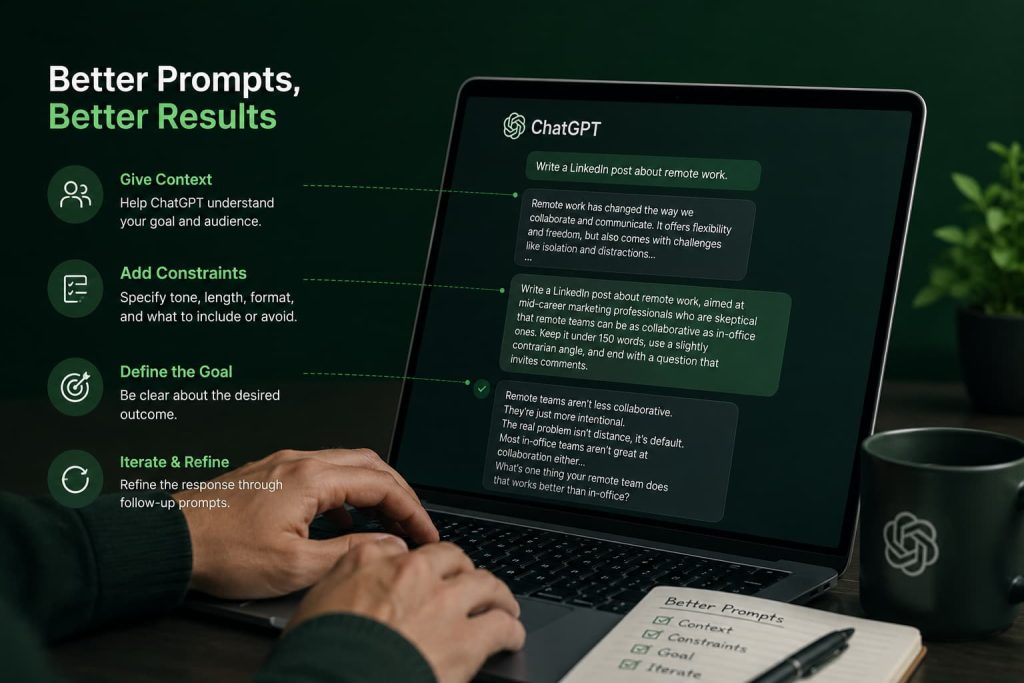
If you take one thing from this article, take this: the quality of your output is a direct function of the quality of your input. This is often called “prompt engineering,” which sounds more technical than it is. In practice, it just means being specific.
Give it context, not just a question
Compare these two prompts:
Write a LinkedIn post about remote work.
Write a LinkedIn post about remote work, aimed at mid-career marketing professionals who are skeptical that remote teams can be as collaborative as in-office ones. Keep it under 150 words, use a slightly contrarian angle, and end with a question that invites comments.
The second prompt takes ten extra seconds to write and produces a dramatically better result. It tells ChatGPT who the audience is, what tone to strike, how long the output should be, and what job the ending needs to do.
Tell it what “done” looks like
ChatGPT can’t read your mind about format. If you want bullet points, say so. If you want a table, ask for a table. If you want the answer in under 100 words, say that too. Leaving format unspecified means you’ll often get a longer, more hedged answer than you actually wanted, because the model is trying to cover its bases.
Assign it a role when it helps
Asking ChatGPT to respond “as an experienced tax accountant” or “as a skeptical editor reviewing this draft” genuinely changes the texture of the response. It’s not magic. It’s just a fast way of telling the model which patterns of language and reasoning to lean on.
Act as a skeptical editor. Read the following paragraph and tell me the three weakest sentences, and why.
Iterate instead of starting over
One thing that surprised me when I started using ChatGPT seriously for work was how much better the fifth message in a conversation is than the first. Each reply you give sharpens the target. “Make it shorter.” “Less formal.” “Cut the second paragraph entirely.” These small corrections compound fast.
Don’t treat a bad first answer as a failure. Treat it as a rough draft you’re allowed to edit out loud.
How to Ask ChatGPT Questions (Without Getting Generic Answers)
There’s a specific failure mode worth naming: asking ChatGPT questions the way you’d ask Google. Search engines reward short queries because they’re matching keywords against an index. ChatGPT rewards the opposite. The more relevant detail you include, the more precisely it can respond.
A few adjustments that consistently improve answer quality:
State your actual goal, not just your literal question. Instead of “How do I write a cover letter,” try “I’m applying for a marketing coordinator role at a startup and have no direct marketing experience, just two years in retail. Help me write a cover letter that reframes my retail experience as relevant.”
Give it constraints upfront. Word counts, tone, audience, format, things to avoid. Constraints don’t limit ChatGPT’s usefulness. They focus it.
Ask follow-up questions like you would with a colleague. “Why did you recommend that approach?” or “What would you change if the budget were half that?” often surfaces better thinking than the original answer.
Push back when something feels off. If an answer sounds too generic or slightly wrong, say so directly. “This feels like generic advice, can you get more specific to my situation?” usually works.
Common Mistakes People Make With ChatGPT
A few patterns come up constantly, across nearly every use case.
Treating the first answer as final. The first response is a starting point, not a verdict. Refining it is where the actual value shows up.
Asking it to be “creative” without any constraints. Open-ended creative requests tend to produce the most predictable, cliché-heavy output ChatGPT is capable of. Ironically, tighter constraints produce more original results, because they force the model away from the most generic pattern.
Assuming it remembers things it doesn’t. Unless you’re in a single ongoing conversation or using saved memory, ChatGPT won’t recall details from a chat you closed yesterday. Restate context when it matters.
Not fact-checking anything that matters. ChatGPT can state incorrect information with total confidence. This is especially true for specific numbers, dates, citations, and niche technical claims. For anything with real consequences, verify independently.
Using it as a replacement for judgment rather than an input to it. ChatGPT is excellent at drafting, structuring, and exploring. The decision at the end, especially for anything involving money, legal matters, health, or people’s careers, should still be yours.
How to Use ChatGPT for Specific Tasks
The core skills above apply everywhere, but a few use cases benefit from more specific approaches.
For work
ChatGPT is genuinely strong at first drafts: emails, meeting agendas, project plans, internal memos. The trick is feeding it real context instead of asking in the abstract.
Draft an email to my team letting them know our product launch is delayed by two weeks due to a vendor issue. Keep the tone calm and confident, not apologetic. Include one sentence about what we’re doing to prevent this happening again.
For studying
Rather than asking ChatGPT to “explain photosynthesis,” ask it to test you.
Quiz me on the stages of photosynthesis with five questions, one at a time, and tell me what I got wrong after each answer.
This flips ChatGPT from a passive explainer into an active study partner, which tends to produce better retention than reading a static explanation.
For content writing
Content writers get the most value out of ChatGPT when they use it for structure and first drafts, then rewrite in their own voice. Asking it to write a “final” blog post in your exact voice on the first try usually disappoints. Asking it to draft an outline, or a rough first pass you can rewrite, tends to work much better.
For research
ChatGPT is useful for synthesizing concepts you already understand loosely and want organized, or for generating a starting list of angles, questions, or considerations on a topic. It’s a poor substitute for primary sources when the stakes are high. Use it to structure your thinking, then verify the specifics elsewhere.
For coding
Developers tend to get the best results by pasting in actual error messages and relevant code, rather than describing the problem from memory.
Here’s the error I’m getting: [paste error]. Here’s the relevant function: [paste code]. What’s causing this, and how would you fix it while keeping the function’s existing signature?
Specificity here isn’t optional. Vague coding questions produce plausible-sounding code that often doesn’t run.
ChatGPT Tips That Make a Real Difference
A handful of habits separate casual users from people who get consistent value out of this tool.
Keep related work in one conversation. Context carries within a chat. Splitting a project across five new chats means re-explaining yourself five times.
Ask it to critique its own output. “What’s the weakest part of this response?” often produces a more honest self-assessment than you’d expect, and a better second draft.
Use custom instructions if you’re on a paid plan (or even the free tier, where available). Telling ChatGPT once, in settings, that you prefer concise answers, or that you’re a software developer, or that you dislike bullet-point overuse, saves you from repeating yourself in every conversation.
Save prompts that work. If you land on a prompt structure that consistently gets you good output, keep it somewhere you can reuse it. Small template libraries save real time.
Don’t over-trust confidence. A well-written, assertive answer isn’t the same as a correct one. Calibrate your trust to the stakes of the task.
ChatGPT Free vs. Paid: Does It Matter?
For most casual use, the free version is genuinely capable. It handles writing, brainstorming, general questions, and basic coding help well.
Where the paid version (ChatGPT Plus, and the higher business and enterprise tiers) tends to earn its cost is in access to more advanced models, higher usage limits, faster responses during peak times, and features like more reliable memory across conversations, file uploads, and image generation.
If you’re using ChatGPT occasionally for personal tasks, the free tier is probably enough. If you’re using it daily for work, especially work involving longer documents, coding, or heavy back-and-forth, the paid tier tends to pay for itself quickly in time saved.
A Simple Way to Think About Prompting
Here’s a mental model that tends to stick: think of every prompt as answering three questions for ChatGPT, whether you state them explicitly or not.
Who is this for? What does “good” look like? What should it avoid?
Most disappointing ChatGPT answers can be traced back to one of these three being missing. Most excellent ones answer all three, even briefly.
The Real Skill Isn’t Prompting. It’s Editing the Conversation.
People often ask how to “master” ChatGPT as if there’s a final skill level to reach. There isn’t, exactly. What actually happens is that you get better at noticing when an answer isn’t quite right, and faster at saying precisely what would fix it.
That’s a more useful skill than any single prompt trick, because it transfers to everything: new features, new models, new tools that don’t exist yet. The people who get the most out of ChatGPT aren’t the ones who found the perfect prompt. They’re the ones who treat every response as a draft worth pushing on.
Start your next conversation with that in mind, and you’ll notice the difference immediately.