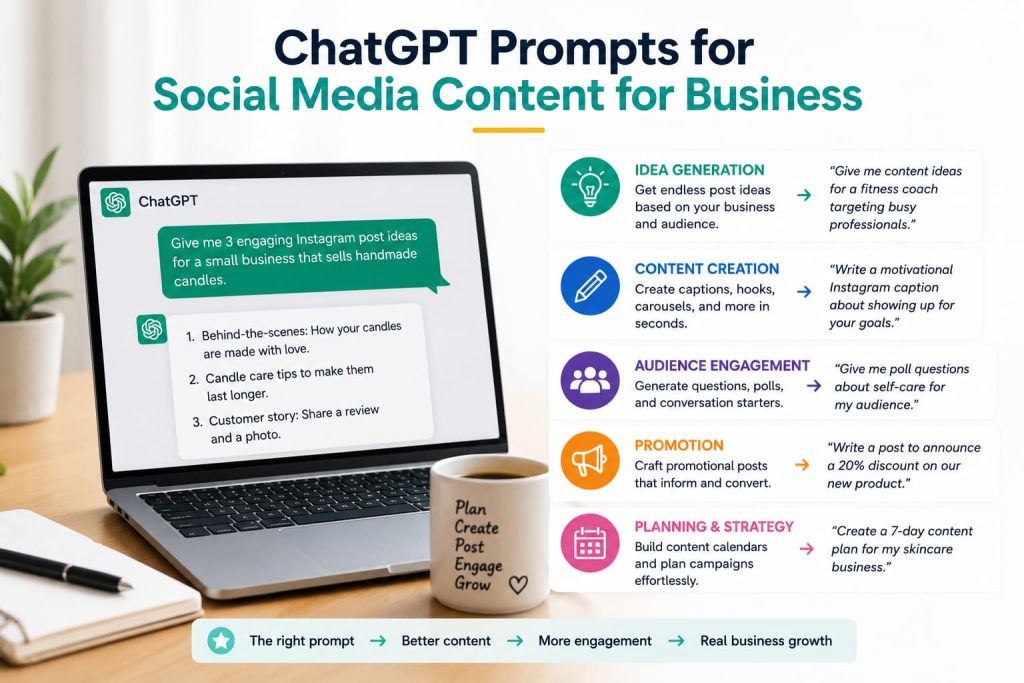
Let’s be honest, ming up with social media content every single day is exhausting.
One day you’re full of ideas. The next day you’re staring at a blank screen, cursor blinking, wondering what on earth to post. You know you should be consistent. You know your audience is out there. But somehow the ideas just… don’t come.
That’s where ChatGPT can help.
With the right prompts, ChatGPT can become your on-demand social media strategist — helping you brainstorm ideas, write posts, plan content calendars, and keep your feed active without burning out. This guide gives you the exact prompts to make that happen, starting today.
Can ChatGPT Create Social Media Content for Businesses?
Short answer? Yes and it does it surprisingly well.
ChatGPT can write captions, generate post ideas, draft promotional copy, create engagement questions, plan content calendars, and even tailor content for different platforms. It understands tone, audience, and context when you give it enough information to work with. If you are going to build a business, ChatGPT can become your best mentor.
Here’s what it’s genuinely good at:
- Brainstorming — generating 10–20 post ideas in seconds
- Writing first drafts — captions, hooks, CTAs, stories
- Repurposing content — turning a blog post into 5 social posts
- Platform adaptation — adjusting tone for LinkedIn vs Instagram vs Facebook
- Content calendars — mapping out weeks or months of content
But here’s what most businesses get wrong: they treat ChatGPT like a vending machine. They type “write me a social media post” and post whatever comes out. That’s why so much AI-generated content feels flat and generic.
ChatGPT works best when you bring the context — your brand voice, your audience, your offers, your stories. Then it does the heavy lifting on structure and copy.
Human creativity still matters. ChatGPT can’t know the story of how you started your business, what your customers said last week, or the behind-the-scenes moment that happened on Tuesday. That’s your edge. ChatGPT just helps you express it faster.
The Best ChatGPT Prompt for Social Media Content
If you only use one prompt, make it this one. It’s a universal framework that works across platforms and content types.
Prompt:
“You are a social media strategist helping a [type of business] grow their audience on [platform]. My target audience is [describe your audience]. My brand voice is [e.g., friendly, professional, casual, bold]. I want to create a [type of post: educational / promotional / engagement / story]. Write 3 versions of a post that [specific goal, e.g., ‘teaches my audience about X’ or ‘promotes my new service Y’]. Include a hook, the main content, and a call to action.”
Why It Works
You’re not just asking for “a post.” You’re giving ChatGPT your business type, platform, audience, voice, goal, and format. That’s enough context to produce something actually usable — not just generic filler.
When To Use It
Use this as your go-to prompt whenever you’re starting from scratch. It works for any industry, any platform, any content type.
Pro Tip
Save a filled-in version of this prompt with your business details already included. That way you just change the content type and goal each time — and you’re writing in seconds.
The Social Media Content Framework Smart Businesses Use
Before we get into the prompts, here’s the framework behind great social media content. Use this to brief ChatGPT better and you’ll get better output every time.
AUDIENCE + VALUE + STORY + ENGAGEMENT + CTA
- Audience — Who are you talking to? What do they care about?
- Value — What does this post teach, inspire, or solve?
- Story — Is there a human moment, example, or experience behind it?
- Engagement — Does it invite a comment, share, or reaction?
- CTA — What’s the next step you want them to take?
Example: Instead of “Here are 5 tips for better sleep,” a post built on this framework might start with: “I used to wake up exhausted every single morning. Then I changed one habit — and it changed everything.” That’s audience + story + value all in the first two lines.
Tell ChatGPT to use this framework and watch the quality of your posts jump immediately.
ChatGPT Prompts for Social Media Post Ideas
Daily Content Ideas
Prompt
“Give me 10 social media post ideas for a [type of business] targeting [audience]. Mix educational, promotional, and engagement content. Include the type of post, the hook, and the platform it works best on.”
What It Does
Gives you a week’s worth of varied content in one shot, with the thinking already done.
Example
A fitness coach targeting busy parents could get posts like: “3 workouts you can do while your kids nap (Instagram Reel idea)” or “Poll: What’s your biggest barrier to working out? (Facebook engagement post).”
Pro Tip
Ask for 20 ideas, then pick the 5 that resonate most. You’ll always get a few gems in a bigger list.
Weekly Content Planning
Prompt
“Create a 5-day social media posting schedule for my [business type] on [platform]. Each day should have a different content type: Monday = motivational, Tuesday = educational, Wednesday = behind-the-scenes, Thursday = promotional, Friday = engagement. Include post hooks for each day.”
What It Does
Turns the “what do I post today?” panic into a repeatable weekly rhythm.
Pro Tip
Once you have a format that works, save it as a template and ask ChatGPT to fill in new topics each week.
Industry-Specific Content Ideas
Prompt
“I run a [specific business, e.g., local bakery / marketing agency / online coaching business]. Give me 15 social media post ideas that are specific to my industry and audience. Focus on topics my ideal customers actually care about, not generic business advice.”
What It Does
Breaks out of generic content and into what your actual audience wants to see.
Pro Tip
Add “and avoid ideas that are overused in my industry” at the end. This pushes ChatGPT to get more creative.
Trending Topic Content
Prompt
“What content trends are popular in [your industry] right now? Suggest 5 social media post ideas that tap into these trends for a [business type] targeting [audience].”
Pro Tip
Combine this with real trending topics you’ve noticed and ask ChatGPT to write posts around them specifically.
ChatGPT Prompts for Educational Content
Educational content builds trust faster than any ad. Here’s how to create it consistently.
Tips and Advice Posts
Prompt
“Write a tips post for [platform] that teaches [target audience] how to [solve a specific problem]. Use a strong hook, keep each tip short and actionable, and end with a CTA to [follow, comment, visit website, etc.].”
Example
A financial advisor could prompt: “Write a LinkedIn post that teaches first-time home buyers how to prepare their finances before applying for a mortgage.”
Pro Tip
After ChatGPT writes it, ask: “Now rewrite the hook to be more surprising or counter-intuitive.” The second version is almost always better.
How-To Content
Prompt
“Write a step-by-step how-to post for [platform] that walks [audience] through [specific process]. Keep it simple enough for a beginner. Format it as numbered steps with a brief explanation for each.”
Pro Tip
How-to posts perform extremely well as carousels on Instagram and LinkedIn. Ask ChatGPT to format each step as a slide.
Industry Insights
Prompt
“Write a social media post sharing an insight about [industry trend or shift] and explain what it means for [target audience]. Position me as a knowledgeable expert without being too technical.”
Myth-Busting Posts
Prompt
“Write a myth-busting post for [platform] that challenges a common misconception about [topic in your industry]. Start with ‘Most people believe X — but here’s the truth.’ Keep it direct and back it up with a simple explanation.”
Why These Work
Myth-busting posts stop the scroll, generate strong reactions, and position you as someone who tells the truth when others don’t. Use them regularly.
ChatGPT Prompts for Engagement Posts
Engagement is what tells the algorithm your content is worth showing. These prompts help you create posts that get people talking.
Poll Questions
Prompt
“Give me 5 poll questions I can use on [platform] for a [business type]. Make them fun, relevant to my audience, and likely to generate strong responses. Include two answer options for each.”
Example
A restaurant could post: “Which would you pick on a Friday night? 🍕 Pizza or 🍣 Sushi?” Simple, visual, impossible not to answer.
Conversation Starters
Prompt
“Write 5 conversation-starter posts for [platform] that encourage my [audience] to share their opinions or experiences related to [topic]. Each post should end with a direct question.”
Pro Tip
The best conversation starters feel a little vulnerable or personal. Ask ChatGPT to “make the post feel like the business owner is sharing a real opinion, not just asking a question.”
Community Building Posts
Prompt
“Write a community-building post for [platform] that makes my [audience] feel seen, understood, and part of something. Reference a common struggle or shared experience and end with something that unites them.”
Audience Feedback Posts
Prompt
“Write a post asking my audience for honest feedback on [product, service, or content]. Make it feel genuine and personal, not like a corporate survey. Include a simple call to action to reply in the comments.”
ChatGPT Prompts for Promotional Content
Here’s the rule most businesses forget: promotional content should still provide value. Nobody wants to be sold at constantly. These prompts help you promote without being annoying.
Product Promotion Posts
Prompt
“Write a promotional post for [product name] targeting [audience]. Lead with a problem my customer has, show how the product solves it, include a benefit (not just a feature), and end with a CTA. Keep it under 150 words for [platform].”
Service Promotion Posts
Prompt
“Write a social media post promoting my [service] to [audience]. Start with a relatable scenario or problem, explain how my service helps, include one specific outcome or result, and add a CTA to [book a call / DM me / click the link].”
Pro Tip
Ask ChatGPT to write “a version that sounds like a recommendation from a satisfied customer’s perspective” — it often reads more naturally than a straight promotion.
Launch Announcements
Prompt
“Write a launch announcement post for [product/service] on [platform]. Build excitement, explain what it is and who it’s for, create a sense of occasion, and tell people exactly what to do next.”
Limited-Time Offers
Prompt
“Write an urgency-driven promotional post for a limited-time offer on [product/service]. Include the offer details, why it’s limited, and a clear deadline. Don’t be pushy — make it feel like I’m doing them a favor by letting them know.”
ChatGPT Prompts for Social Media Content Calendars
Weekly Content Calendar
Prompt
“Create a weekly social media content calendar for a [business type] on [platforms]. Include post topics, content types, and suggested captions for each day. Align content to these goals: [brand awareness / engagement / lead generation / sales].”
Monthly Content Plan
Prompt
“Build a 30-day social media content plan for my [business]. Include 4 content pillars: educational, promotional, engagement, and behind-the-scenes. Distribute them across the month and suggest 2–3 post topics per pillar.”
Multi-Platform Strategy
Prompt
“I post on Instagram, LinkedIn, and Facebook. Take this content idea — [describe it] — and adapt it for each platform. Adjust the tone, length, and format to suit each platform’s audience.”
Campaign Planning
Prompt
“Help me plan a 2-week social media campaign to promote [product/event/launch]. Include a content arc with a warm-up phase, launch phase, and follow-up phase. Give me 3 post ideas for each phase.”
How I Would Use ChatGPT to Manage Social Media for a Small Business
If I were managing social media for a small business, here’s the exact workflow I’d use.
Monday morning (20 minutes): Run the weekly planning prompt. Get 10 post ideas for the week across education, promotion, and engagement. Pick the 5 best.
Monday–Friday (10 minutes per post): Use the universal prompt to draft each post. Edit it to add a personal story, specific detail, or brand voice tweak. Schedule it.
End of week (15 minutes): Check what performed best. Note the topics, formats, and hooks that got the most engagement. Adjust next week’s prompts accordingly.
Monthly: Run the monthly content plan prompt to map out upcoming campaigns, product launches, or seasonal content. Get ahead so you’re never scrambling.
Repurposing: Whenever a post performs well, ask ChatGPT to “turn this post into a carousel, a short video script, and a story.” One piece of content becomes four.
This workflow keeps you consistent without spending hours on content every day. The secret is batching — plan once, create in bulk, schedule in advance.
Frequently Asked Questions
Can ChatGPT create social media posts?
Yes. ChatGPT can write captions, hooks, CTAs, carousel copy, video scripts, and full posts for any platform. The key is giving it detailed prompts that include your audience, tone, and goal — generic prompts produce generic posts.
What is the best ChatGPT prompt for social media content?
The most effective prompt includes: your business type, target platform, audience description, brand voice, content type (educational/promotional/engagement), and specific goal. Use the universal prompt in this guide as your starting template.
Can ChatGPT create content calendars?
Absolutely. ChatGPT can build weekly, monthly, and campaign-level content calendars. Give it your content pillars, posting frequency, and goals, and it will map out a full schedule with post topics and ideas.
Can ChatGPT write Instagram captions?
Yes — and it can do it well when you specify your audience, the image or video context, your brand voice, and whether you want a long storytelling caption or a short punchy one. Always add your own personal touch before posting.
Should I edit ChatGPT-generated content?
Always. ChatGPT writes great drafts, but your edits are what make content sound authentically human. Add your real experiences, your specific customers, your brand personality. That’s what makes people follow you — not just the content.
Conclusion
You don’t need to stare at a blank screen anymore.
With the right ChatGPT prompts, you can go from “I have no idea what to post” to “I have content planned for the next two weeks” in a single afternoon. Start with the universal prompt. Try the weekly planning prompt. Pick one engagement post format and test it this week.
The businesses winning on social media right now aren’t the ones with the biggest budgets — they’re the ones who show up consistently with content their audience actually cares about. ChatGPT helps you do that faster.
Want to go deeper? Check out how to use [ChatGPT Prompts for Marketing Strategy], build your [ChatGPT Prompt for Customer Persona], and craft your [ChatGPT Prompt for Brand Positioning] to make every piece of content work harder for your business.