You have an app idea. Maybe it’s been sitting in your notes app for months, half-formed, waiting for the “right time” to actually do something with it.
Here’s the thing: the problem was never the idea. The problem is figuring out what to do next.
Do you sketch wireframes first? Hire a developer? Write a business plan? Learn to code? Most people freeze right here, at the gap between “I have an idea” and “I have a plan.”
This is exactly where ChatGPT becomes useful. Not as a magic app-builder that spits out a finished product, but as a thinking partner that helps you turn a vague idea into a structured, buildable plan — the same way a product manager or startup advisor would if you had one on speed dial.
This guide gives you the exact prompts to take your app from idea to launch, plus the reasoning behind each one, so you’re not just copying text into a chat box — you’re actually building something.
Can ChatGPT Help You Build an App?
Yes — but not in the way most people assume.
ChatGPT can’t write your entire codebase and deploy it to the App Store while you sleep. What it can do is handle nearly everything around the code, which is usually the part that actually kills app projects.
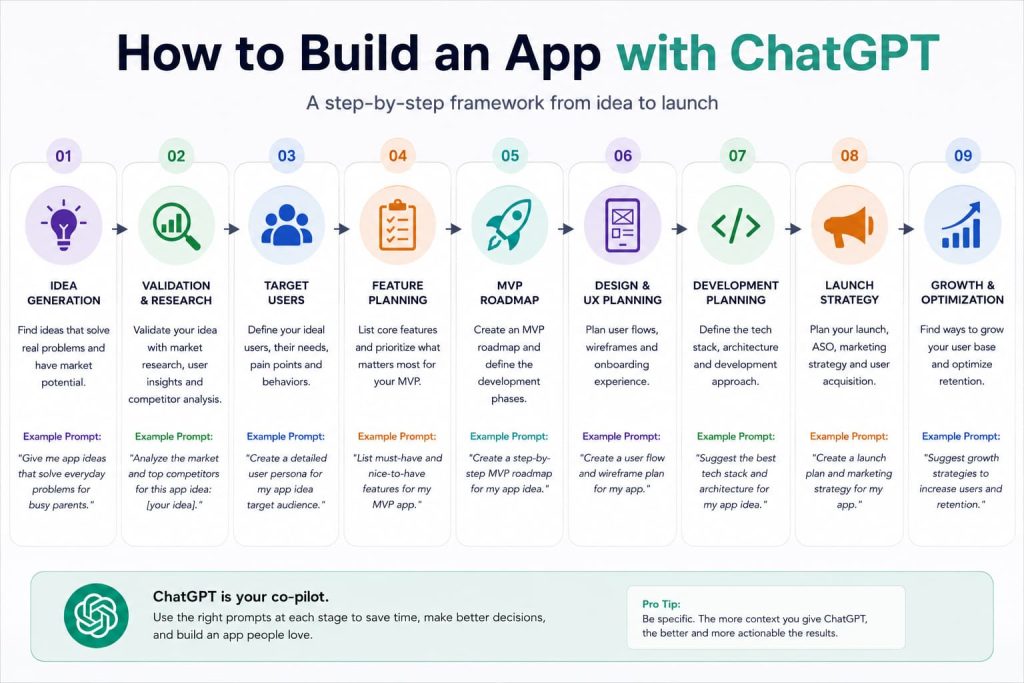
Here’s where ChatGPT genuinely helps:
- Idea generation — brainstorming and refining concepts based on real problems
- Validation — stress-testing your idea against competitors and market demand
- Feature planning — figuring out what to build first (and what to skip)
- UX planning — mapping user flows before a single screen is designed
- Wireframe direction — describing layouts and interactions in enough detail for a designer or no-code tool to execute
- Technical specifications — turning your idea into a spec a developer could actually build from
- MVP planning — cutting your idea down to the smallest version that still delivers value
- Marketing strategy — planning your launch, positioning, and growth loops
Here’s what it can’t do well: it doesn’t know your specific users, it can’t test your app with real humans, and it won’t tell you your idea is bad unless you push it to be honest. Treat it like a sharp collaborator, not an oracle.
The founders who get the most out of ChatGPT aren’t the ones who ask it to “build me an app.” They’re the ones who use it to think more clearly, faster, at every stage of the process.
The Best ChatGPT Prompt to Build an App
If you only use one prompt from this entire guide, use this one. It’s a master prompt designed to take a rough idea and turn it into a structured app plan in a single conversation.
Prompt:
“Act as a startup founder and product strategist. I want to build an app around this idea: [describe your idea in 1-2 sentences]. Help me develop this into a full concept by walking through: 1) A refined problem statement, 2) Who the target user is and what they currently do instead of using an app like this, 3) 3-5 competitor apps and what they’re missing, 4) A core feature list split into ‘must-have’ and ‘nice-to-have’, 5) A lean MVP roadmap I could realistically build first, 6) Monetization options that fit this type of app, and 7) A simple launch strategy for getting my first 100 users. Ask me clarifying questions before you start if you need more context.”
Why It Works
This prompt forces ChatGPT to think in stages instead of dumping generic advice. By asking it to move through problem, user, competitors, features, MVP, monetization, and launch, you get a structured document instead of a scattered brainstorm.
The instruction to ask clarifying questions matters too — it stops ChatGPT from guessing and pushes it to actually understand your idea before responding.
When To Use It
Use this at the very start, before you’ve committed to any specific direction. It’s also useful to re-run every few weeks as your idea evolves, since the output will shift based on what you’ve learned.
How To Customize It
Swap in constraints that matter to you — budget, timeline, whether you plan to code it yourself or hire out, or whether it’s a mobile app, web app, or SaaS product. The more real detail you give it, the less generic the plan will be.
Pro Tip
Paste your answers to ChatGPT’s clarifying questions back into the same conversation rather than starting a new one. Context builds on itself — a fresh chat resets that thinking.
The App Development Framework Smart Founders Use
Before diving into individual prompts, it helps to understand the framework running underneath all of them:
PROBLEM → USER → SOLUTION → MVP → VALIDATION → GROWTH
This isn’t a coding framework. It’s a thinking framework, and it’s the same one product managers at real companies use before writing a single line of a spec.
Problem — What’s actually broken or frustrating right now? Not “people need an app for X,” but the specific pain point that makes someone want a solution.
User — Who feels this problem most acutely? Not “everyone” — a specific person, in a specific situation, doing a specific workaround today.
Solution — What’s the simplest way your app solves that problem better than the current workaround?
MVP — What’s the smallest version of that solution you could actually build and put in front of real users?
Validation — How do you know people want this before you’ve spent months building it?
Growth — Once it works for a small group, how does it spread to more people?
Every prompt in this guide maps to one of these six stages. If you ever feel stuck, ask yourself which stage you’re actually in — that’ll tell you which prompt to reach for.
ChatGPT Prompts for App Ideas
Finding App Ideas
Prompt: “I want to build an app but don’t have a specific idea yet. Ask me about my work experience, hobbies, and daily frustrations, then suggest 5 app ideas based on problems I’m uniquely positioned to solve.”
What It Does: Instead of generating generic app ideas, this anchors suggestions in your actual life and experience — which usually produces ideas you’re more likely to follow through on.
Example: Someone who spent years managing restaurant inventory might get suggestions around simplified supplier ordering apps, rather than a random productivity app they have no context for.
Pro Tip: The best ideas usually come from problems you’ve personally lived with. If ChatGPT suggests something that makes you go “oh, I’ve complained about that exact thing,” that’s a signal worth following.
Solving Real Problems
Prompt: “List 10 everyday frustrations people in [industry or group, e.g. freelance designers, new parents, gym owners] deal with. For each one, suggest a simple app feature that could solve it.”
What It Does: Forces the idea generation process to start from a real frustration rather than a cool feature, which is how most useful apps actually get built.
Example: For freelance designers, this might surface frustrations like chasing late client payments — leading to an app feature idea around automated invoice reminders.
Pro Tip: Pick the frustration that makes you the most annoyed just reading it. Emotional reaction is often a decent proxy for market size.
Identifying Market Opportunities
Prompt: “What underserved niches exist within [broad app category, e.g. fitness apps, budgeting apps, scheduling apps]? Focus on segments that existing big players ignore or serve poorly.”
What It Does: Pushes past the obvious, crowded app categories and toward specific niches where a smaller app can actually compete.
Example: Instead of “another budgeting app,” this might surface a gap like budgeting tools built specifically for people with irregular freelance income.
Pro Tip: Niche doesn’t mean small forever — it means a wedge. Plenty of huge apps started by dominating one narrow niche first.
Matching Ideas to Your Skills
Prompt: “Here are 3 app ideas I’m considering: [list them]. Given that I have [your skills/resources, e.g. design background, no coding experience, $2,000 budget], which one is the most realistic for me to actually build and launch? Explain your reasoning.”
What It Does: Cuts through idea paralysis by weighing feasibility, not just potential — which is usually the missing piece when people can’t choose between ideas.
Example: A non-technical founder with a small budget might get steered toward a no-code-buildable app over one requiring custom backend infrastructure.
Pro Tip: The “best” idea on paper is worthless if you never finish it. Bias toward the one you can actually ship.
ChatGPT Prompts for App Validation
Competitor Analysis
Prompt: “Analyze the top 5 competitor apps for [your app idea]. For each one, tell me: their core features, what users complain about in reviews, their pricing model, and one clear gap I could exploit.”
What It Does: Gives you a structured competitive landscape instead of vague “there’s competition” warnings, and points directly at where your app could differentiate.
Example: If competitors all have clunky onboarding, that gap becomes your opening — a simpler, faster first-run experience.
Pro Tip: Actually read a handful of 2-3 star reviews on competitor apps yourself. That’s where the real complaints live, and ChatGPT can help you turn those complaints into feature ideas.
Market Research
Prompt: “Help me estimate demand for [your app idea]. What search trends, forum discussions, or existing tools suggest people are actively looking for a solution like this?”
What It Does: Pushes you toward evidence-based validation rather than gut feeling, using signals that are actually checkable.
Example: You might discover a related keyword gets meaningful monthly search volume, or that a subreddit for your target audience frequently discusses the exact problem you’re solving.
Pro Tip: Take ChatGPT’s suggestions as a starting point, then verify with a quick search yourself — it can point you in the right direction, but you should confirm the actual numbers.
User Research
Prompt: “Write me 8 interview questions I could ask potential users of [your app idea] to find out if this problem is painful enough for them to pay for a solution.”
What It Does: Gives you a ready-made script for talking to real humans, which remains the single most reliable form of validation.
Example: Questions might probe how the person currently solves the problem, how much time or money it costs them, and how they’d feel if the problem disappeared tomorrow.
Pro Tip: Ask about behavior, not opinions. “What did you do the last time this happened?” beats “would you use an app like this?” every time — people are unreliable narrators of their own future behavior.
Opportunity Assessment
Prompt: “Based on everything we’ve discussed about [your app idea], give me an honest assessment: is this a strong opportunity, a weak one, or does it need a pivot? Be direct, not encouraging.”
What It Does: Explicitly asks for honesty instead of cheerleading, which counteracts ChatGPT’s natural tendency to be agreeable.
Example: You might get told your core idea is solid but your initial target user is too narrow to reach profitably — useful, uncomfortable feedback you need early.
Pro Tip: Ask this question again after every major round of research. Your answer should get more confident over time, not less.
ChatGPT Prompts for MVP Planning
Core Feature Selection
Prompt: “Here’s my full feature wishlist for [your app idea]: [list features]. Help me sort these into ‘must-have for MVP,’ ‘nice-to-have later,’ and ‘cut entirely.’ Be ruthless — assume I only have time to build 3-4 features well.”
What It Does: Solves the most common early-stage mistake: trying to build everything at once instead of the smallest useful version.
Example: A social fitness app wishlist might get trimmed from 15 features down to workout logging, friend feeds, and streaks — with leaderboards and challenges pushed to a later version.
Pro Tip: If everything on your list feels essential, that’s a sign you need this exercise more, not less.
MVP Roadmaps
Prompt: “Create a 6-week MVP build roadmap for [your app idea], broken into weekly milestones, assuming I’m working with [a developer / a no-code tool / myself learning to code].”
What It Does: Turns an abstract “I need to build this” into a concrete week-by-week plan with checkpoints you can actually track.
Example: Week one might focus on core data structure and user login, while week six is reserved for bug fixes and a soft launch to a small test group.
Pro Tip: Build in buffer time. Every roadmap is optimistic until reality intervenes — plan for that.
Prioritization Frameworks
Prompt: “Apply the RICE framework (Reach, Impact, Confidence, Effort) to this list of potential features for my app: [list features]. Show me the scoring and tell me which 3 should come first.”
What It Does: Brings a real product management framework into your planning so feature prioritization isn’t just a gut call.
Example: A feature with high impact but low reach might still lose out to one with moderate impact but far higher confidence and lower effort.
Pro Tip: Frameworks like RICE aren’t perfect math — they’re a structure for having a better argument with yourself about what matters most.
Development Planning
Prompt: “Turn this MVP feature list into a technical specification a developer could build from: [list features]. Include suggested screens, key user actions, and any data that needs to be stored.”
What It Does: Bridges the gap between your product idea and something a developer (or you, in a no-code tool) can actually start building.
Example: A simple habit tracker spec might list screens for onboarding, daily check-in, and progress history, along with the data fields each screen needs.
Pro Tip: Even a rough spec dramatically speeds up conversations with developers or freelancers — it shows you’ve done the thinking, which earns you better collaborators.
ChatGPT Prompts for UX and App Design
User Flows
Prompt: “Map out the core user flow for [specific action, e.g. a user signing up and completing their first task] in my app. List each screen and decision point in order.”
What It Does: Forces you to think through the experience step by step, which catches confusing or missing steps before they become expensive design or dev mistakes.
Example: A meal-planning app flow might reveal that users need to set dietary preferences before they can get any recommendations — a step easy to forget until it’s mapped out.
Pro Tip: Walk through the flow ChatGPT gives you as if you were a first-time user with zero context. Confusing moments usually reveal themselves fast.
Wireframe Planning
Prompt: “Describe a simple wireframe layout for the [specific screen, e.g. home screen] of my app. Include what should be visible above the fold, primary actions, and navigation.”
What It Does: Gives you (or your designer) a clear starting point for layout decisions, described in plain language rather than requiring you to sketch first.
Example: For a task management app’s home screen, this might suggest today’s tasks front and center, with a floating “add task” button and a bottom nav for switching views.
Pro Tip: Feed this description into a no-code design tool or hand it to a designer as a starting brief — it saves the “blank page” problem.
Onboarding Design
Prompt: “Design a 3-screen onboarding flow for [your app idea] that gets users to their first ‘aha moment’ as fast as possible. Explain what each screen should communicate.”
What It Does: Focuses onboarding on speed to value, which is one of the biggest factors in whether new users stick around.
Example: A language-learning app’s onboarding might skip lengthy explanations entirely and get the user into a first mini-lesson within 30 seconds.
Pro Tip: If your onboarding needs more than 3-4 screens to explain your app, that’s usually a sign the app itself needs simplifying, not the onboarding.
UX Improvements
Prompt: “Here’s a description of my current app flow for [specific feature]: [describe it]. What friction points or confusing steps do you see, and how would you simplify it?”
What It Does: Acts as a quick sanity check for an existing flow, catching obvious friction before you spend money on user testing.
Example: A checkout flow requiring account creation before purchase might get flagged as unnecessary friction that could be delaying or losing sales.
Pro Tip: Use this after you’ve built a rough version, not just at the planning stage — real flows always reveal issues that theoretical ones don’t.
ChatGPT Prompts for App Monetization
Subscription Models
Prompt: “Suggest a subscription pricing structure for [your app idea]. Include tier names, what’s included at each tier, and pricing that fits similar apps in this category.”
What It Does: Gives you a realistic starting point for pricing based on category norms, rather than guessing at numbers.
Example: A productivity app might land on a free tier with basic features, a $6-9/month individual tier, and a team tier priced per seat.
Pro Tip: Start pricing slightly lower than you think is right, and plan to raise it once you have testimonials and proof the app delivers value.
Freemium Models
Prompt: “Help me decide what should be free versus paid in [your app idea]. The free tier needs to be genuinely useful, but the paid tier needs a clear, compelling reason to upgrade.”
What It Does: Solves the classic freemium tension — a free tier too generous kills conversions, one too limited kills adoption.
Example: A note-taking app might keep unlimited basic notes free, while gating collaboration features and advanced search behind the paid tier.
Pro Tip: The best paywall sits right at the point where a user’s usage naturally outgrows the free tier — not before they’ve felt real value.
Pricing Strategy
Prompt: “What pricing psychology principles should I apply when setting prices for [your app idea]? Suggest 3 specific price points and explain the reasoning behind each.”
What It Does: Brings in concepts like anchoring and charm pricing so your numbers aren’t arbitrary.
Example: You might get a suggested $4.99 / $9.99 / $19.99 tier structure, with the middle tier positioned as the clear “best value” option most users pick.
Pro Tip: Whatever price you land on, be ready to test it. Pricing is one of the easiest things to experiment with post-launch.
Revenue Optimization
Prompt: “My app currently has [current pricing/monetization setup]. What are 3 ways I could increase revenue without hurting user experience or trust?”
What It Does: Points you toward sustainable revenue growth instead of tactics that boost short-term numbers but damage retention.
Example: Suggestions might include an annual plan discount to improve cash flow, or a higher-tier plan for power users who’ve outgrown the current top tier.
Pro Tip: Revisit this prompt every few months as your user data grows — the right monetization moves change as you learn more about how people actually use your app.
ChatGPT Prompts for App Launch and Marketing
Launch Plans
Prompt: “Create a 4-week pre-launch and launch plan for [your app idea], including what to do each week to build an audience before launch day and drive signups on the day itself.”
What It Does: Replaces a vague “launch and hope” approach with a structured countdown that builds momentum before you actually go live.
Example: Early weeks might focus on building an email waitlist and sharing behind-the-scenes progress, while launch week concentrates on a coordinated push across your existing channels.
Pro Tip: Your waitlist, however small, is your most valuable launch-day asset. Start building it earlier than feels necessary.
App Store Optimization
Prompt: “Write an optimized App Store / Google Play listing for [your app idea], including title, subtitle, description, and 5 keyword suggestions to improve discoverability.”
What It Does: Applies basic ASO principles so your listing is actually built to be found, not just to describe the app.
Example: A budgeting app title might shift from a clever brand name alone to a name plus keyword-rich subtitle like “Budget & Expense Tracker.”
Pro Tip: Look at your top 3 competitors’ listings before finalizing yours — you want to stand out, not blend in.
User Acquisition
Prompt: “Suggest 5 low-cost or free user acquisition channels for [your app idea], considering my target audience is [describe audience]. Rank them by likely effectiveness for a brand-new app with no existing audience.”
What It Does: Focuses on realistic channels for a founder without a big ad budget, rather than defaulting to paid ads.
Example: For a niche B2B tool, this might rank relevant online communities and cold outreach above broad social media as more effective early channels.
Pro Tip: Pick one or two channels and go deep instead of spreading thin across five. Early-stage traction usually comes from focus.
Content Marketing
Prompt: “Suggest a content marketing plan for [your app idea] that builds an audience before and after launch. Include content formats and 10 topic ideas relevant to my target user.”
What It Does: Gives you a content roadmap tied directly to your target user’s problems, which builds organic discovery over time.
Example: A freelancer invoicing app might get topic ideas around late client payments, contract templates, and tax season prep — all natural entry points for the exact audience the app serves.
Pro Tip: Content built around your users’ problems (not just your app’s features) tends to attract people long before they’re ready to buy — which is exactly when you want to start earning their trust.
How I Would Use ChatGPT If I Were Building an App Today
If I were starting from scratch tomorrow, here’s exactly how I’d move through this.
Idea generation. I’d start with the “Finding App Ideas” prompt, but I’d be honest about my own frustrations rather than trying to think of something impressive. The best ideas usually come from something that’s genuinely annoyed me recently.
Validation. Before writing a single feature list, I’d run the competitor analysis prompt and then actually talk to 5-10 people who match my target user. I’d use the user research prompt to generate the interview questions, then push myself to ask about behavior, not opinions.
MVP planning. Once I had real signal that the problem was worth solving, I’d use the core feature selection prompt and force myself to cut the list down hard. I’d rather ship something small in six weeks than something impressive in six months.
Design. I’d map the single most important user flow — the one moment where the app delivers its core value — before worrying about anything else. Everything else can be rough at first; that one flow needs to feel great.
Development. I’d turn my trimmed feature list into a technical spec using the development planning prompt, whether I was building it myself in a no-code tool or handing it to a developer.
Launch. I’d start building an audience weeks before launch, even if it’s just a simple waitlist page and a handful of honest posts about what I’m building and why. Launch day should be the moment you activate an audience, not the moment you start building one.
The common thread through all of it: ChatGPT speeds up the thinking, but the actual proof still comes from real users interacting with a real product. Don’t let good prompts substitute for that.
Frequently Asked Questions
Can ChatGPT build an app?
ChatGPT can’t independently write, deploy, and maintain a full app on its own, but it can generate code snippets, technical specifications, and detailed plans that a developer or no-code tool can use to actually build it.
What is the best ChatGPT prompt to build an app?
The most effective prompt asks ChatGPT to act as a startup founder and product strategist, then walks through problem definition, target users, competitor analysis, feature planning, MVP roadmap, monetization, and launch strategy in one structured conversation.
Can ChatGPT create app features?
Yes — ChatGPT is particularly useful for brainstorming, prioritizing, and refining feature lists, especially when asked to separate must-have features from nice-to-have ones for a lean MVP.
Can ChatGPT help with app design?
ChatGPT can describe user flows, wireframe layouts, and onboarding sequences in enough detail for a designer or no-code tool to execute, though it can’t generate a finished visual design on its own.
Can ChatGPT help launch an app?
Yes — ChatGPT can help build a pre-launch and launch plan, write App Store listings, suggest user acquisition channels, and generate content marketing ideas tailored to your target audience.
Conclusion
ChatGPT won’t build your app for you, and it shouldn’t have to. What it does well is compress the thinking that used to take founders weeks — competitor research, feature prioritization, MVP planning, launch strategy — into focused conversations you can have in an afternoon.
Validation still matters more than ever. No prompt replaces the moment a real person uses your app and tells you honestly what they think.
And execution beats ideas every time. The founders who succeed aren’t the ones with the cleverest concept — they’re the ones who actually ship something small, learn from it, and keep going.
Your next step: pick one prompt from this guide — probably the flagship master prompt near the top — and actually run it right now with your idea. Momentum starts with one real conversation, not a perfect plan.