PixelChat is an AI character-chat platform designed for interactive conversations, roleplaying, and storytelling. It lets users explore existing AI characters or create their own. You can customize personalities, build fictional scenarios, and shape conversations around your interests.
But what makes PixelChat different from other AI chatbot platforms? Let’s explore its features, pricing, benefits, limitations, and how to get started.
What Is PixelChat?
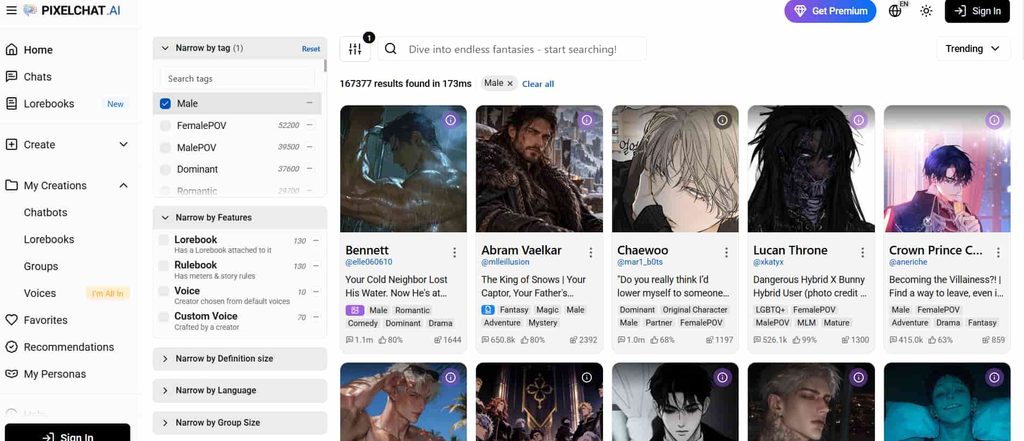
PixelChat is an AI-powered character chat platform developed for people who enjoy interactive conversations and creative storytelling.
Unlike traditional AI assistants that focus on answering questions, PixelChat focuses on character-based interactions. You can chat with fictional personalities, explore different scenarios, and create custom AI characters.
The platform supports several types of conversations. These include casual chats, fictional roleplay, creative writing, and storytelling.
You can also browse characters created by other users. If you cannot find a character that matches your interests, you can build one yourself.
PixelChat uses large language models (LLMs) to generate responses. These models analyze the character’s personality, your messages, available memories, and conversation context before generating a reply.
The result is an interactive experience where conversations can develop based on your input.
How Does PixelChat Work?
PixelChat uses AI models to generate responses based on the information available in a conversation.
Each character has its own personality, background, and communication style. These details influence how it responds to your messages.
Here is how the process works:
- Choose a character: Browse the available AI characters and select one that interests you.
- Start a conversation: Open the character’s chat and respond to its greeting.
- Provide context: Introduce your ideas, describe situations, or guide the conversation.
- Receive AI responses: The platform generates replies based on your messages and the character’s definition.
- Continue the interaction: Build the conversation through additional messages.
You can also regenerate a response if you do not like the original one. This gives you another version without necessarily starting a new conversation.
One important detail is that PixelChat conversations are separate. A character does not automatically carry information from one conversation into another.
Key Features of PixelChat
PixelChat offers several features for users who want more control over their AI conversations.
Here are some of its most useful capabilities.
1. AI Character Creation
One of PixelChat’s main features is its character creation tool.
You do not have to rely on existing characters. You can create your own AI personality and customize how it behaves.
The character editor includes several fields:
- Name: Choose a name for your AI character.
- Title: Add a short description of the character.
- Greeting: Write the opening message users see when starting a conversation.
- Personality: Define the character’s behavior, background, preferences, and communication style.
- Avatar: Upload an image or generate an avatar.
- Tags: Add relevant tags to help users discover the character.
- Visibility: Choose whether the character should be public, unlisted, or private.
These settings help determine how the character interacts with users.
For better results, provide clear personality instructions. A well-defined character is more likely to produce consistent responses.
2. Large Character Library
You do not need to create a character to start using PixelChat.
The platform has a large library of community-created characters. You can explore different personalities, themes, and fictional scenarios.
Its discovery system also makes finding characters easier.
You can:
- Search for specific characters.
- Browse trending characters.
- Explore recently added characters.
- Filter characters using tags.
- Sort characters by popularity.
- Save interesting characters to your favorites.
PixelChat also provides personalized character recommendations based on factors such as your favorites, ratings, and previous conversations.
This makes it easier to discover new characters without searching manually.
3. Custom Personas
Personas allow you to create different identities for your conversations.
For example, you might want to use one identity for a fantasy roleplay and another for a fictional business conversation.
You can create separate personas with different names, avatars, and personal descriptions.
A persona can include details such as:
- Name
- Appearance
- Personality
- Background
- Role in a fictional scenario
You can select a persona when starting a conversation.
This feature is particularly useful for people who frequently switch between different roleplaying scenarios.
The free plan supports up to three personas. Paid plans increase that limit.
4. Context Memory
Context memory helps AI characters maintain continuity throughout conversations.
Without enough context, an AI character may forget earlier details or misunderstand what is happening in a story.
PixelChat uses context memory to process information such as:
- Previous messages
- Character personality
- User persona
- Relevant memories
- Conversation instructions
The amount of available context depends on your subscription and the AI model you use.
Paid subscriptions provide higher context limits.
However, more context does not guarantee perfect memory. AI characters can still forget details or produce inconsistent responses.
5. Multiple AI Models
PixelChat offers different AI models for generating conversations.
Each model has its own strengths, response characteristics, and memory capabilities.
Some models are designed for creative storytelling. Others are better suited to longer conversations or more complex interactions.
The available models depend on your subscription.
You can also change the model through the conversation’s generation settings when your plan supports that option.
This flexibility lets users experiment with different response styles.
6. Conversation Images
PixelChat supports image generation within conversations on eligible subscription plans.
Instead of relying entirely on text, you can generate images related to the character and the current conversation.
The generated image uses information from the character’s avatar and the latest message.
This can make fictional storytelling more engaging.
However, conversation image generation is not available on every subscription plan.
7. Text-to-Speech
PixelChat also offers text-to-speech functionality.
This feature allows supported characters to read their responses aloud.
It can make conversations feel more interactive, especially for users who prefer listening instead of reading every message.
Text-to-speech is included in the highest subscription tier.
8. Saved Conversations
You do not have to lose your conversations when you leave the platform.
PixelChat automatically saves chats. You can return to previous conversations and continue where you left off.
You can also start a new conversation with the same character without replacing your existing chat.
This is useful when you want to explore different storylines with one character.
Is PixelChat Free?
Yes. PixelChat offers a free plan with unlimited messages and unlimited character creation.
However, some advanced features require a paid subscription.
The platform currently offers three paid plans: Get A Taste, True Supporter, and I’m All In.
Here is a breakdown of its subscription options.
PixelChat Pricing and Plans
| Features | Free | Get A Taste | True Supporter | I’m All In |
|---|---|---|---|---|
| Monthly price | Free | $5.95 | $19.95 | $29.95 |
| Context memory | 4,096 tokens | 4,096 tokens | 8,192 tokens | 32,768 tokens |
| Maximum reply tokens | 180 | 180 | 300 | 300 |
| User personas | 3 | 10 | 50 | 100 |
| Unlimited messages | Yes | Yes | Yes | Yes |
| Character creation | Unlimited | Unlimited | Unlimited | Unlimited |
| Ad-free experience | No | Yes | Yes | Yes |
| Memory Manager | No | Yes | Yes | Yes |
| Semantic Memory 2.0 | No | No | Yes | Yes |
| Conversation Images | No | No | Yes | Yes |
| Advanced AI models | No | No | Yes | Yes |
| Text-to-Speech | No | No | No | Yes |
| Priority generation | No | No | No | Yes |
Prices are listed in USD and may change. Check the official pricing page before subscribing.
Free Plan
The free plan is a good starting point for new users.
It includes unlimited messages and character creation. You can also explore the character library and create up to three personas.
However, you will have a smaller context memory limit and fewer advanced features.
If you want to understand how the platform works before spending money, start here.
Get A Taste ($5.95/month)
Get A Taste is the entry-level paid subscription.
It includes everything in the free plan, along with:
- Ad-free conversations
- Up to 10 personas
- Memory Manager
- Priority over free users in waiting queues
This plan is suitable for users who want a cleaner experience and more control over their personas and memories.
True Supporter ($19.95/month)
True Supporter adds more advanced features.
It includes:
- 8,192-token context memory
- Up to 50 personas
- Semantic Memory 2.0
- Conversation image generation
- Access to advanced AI models
- Up to 300 tokens per reply
This plan is worth considering if you regularly use PixelChat for longer conversations and storytelling.
I’m All In ($29.95/month)
I’m All In is PixelChat’s highest subscription tier.
It includes all the features from the lower plans, plus:
- Up to 32,768-token context memory
- Up to 100 personas
- Text-to-speech
- Priority generation queue
- Access to all available AI models, including PixelXL
- Conversation images for private characters
It is designed for users who want access to the platform’s most advanced features.
Does PixelChat offer a free trial?
No. According to its official support documentation, PixelChat does not currently offer free trials. You can use the free plan to explore its basic features before choosing a subscription.
How to Use PixelChat
Getting started with PixelChat is relatively straightforward.
Follow these steps to begin chatting with AI characters.
Step 1: Visit the Official Website
Open your browser and visit https://pixelchat.ai/.
You can access the platform through its website.
Step 2: Create an Account
Sign up or log in to your PixelChat account.
Follow the instructions provided by the platform to complete the process.
Step 3: Explore AI Characters
After accessing your account, explore the available characters.
You can browse popular characters or use the search and filtering options to find something specific.
Take a look at the character’s description, personality, and greeting before starting a conversation.
Step 4: Start a Conversation
Select a character to open its chat.
You will see its greeting message. Reply to begin the interaction.
You can ask questions, introduce a fictional situation, or guide the conversation in your preferred direction.
Step 5: Create Your Own Character
If you prefer something more personalized, open the Create Chatbot option.
Add a name, title, greeting, personality, and avatar.
You can also configure advanced settings to define the character’s scenario and example dialogues.
Choose the visibility setting that matches your preferences.
Once everything is ready, save your character.
You can now start chatting with your creation.
How to Create a Good AI Character on PixelChat
Creating a character is easy. Creating an interesting one requires more thought.
The quality of your character definition can influence the entire conversation.
Here are some practical tips.
Give Your Character a Clear Personality
Avoid vague descriptions.
Instead of writing that your character is friendly, explain how that friendliness appears in conversations.
For example:
Instead of: “Alex is a friendly person.”
Try: “Alex is an optimistic, patient, and curious person. He enjoys helping others, asks thoughtful questions, and uses light humor during conversations.”
The second description provides more useful behavioral guidance.
Write an Engaging Greeting
The greeting is the first message users see.
Make it relevant to the character and the scenario.
A good greeting introduces the situation and gives users a reason to respond.
Use Relevant Tags
Tags help users discover your character.
Choose tags that accurately describe its personality, theme, and role.
Avoid unrelated tags. They can create incorrect expectations and hurt the character’s discoverability.
Add Example Dialogues
Example dialogues help establish how your character communicates.
You can demonstrate its speaking style through sample conversations.
For example, show how the character responds when it is happy, confused, frustrated, or surprised.
This gives the AI additional guidance about its communication style.
Keep the Character Definition Focused
Adding too much information can consume the context available for actual conversations.
PixelChat’s support documentation recommends keeping character definitions around 800–1,100 tokens.
Use a Lorebook for additional background information when necessary.
What Is a Lorebook in PixelChat?
A Lorebook is a feature that helps users manage detailed information about a fictional world.
It can store information about:
- Locations
- Supporting characters
- Historical events
- Important objects
- Story rules
- Background information
Instead of placing everything inside a character’s personality description, you can organize additional information in a Lorebook.
PixelChat uses keywords to determine when specific entries should become relevant to a conversation.
For example, imagine you are creating a fantasy story.
You could add an entry about a fictional kingdom. Whenever its name appears in the conversation, the relevant information can be added to the AI’s context.
This helps maintain consistency in more complicated roleplaying scenarios.
Is PixelChat Available on Android and iOS?
PixelChat supports Android devices and web browsers.
PixelChat for Android
You can download the official PixelChat Android app through Google Play.
The Android application is supported and regularly updated.
Always check the developer name before installing an application.
PixelChat for iPhone
The official PixelChat iOS application is no longer available on the Apple App Store, according to its support documentation.
However, iPhone and iPad users can still access the website through Safari.
You can also add the website to your home screen:
- Open Safari.
- Visit https://pixelchat.ai/.
- Tap the Share icon.
- Select Add to Home Screen.
This creates a convenient shortcut for accessing PixelChat.
Is PixelChat Safe to Use?
PixelChat has community guidelines and content moderation rules designed to maintain a safe environment.
However, users should understand how the platform works before sharing personal information or creating characters.
Here are a few important considerations.
Age Requirements
PixelChat requires users to be at least 18 years old.
Its guidelines also require all characters to portray adults.
Content Restrictions
PixelChat is a safe-for-work platform.
Its rules prohibit sexually explicit content, nudity, excessively violent material, hate speech, harassment, and other restricted content.
Users should review the community guidelines before creating or interacting with characters.
Personal Information
Avoid sharing sensitive personal information in AI conversations.
This includes passwords, financial details, private addresses, and other information that should not be exposed.
The Google Play listing states that the app may collect personal and financial information, along with other data types.
It also indicates that data is encrypted in transit and that users can request data deletion.
Read the platform’s privacy policy and review the app’s data safety information before using it.
AI Responses Are Not Always Accurate
PixelChat generates fictional conversations using AI models.
Characters can produce incorrect information, forget details, or respond in unexpected ways.
Do not treat their responses as professional medical, legal, or financial advice.
PixelChat Pros and Cons
Like other AI character-chat platforms, PixelChat has advantages and limitations.
Pros
- Free plan with unlimited messages.
- Unlimited character creation.
- Large community-created character library.
- Customizable AI personalities.
- Multiple user personas.
- Different AI models.
- Saved conversations.
- Conversation image generation on eligible plans.
- Android and web access.
Cons
- Advanced features require paid subscriptions.
- Context memory varies by subscription.
- AI characters can forget details.
- The official iOS app is no longer available.
- Some advanced features are limited to higher-tier plans.
- AI-generated responses may be inconsistent.
Who Should Use PixelChat?
PixelChat is primarily designed for people who enjoy interactive AI conversations.
However, its features can also support several creative activities.
Roleplaying Enthusiasts
If you enjoy fictional scenarios, PixelChat provides tools to explore different characters and storylines.
You can choose existing characters or create your own.
Creative Writers
Writers can use AI characters to experiment with dialogue, personality development, and fictional scenarios.
It can also help test how different characters might respond to the same situation.
However, AI-generated content should be reviewed and edited before publication.
Language Learners
You can use character conversations to practice everyday language.
For example, create a fictional shopkeeper and practice ordering food, asking questions, or discussing daily activities.
Remember that AI-generated language may contain mistakes. Verify important grammar and vocabulary with reliable learning resources.
AI Enthusiasts
People interested in conversational AI can experiment with different models, character definitions, personas, and generation settings.
This makes PixelChat an interesting platform for exploring AI-powered storytelling.
PixelChat vs. Traditional AI Chatbots
PixelChat and traditional AI assistants serve different purposes.
A general-purpose AI assistant is usually designed to answer questions, solve problems, explain concepts, and help with everyday tasks.
PixelChat focuses more on fictional characters and interactive storytelling.
Here is a simple comparison.
| Feature | PixelChat | Traditional AI Assistants |
|---|---|---|
| Main purpose | Character chat and roleplay | General assistance |
| Custom characters | Yes | Depends on platform |
| Fictional scenarios | Core feature | Supported by many |
| Character personalities | Highly customizable | Varies |
| Multiple personas | Yes | Varies |
| General research | Not its primary purpose | Usually a core feature |
| Storytelling | Core feature | Supported |
The better option depends on what you want to accomplish.
If you want to explore fictional characters and interactive roleplay, PixelChat is worth considering.
If you need research, coding assistance, or detailed factual explanations, a general-purpose AI assistant may be more appropriate.
Frequently Asked Questions About PixelChat
1. What is PixelChat used for?
PixelChat is used for AI character conversations, fictional roleplaying, and storytelling. Users can interact with existing characters or create custom AI personalities.
2. Is PixelChat free?
Yes. PixelChat offers a free plan with unlimited messages and character creation. However, advanced features require a paid subscription.
3. Does PixelChat have an Android app?
Yes. PixelChat has an official Android application available through the Google Play Store.
4. Is PixelChat available on iPhone?
The official PixelChat iOS app has been removed from the Apple App Store. However, iPhone users can access the platform through Safari.
5. Can I create my own characters on PixelChat?
Yes. You can create custom AI characters by defining their names, personalities, greetings, avatars, and other settings.
6. Does PixelChat support multiple AI models?
Yes. PixelChat provides several AI models. Some are available to free users, while others require paid subscriptions.
7. Can PixelChat remember previous conversations?
PixelChat uses context memory and additional memory features to help characters maintain continuity. However, its ability to remember information depends on the available context and subscription.
Separate conversations also have independent histories.
8. Does PixelChat support image generation?
Yes. Eligible paid subscriptions include conversation image generation. The feature can create images based on the character’s avatar and recent conversation.
9. Does PixelChat offer text-to-speech?
Yes. Text-to-speech is available with the I’m All In subscription.
10. Is PixelChat suitable for creative writing?
Yes. You can use it to experiment with fictional characters, dialogue, and storytelling scenarios. However, review and edit AI-generated content before using it in professional publications.
11. Can I use PixelChat on a computer?
Yes. You can access PixelChat through its official website using a desktop or laptop browser.
12. Is PixelChat suitable for children?
No. PixelChat requires users to be at least 18 years old.
Final Thoughts
PixelChat offers an interesting way to explore AI-powered character conversations and interactive storytelling.
Its character creation tools, large character library, custom personas, and different AI models provide plenty of creative flexibility.
The free plan is a good place to start. If you need additional memory, conversation images, or advanced models, you can consider a paid subscription.
Ultimately, PixelChat is worth exploring if you enjoy fictional conversations and want more control over your AI characters.