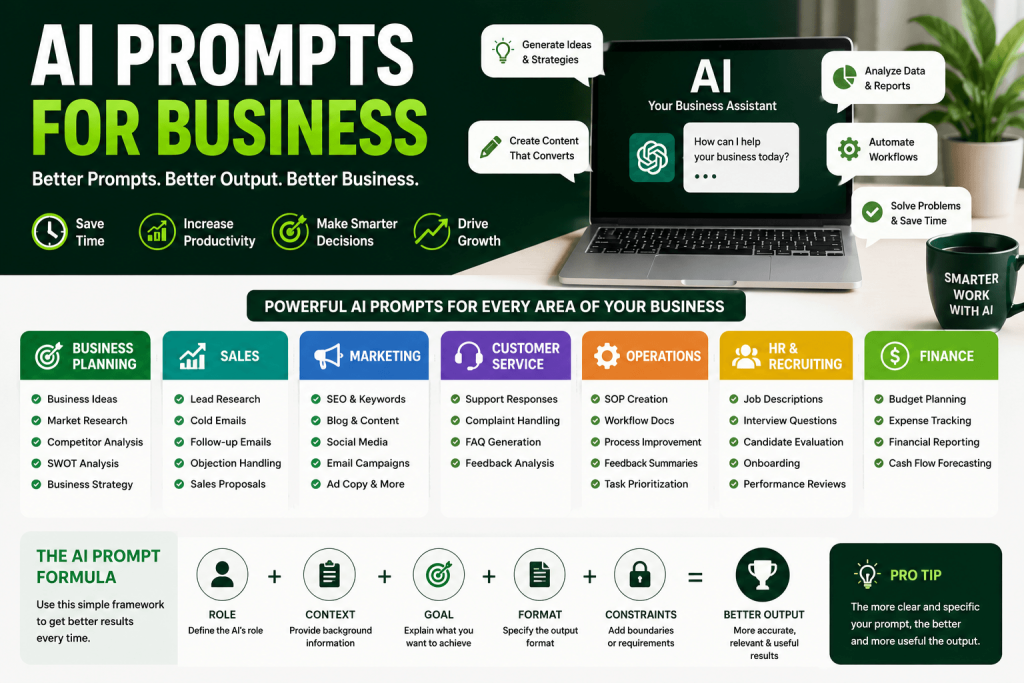
Every week, thousands of business owners sit down to write emails, create reports, build proposals, and brainstorm ideas — doing work that now takes AI tools a fraction of the time.
The difference between business owners who save hours every week with AI and those who waste time getting mediocre results? The quality of their prompts.
A bad prompt gives you generic garbage. A great prompt gives you something you can actually use.
This guide gives you 100+ ready-to-use AI prompts across every major business function — sales, marketing, operations, HR, finance, and more — plus a formula for building your own high-quality prompts from scratch.
Let’s get into it.
What Are AI Prompts for Business?
An AI prompt is simply the instruction you give an AI tool like ChatGPT, Claude, or Gemini.
Think of it like briefing a very capable employee. The clearer your brief, the better their output.
Weak prompt: “Write me a sales email.”
Strong prompt: “You are a B2B sales expert. Write a cold outreach email targeting a VP of Operations at a mid-size manufacturing company. Our product is a workflow automation tool that reduces manual data entry by 70%. The tone should be professional but direct. Keep it under 150 words and end with a soft call to action to book a 15-minute call.”
One gives you a generic template. The other gives you something that might actually book a meeting.
The business AI prompts in this guide are already written at that second level — specific, contextual, and practical.
Best AI Prompts for Business Planning
Good strategy starts with good thinking. AI can help you stress-test ideas, research markets, and build plans — faster than any consultant and at zero hourly rate.
1. Business Idea Validation
Prompt:
“I have a business idea: [describe your idea in 2–3 sentences]. Act as a critical business advisor. Identify the 5 biggest risks with this idea, 3 market opportunities it could capitalize on, and 3 similar businesses that have succeeded or failed and why. Be direct, not encouraging.”
What it does: Forces AI to pressure-test your idea rather than just validate it.
Use case: A founder thinking about launching a niche subscription box uses this before investing time or money.
Pro tip: Ask for the devil’s advocate version — it’s more useful than cheerleading.
2. Market Research Summary
Prompt:
“I’m launching [product/service] targeting [specific customer type] in [industry/geography]. Summarize the key market trends, customer pain points, and buying behavior for this segment. Format as bullet points under 3 headings: Market Trends, Customer Needs, and Buying Behavior.”
What it does: Gives you a structured market overview to inform positioning and messaging.
Use case: A consultant building a pitch deck for a new client engagement.
Pro tip: Follow up with: “Now suggest 3 unmet needs in this market that a new entrant could address.”
3. Competitive Analysis
Prompt:
“List the top 5 competitors for a [type of business] targeting [customer segment]. For each, summarize: their main value proposition, their likely weaknesses, and one opportunity a competitor could exploit. Format as a table.”
What it does: Delivers a quick competitive landscape with strategic angles.
Use case: A SaaS startup preparing for investor meetings wants a clean competitive overview.
Pro tip: Paste competitor website copy directly into the prompt and ask AI to analyze their positioning for you.
4. SWOT Analysis
Prompt:
“Conduct a SWOT analysis for my business: [brief description of your business, target market, and current situation]. Be specific and practical. For each weakness and threat, suggest one immediate action to address it.”
What it does: Produces a SWOT with built-in action items, not just observations.
Use case: A small agency preparing for a quarterly strategy session.
Pro tip: Run this every quarter and compare outputs to track business evolution.
5. Business Strategy Framework
Prompt:
“I run a [type of business] with [revenue range/team size]. My goal for the next 12 months is [specific goal]. Build me a 90-day strategic roadmap with monthly milestones, key focus areas, and 3 risks to manage. Format as a numbered action plan.”
What it does: Turns your goal into a concrete execution plan.
Use case: An e-commerce brand hitting a revenue plateau uses this to build a growth plan.
Pro tip: Use specific numbers. “Grow revenue” is weak. “Go from $50K/month to $80K/month” gives AI the context to give you precise recommendations.
Best AI Prompts for Sales
Sales is where AI delivers some of its fastest ROI. From prospecting to closing, the right prompts can compress hours of writing into minutes.
6. Lead Research Brief
Prompt:
“I’m about to contact [prospect name/company]. Based on what a B2B sales rep would typically research, what are the top 7 things I should know before reaching out? Include: company size, likely pain points, industry trends, and potential objections. Format as a pre-call brief.”
What it does: Simulates sales intelligence prep so you walk into every conversation ready.
Use case: An AE preparing for a demo with a new enterprise prospect.
Pro tip: Paste their LinkedIn bio or website text into the prompt for more accurate research.
7. Cold Email (Problem-Focused)
Prompt:
“Write a cold outreach email to [job title] at [industry] companies. Our product/service is [description]. The main problem we solve is [specific pain point]. Tone: direct, human, no fluff. Length: under 120 words. End with a low-friction CTA like booking a 15-minute call. Avoid buzzwords.”
What it does: Generates a clean, problem-focused cold email that doesn’t sound robotic.
Use case: An agency owner prospecting to marketing directors at DTC brands.
Pro tip: Generate 5 versions and A/B test subject lines and CTAs.
8. Follow-Up Email Sequence
Prompt:
“Write a 3-email follow-up sequence for a prospect who didn’t respond to my first cold email about [product/service]. Each email should take a different angle: Email 1 — add value with a relevant insight. Email 2 — address a common objection. Email 3 — final close with a direct ask. Keep each under 100 words.”
What it does: Builds a follow-up cadence that doesn’t feel spammy.
Use case: A B2B consultant following up on proposals sent to SMB clients.
Pro tip: Add “vary the subject lines and avoid the word ‘following up'” for dramatically better open rates.
9. Discovery Call Script
Prompt:
“Create a discovery call script for selling [product/service] to [ideal customer]. Include: 5 opening questions to understand their current situation, 4 questions to uncover pain and urgency, 2 questions to understand budget and decision-making process, and 3 transition statements to move toward next steps.”
What it does: Gives your sales team a structured discovery call framework.
Use case: A SaaS company onboarding a new inside sales rep.
Pro tip: Ask AI to then rewrite the questions as open-ended versions if any feel too yes/no.
10. Objection Handling Guide
Prompt:
“List the 8 most common objections a prospect might raise when buying [product/service]. For each objection, provide: the underlying concern behind it, a one-sentence empathy acknowledgment, and a specific response that addresses the concern without being pushy.”
What it does: Builds a practical objection handling playbook your team can actually use.
Use case: A sales manager preparing reps for a new product launch.
Pro tip: Role-play with AI — ask it to play the skeptical prospect while you practice responses.
11. Sales Proposal Outline
Prompt:
“Create a sales proposal outline for [prospect company] interested in [product/service]. Include: executive summary, problem statement, our solution, implementation timeline, pricing structure, ROI estimate, and next steps. Tailor the language to a [industry] audience. Keep it scannable with headers and bullet points.”
What it does: Gives you a polished, client-ready proposal structure in minutes.
Use case: A consultant creating a proposal for a corporate client.
Pro tip: Paste the prospect’s stated goals from your discovery call and ask AI to align the proposal directly to those priorities.
Best AI Prompts for Marketing
Marketing teams that use AI prompts strategically can 3–5x their content output without sacrificing quality.
12. SEO Blog Post Brief
Prompt:
“Create a detailed SEO content brief for a blog post targeting the keyword ‘[target keyword]’. Include: search intent, target audience, recommended H1, 6–8 H2 subheadings, 3 competitor angles to differentiate from, key questions to answer, and a suggested word count. Format for a content writer to follow.”
What it does: Builds a writer-ready brief that improves content quality and ranking potential.
Use case: A content manager briefing freelance writers on a content calendar.
Pro tip: Add “include 5 semantically related keywords to naturally incorporate” for better topical coverage.
13. Social Media Content Calendar
Prompt:
“Create a 4-week social media content calendar for [business type] targeting [audience]. Include 3 posts per week across [platforms]. Mix content types: educational, promotional, and engagement. For each post, include: platform, content theme, caption outline, and hashtag suggestions. Format as a table.”
What it does: Plans a month of social content in one sitting.
Use case: A boutique brand with no full-time social media manager.
Pro tip: Add “our brand voice is [adjective, adjective, adjective]” to get outputs that actually sound like your brand.
14. Email Newsletter
Prompt:
“Write an email newsletter for [business/brand] on the topic of [subject]. Target audience: [description]. Include: a compelling subject line (under 50 characters), a 3-sentence opener that hooks the reader, the main content in 200–250 words with practical value, and a CTA that drives [desired action]. Tone: [conversational/professional/inspirational].”
What it does: Produces a ready-to-send newsletter in minutes.
Use case: A founder who sends a weekly update to customers and prospects.
Pro tip: Tell AI the #1 action you want readers to take before it writes anything — this sharpens every element of the email.
15. Ad Copy (Multiple Variations)
Prompt:
“Write 5 variations of a Facebook/Google ad for [product/service]. Target audience: [description]. Each ad should highlight a different angle: (1) pain point, (2) social proof, (3) result/transformation, (4) urgency/scarcity, (5) curiosity. Include headline and body copy for each. Keep each under 30 words for the headline and 90 words for the body.”
What it does: Generates a full ad testing matrix instantly.
Use case: A performance marketer launching a new product campaign.
Pro tip: Ask for a 6th variation targeting objectors — people who’ve heard of you but haven’t bought yet.
16. Content Strategy for a New Brand
Prompt:
“Build a content marketing strategy for a [business type] launching in [market]. Include: content pillars (3–5 themes), recommended channels with rationale, content formats by channel, publishing frequency, and 10 content ideas for the first month. Audience: [description]. Goal: [traffic/leads/brand awareness].”
What it does: Gives you a strategic content foundation without hiring a strategist.
Use case: A startup founder who needs a content strategy before they can afford to hire.
Pro tip: Ask AI to prioritize channels based on where your specific audience spends time, not what’s popular in general.
Best AI Prompts for Customer Service
Great customer service scales when your team has the right templates and processes. AI makes building those faster than ever.
17. Professional Support Response
Prompt:
“A customer sent this message: ‘[paste customer message]’. Write a professional, empathetic response that: acknowledges their frustration, explains what happened (or asks a clarifying question if needed), gives a clear resolution or next step, and ends on a positive note. Keep it under 150 words.”
What it does: Turns even a heated customer complaint into a well-handled interaction.
Use case: A small e-commerce brand managing customer support with a lean team.
Pro tip: Create a library of AI-drafted templates for your 10 most common support scenarios.
18. Complaint Escalation Response
Prompt:
“A customer is threatening to leave a negative review over [issue]. Write a response that de-escalates the situation, shows genuine accountability, offers a specific resolution (discount/replacement/refund), and gives them a reason to stay. Tone: sincere, not defensive. Under 200 words.”
What it does: Handles high-stakes customer situations with the right tone.
Use case: An agency dealing with an unhappy client after a project delivery issue.
Pro tip: Ask AI to avoid generic phrases like “we apologize for the inconvenience” and replace them with specific, human language.
19. FAQ Document Generator
Prompt:
“Based on this product/service description: [paste description], generate a FAQ document with 15 questions and detailed answers. Organize by category: Pre-purchase, During Use, Billing, and Troubleshooting. Write answers in plain language, as if explaining to someone who’s never heard of this before.”
What it does: Builds a complete FAQ page in one prompt.
Use case: A SaaS company preparing a help center for a new product launch.
Pro tip: Ask customers what they actually ask most often, then feed those real questions into the prompt for much better results.
20. Customer Feedback Analysis
Prompt:
“Here are 20 customer reviews/feedback responses: [paste feedback]. Analyze and summarize: top 3 things customers love, top 3 pain points or complaints, 3 product/service improvement suggestions, and the overall sentiment. Format as an executive summary I can share with my team.”
What it does: Turns raw feedback into actionable business intelligence.
Use case: A product manager doing a quarterly review of customer sentiment.
Pro tip: Run this monthly on new reviews to track how customer perception shifts over time.
Best AI Prompts for Operations
Operations runs on documentation, processes, and clear communication. AI can cut the time it takes to build these by 80%.
21. Standard Operating Procedure (SOP)
Prompt:
“Create a detailed SOP for [specific process, e.g., ‘onboarding a new client’ or ‘processing a customer refund’]. Include: purpose, who is responsible, step-by-step instructions, tools or systems needed, common mistakes to avoid, and a checklist at the end. Write so a new team member with no prior experience could follow it.”
What it does: Transforms a process that lives in someone’s head into a scalable document.
Use case: An agency systematizing client delivery so they can hire and delegate.
Pro tip: Record yourself doing the task verbally, get a transcript, and paste it into the prompt for more accurate SOPs.
22. Process Improvement Analysis
Prompt:
“Here is how we currently handle [process]: [describe current workflow]. Identify inefficiencies, bottlenecks, and manual steps that could be automated or eliminated. Suggest an improved version of this process and estimate the time savings per week. Format as: Current Process → Problems → Improved Process → Estimated Time Saved.”
What it does: Gives you a structured process audit and improvement plan.
Use case: An operations manager looking to streamline a billing or fulfillment workflow.
Pro tip: Ask for tool recommendations — AI often knows specific software that can automate the bottlenecks it identifies.
23. Meeting Summary and Action Items
Prompt:
“Here are my notes from a meeting: [paste raw notes]. Convert these into a clean meeting summary with: key decisions made, action items (who owns what and by when), open questions still to resolve, and a 3-sentence executive summary I can forward to stakeholders.”
What it does: Turns messy meeting notes into a professional summary in 30 seconds.
Use case: A project manager running weekly client status calls.
Pro tip: If you have a recording transcript, paste that instead of notes — AI handles raw transcripts well.
24. Task Prioritization Framework
Prompt:
“Here is my task list for this week: [list your tasks]. Prioritize them using the Eisenhower Matrix (Urgent/Important, Not Urgent/Important, Urgent/Not Important, Not Important/Not Urgent). Then suggest an order for tackling them Monday–Friday, and identify 2–3 tasks I should delegate or eliminate entirely.”
What it does: Applies a proven productivity framework to your real workload.
Use case: An overwhelmed founder who needs help thinking through their week.
Pro tip: Use this on Sunday evenings to walk into Monday with a clear head.
Best AI Prompts for HR and Recruiting
Hiring and managing people takes enormous documentation time. AI helps you build a more professional HR function faster.
25. Job Description
Prompt:
“Write a compelling job description for a [job title] role at a [company type]. Include: a 2-sentence company overview, the role’s purpose, 6–8 key responsibilities, 4–5 required qualifications, 3 preferred qualifications, and what makes this role exciting. Tone: [professional/startup culture/corporate]. Avoid generic filler like ‘team player’ or ‘self-starter’.”
What it does: Creates a specific, attractive job post that filters in the right candidates.
Use case: A growing SMB writing its first formal job description.
Pro tip: Add “make the responsibilities action-oriented starting with strong verbs” for descriptions that feel concrete and clear.
26. Interview Question Bank
Prompt:
“Create a structured interview question bank for hiring a [job title]. Include: 5 behavioral questions (STAR format), 4 situational questions, 3 skills assessment questions, 2 culture fit questions, and 1 question to test self-awareness. For each question, add what a strong answer looks like.”
What it does: Builds a complete interview guide your hiring team can use consistently.
Use case: A hiring manager standardizing interviews across a growing team.
Pro tip: Ask for red flag answers too — knowing what bad looks like is just as valuable as knowing what good looks like.
27. Employee Onboarding Plan
Prompt:
“Create a 30-60-90 day onboarding plan for a new [job title] joining [type of company]. For each phase, include: key learning goals, key activities, people they should meet, milestones to achieve, and how success is measured. Format as a table.”
What it does: Builds a structured onboarding roadmap that reduces time-to-productivity.
Use case: An HR manager creating onboarding templates for common roles.
Pro tip: Ask AI to suggest check-in questions a manager should ask at the 30-, 60-, and 90-day marks.
28. Performance Review Template
Prompt:
“Create a performance review template for a [job title] role. Include sections for: key accomplishments, areas of strength with examples, areas for development, goal achievement vs. targets, competency ratings (with a 1–5 scale and descriptors), and a development plan for the next 6 months. Format for both manager and self-assessment versions.”
What it does: Saves hours of template-building and ensures reviews are fair and structured.
Use case: A people ops manager building review infrastructure for a 20-person company.
Pro tip: Follow up with: “Now write example language for a high-performer, an average performer, and an underperformer for the ‘areas for development’ section.”
Best AI Prompts for Finance
Finance doesn’t need to be a black box. AI can help you understand your numbers, plan better, and communicate financial information clearly.
29. Budget Planning Template
Prompt:
“Help me build a 12-month operating budget template for a [type of business] with [number of employees] and approximately [revenue range]. Include: revenue categories, fixed costs, variable costs, headcount costs, marketing spend, and a contingency buffer. Format as a spreadsheet-friendly table with monthly columns.”
What it does: Gives you a budget structure you can drop into a spreadsheet immediately.
Use case: A startup founder building their first annual budget before raising investment.
Pro tip: Ask AI to add industry benchmark percentages for each cost category so you can see how your planned spend compares.
30. Cash Flow Forecast Narrative
Prompt:
“Based on these numbers: [paste monthly revenue and expense data], write a cash flow narrative for the next quarter. Identify months where cash could be tight, explain the key drivers, and suggest 3 actions to improve cash position. Write for a non-financial audience — like a founder who handles numbers but isn’t a CFO.”
What it does: Translates your spreadsheet into a plain-language narrative you can share with stakeholders.
Use case: A founder preparing for a board meeting.
Pro tip: Ask AI to also flag any one-time cash events (big vendor payments, tax bills) that need to be planned for separately.
31. Financial Report Summary
Prompt:
“Here is our monthly P&L: [paste data]. Write a 3-paragraph executive summary that covers: top-line performance vs. last month and vs. target, the biggest drivers of any variance, and 2–3 key actions to take based on the numbers. Write for a board or investor audience. No jargon.”
What it does: Turns raw financials into a board-ready narrative in minutes.
Use case: A CFO or founder preparing monthly investor updates.
Pro tip: Save time by building this into your monthly routine — run the prompt right after books close.
The AI Prompt Formula for Better Results
Here’s the single framework that will make every prompt you write more effective:
ROLE + CONTEXT + GOAL + FORMAT + CONSTRAINTS
Let’s break it down:
ROLE — Tell AI who it’s acting as. “You are an experienced B2B copywriter…”
CONTEXT — Give the situation, audience, and relevant background. “…writing for a SaaS company targeting HR managers at companies with 200–500 employees…”
GOAL — State exactly what you want to achieve. “…to write a landing page headline and sub-headline that drives trial sign-ups…”
FORMAT — Specify how you want the output. “…Give me 5 variations. Format as: Headline / Sub-headline / Angle.“
CONSTRAINTS — Set limits that shape quality. “…Headline under 10 words. Sub-headline under 20 words. No hyperbole or vague promises.”
Weak Prompt vs. Strong Prompt
| Weak | Strong | |
|---|---|---|
| Prompt | “Write me an email” | Full ROLE + CONTEXT + GOAL + FORMAT + CONSTRAINTS |
| Output | Generic email you’d never actually send | Specific draft you edit and send |
| Time | 10 minutes refining | 2 minutes editing |
Real example transformation:
Weak: “Write a sales email for my consulting business.”
Strong: “You are a B2B sales consultant with 15 years of experience. I run a strategic finance consulting firm targeting Series A–C startup founders who are preparing for their next fundraise. Write a cold outreach email that positions me as someone who helps founders build investor-grade financial models. Tone: credible and direct, not salesy. Under 130 words. End with a soft ask to connect for a 20-minute call.”
The strong version will give you an email you can actually use. Every time.
Common Mistakes Businesses Make When Using AI
1. Being Too Vague
“Help me with marketing” gives you nothing useful. “Write three 60-word Instagram captions for a skincare brand targeting women 30–45, promoting a new vitamin C serum, using an educational tone” gives you something you can post.
2. Providing No Context
AI doesn’t know your business, your customers, or your brand voice unless you tell it. Without context, you get generic. Feed it specifics and you get specific.
3. Accepting the First Draft Blindly
AI outputs are starting points, not finished products. Always edit for accuracy, brand voice, and factual claims — especially for anything involving numbers, data, or legal/medical topics.
4. Not Fact-Checking
AI can confidently state things that are wrong. Never publish statistics, quotes, or claims from AI without verifying the source yourself.
5. Using One-and-Done Prompts
The best AI interactions are conversational. After your first output, say “make it shorter,” “try a more assertive tone,” or “add a specific example.” Most people stop at the first response and leave 80% of the value on the table.
6. Giving AI Too Much to Do at Once
“Write me a full marketing strategy, content calendar, 10 blog posts, and 50 social media captions” in one prompt won’t work well. Break big tasks into specific, focused prompts.
Best Practices for Using AI Prompts in Business
- Build a prompt library. Save your best-performing prompts in a shared doc. Every great prompt is a reusable asset.
- Use role-playing. Asking AI to take on a specific expert role (“You are a seasoned CMO…”) dramatically improves output quality.
- Iterate out loud. Treat AI like a junior team member — give feedback, ask for revisions, push for better.
- Add your brand voice. Keep a paragraph that describes your tone and include it in prompts for any customer-facing content.
- Test multiple outputs. Always ask for 3–5 variations and pick the best, or combine elements from different versions.
- Use AI for first drafts, humans for final review. AI accelerates creation; human judgment ensures quality.
- Keep context consistent. In a long AI conversation, earlier context matters. If you’re building something complex, remind the AI of key details at each new step.
- Don’t over-automate. Not every business interaction should be AI-generated. Know when human writing matters more — personal client notes, sensitive communications, crisis responses.
Conclusion
The businesses that win over the next five years won’t necessarily be the biggest or the best-funded. They’ll be the ones that learn to work smarter with AI.
But here’s the truth: AI is only as good as the instructions you give it.
The prompts in this guide are your starting point. Adapt them for your business, your voice, and your specific goals. Save the ones that work. Improve them over time. Share them with your team.
One thing you can do right now: Pick one section from this guide that matches your biggest bottleneck today — whether that’s sales, marketing, operations, or HR. Take one prompt. Customize it with your specifics. Run it.
You’ll see immediately what AI can do when you give it something real to work with.
That’s where it begins.
Frequently Asked Questions
What are the best AI prompts for business?
The best AI prompts for business are specific, role-based instructions that include context, a clear goal, and a desired output format. Categories include prompts for sales, marketing, HR, operations, and finance.
How do I use AI prompts to grow my business?
Use AI prompts to automate time-consuming writing tasks like emails, proposals, content, and SOPs. Start with your highest-volume tasks, build a prompt library of what works, and refine prompts over time.
Can AI help with sales outreach?
Yes. AI can write cold emails, follow-up sequences, objection handling guides, discovery call scripts, and proposal outlines — saving sales teams hours per week while improving consistency and quality.
What is the best way to structure an AI prompt?
Use the ROLE + CONTEXT + GOAL + FORMAT + CONSTRAINTS framework. Define who AI is acting as, give relevant business context, state your desired outcome, specify output format, and add any limits on length, tone, or style.