AI detection tools are getting smarter. So are the writers trying to work around them.
Whether you’re a blogger trying to preserve your editorial voice, a student worried about false positives on an essay you actually wrote, or a content marketer who uses ChatGPT as a drafting tool — the question of how to make AI-generated content sound more human is one of the most searched topics in the writing world right now.
This guide gives you a practical, honest answer. You’ll learn exactly how AI detectors work, what triggers them, and which ChatGPT prompts to avoid AI detection actually move the needle. You’ll also learn what doesn’t work, and why relying on prompts alone is a losing strategy.
No hype. No guarantees. Just what works.
Can ChatGPT Really Avoid AI Detection?
Short answer: sometimes, partially, and with effort.
The longer answer requires understanding how these tools actually work and what their real limitations are.
How AI Detectors Work
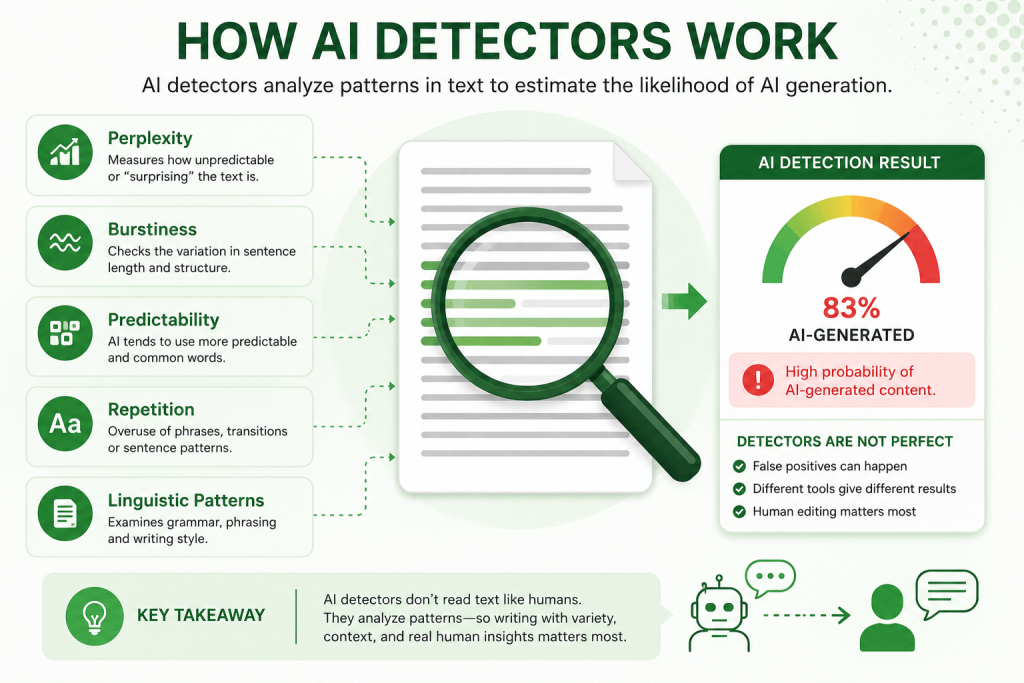
Tools like GPTZero, Originality.ai, Copyleaks, and Turnitin’s AI detector don’t look for specific words or phrases. They analyze statistical patterns in your text, patterns that AI models reliably produce and human writers rarely do.
There are two main signals detectors look for:
1. Perplexity Perplexity measures how “surprising” each word choice is. AI models, trained to generate the most statistically probable next token, tend to produce low-perplexity text — meaning very predictable word sequences. Human writing has natural highs and lows. We make odd choices. We use unusual metaphors. We contradict ourselves slightly.
2. Burstiness Burstiness refers to variation in sentence length and complexity. Humans tend to write in bursts — a long, complex sentence followed by a short one. AI outputs sentences with suspiciously consistent rhythm and length.
Detectors combine these signals (and others, depending on the platform) to generate a probability score. That score is never a certainty — it’s a prediction.
Limitations of Detection Tools
Here’s something the tools themselves will tell you if you read the fine print: AI detectors are not reliable enough to be used as evidence of wrongdoing.
GPTZero’s own documentation notes that their tool is designed to assist human judgment, not replace it. Originality.ai has publicly acknowledged that detection becomes harder as models improve.
The core problem is that these tools are trained on a fixed snapshot of AI outputs. Every time a model is updated — or a writer uses clever prompting — the statistical fingerprint shifts. Detectors are always playing catch-up.
False Positives Are a Real Problem
This is the part most articles gloss over.
Studies have found that AI detectors falsely flag human-written content at surprisingly high rates — particularly when the writer:
- Has a formal or academic writing style
- Is a non-native English speaker
- Writes with structured, organized prose
- Covers technical topics with precise vocabulary
A 2023 study from Stanford found that essays written by non-native English speakers were disproportionately flagged as AI-generated. That’s a serious fairness issue — and it means you can’t treat detector output as ground truth.
What Makes Content Look AI-Generated?
Before you craft any prompt, you need to understand the enemy. Here are the patterns AI writing reliably falls into:
| Signal | What It Looks Like |
|---|---|
| Predictable phrasing | “In today’s digital landscape,” “It’s important to note that,” “Delve into” |
| Symmetric sentence rhythm | Every sentence roughly the same length |
| Hedge stacking | “It’s worth considering that arguably…” |
| Topic sentence formalism | Every paragraph opens with a clean thesis |
| Overuse of transition words | “Furthermore,” “Moreover,” “Additionally” in every paragraph |
| No personal stance | Text makes claims without commitment |
| Generic examples | Vague, interchangeable illustrations |
| No real-world specificity | No data, dates, named sources, or concrete context |
| Passive voice clusters | “It has been found that…” “Results were observed…” |
The more of these patterns present in your text, the higher your detection score will be. The goal of any good ChatGPT prompt is to suppress as many of these patterns as possible.
Best ChatGPT Prompt to Avoid AI Detection
This is the master prompt — one designed to suppress the most common AI writing patterns in a single generation. It works best for blog posts, articles, and long-form content.
Copy it, customize the bracketed fields, and use it as your starting point.
Write a [CONTENT TYPE] about [TOPIC] for [AUDIENCE].

Follow these style rules:

- Write at a Grade 9 reading level
- Use a mix of short, punchy sentences and longer, more complex ones — vary the rhythm throughout
- Use first or second person where natural ("you", "I", "we")
- Include at least one specific example, statistic, or real-world reference
- Avoid all of the following phrases: "it's important to note," "in today's digital landscape," "delve into," "furthermore," "moreover," "it's worth considering," "game-changer," "leverage," "key takeaways"
- Start sentences differently — no two consecutive sentences should begin with the same word
- Include one slightly unconventional opinion or honest observation
- Do not use passive voice more than twice
- Do not write a formal conclusion with "In conclusion" or "To summarize"
- Use contractions naturally (it's, you're, don't, can't)
- Write like a knowledgeable friend explaining something, not a textbook

Length: [WORD COUNT]
Tone: [e.g., conversational and direct / professional but approachable]
This prompt alone won’t guarantee your content passes every detector. But it will meaningfully reduce the statistical fingerprint of AI-generated text by attacking the most common patterns directly.
10 Effective ChatGPT Prompts for More Human-Like Writing
Each prompt below targets a specific AI writing weakness. Use them individually or combine elements into your master prompt.
Prompt 1: The Sentence Variety Prompt
Rewrite this paragraph so that sentence lengths vary dramatically.
Some sentences should be very short (3–7 words).
Others can be long and complex.
Do not let two sentences of similar length appear consecutively.

[PASTE YOUR PARAGRAPH]
Prompt 2: The Specificity Injection Prompt
Rewrite this content to feel more grounded and specific.
Add at least two concrete examples, real numbers, or named scenarios.
Remove any vague phrases like "many people," "various factors," or "in some cases."

[PASTE YOUR CONTENT]
Prompt 3: The Opinion Prompt
Rewrite this section so that the writer has a clear point of view.
Include at least one direct opinion or recommendation.
Avoid neutral, hedge-heavy language.
The writer should sound confident, not cautious.

[PASTE YOUR CONTENT]
Prompt 4: The Contraction and Casual Tone Prompt
Edit this text to sound more natural and conversational.
Add contractions wherever they fit (don't, it's, you'll, we've).
Remove overly formal phrasing.
The tone should feel like a knowledgeable professional talking — not writing a report.

[PASTE YOUR CONTENT]
Prompt 5: The Forbidden Phrases Prompt
Rewrite this content and remove every instance of the following phrases
(replace them with more direct, specific language):
- "It is important to note"
- "Furthermore" / "Moreover" / "Additionally"
- "In today's fast-paced world"
- "Delve into"
- "Leverage"
- "Comprehensive"
- "Game-changer"
- "Cutting-edge"
- "Utilize" (use "use" instead)

[PASTE YOUR CONTENT]
Prompt 6: The Active Voice Prompt
Rewrite this paragraph so that every sentence uses active voice.
No passive constructions allowed.
The subject should always be doing something.

[PASTE YOUR PARAGRAPH]
Prompt 7: The Burstiness Prompt
Rewrite this content with natural human writing rhythm.
Humans write in bursts: complex thoughts followed by simple ones.
Use short statements to emphasize key points.
Use longer sentences to explain nuance.
Alternate between them throughout.

[PASTE YOUR CONTENT]
Prompt 8: The First-Person Narrative Prompt
Rewrite this in first person, as if the writer has personal experience
or a direct stake in the topic.
Include one brief anecdote or personal observation.
Keep it relevant to the topic.

[PASTE YOUR CONTENT]
Prompt 9: The Rhetorical Question Prompt
Add two or three rhetorical questions to this content —
placed naturally, not forced.
Questions should make the reader pause and think.
They should feel like something a real person would say mid-explanation.

[PASTE YOUR CONTENT]
Prompt 10: The Imperfection Prompt
Rewrite this content so it sounds less polished and more human.
Humans don't always write perfectly structured paragraphs.
They sometimes start a new thought mid-section.
They occasionally use a dash — like this — for asides.
Add one or two of these natural imperfections.

[PASTE YOUR CONTENT]
Advanced Prompt Engineering Formula
If you want consistent results across different content types, build your prompts using this formula:
[Role] + [Output Type] + [Topic + Audience] + [Style Constraints] + [Avoid List] + [Format Rules]
Here’s what that looks like in practice:
You are an experienced [ROLE, e.g., "financial journalist" / "fitness coach" / "SaaS copywriter"].

Write a [FORMAT, e.g., "600-word blog post" / "product description" / "professional bio"]
about [TOPIC] for [AUDIENCE].

Style rules:
- Vary sentence length dramatically
- Use contractions naturally
- Avoid passive voice
- Include one specific example or data point
- Take a clear stance where appropriate

Do not use: "Furthermore," "Moreover," "It's important to note," "Delve into,"
"Leverage," "In conclusion," "Game-changer"

Format: [SPECIFIC FORMAT REQUIREMENTS]
The role assignment matters more than most writers realize. When you tell ChatGPT to write as a “veteran tech journalist,” it shifts the style subtly but meaningfully — the language becomes more specific, the claims more grounded, and the sentence patterns more varied.
Prompt Examples for Different Use Cases
Blog Posts
Write a 900-word blog post about [TOPIC] for [TARGET READER].

Write as an experienced writer with direct opinions — not a neutral observer.
Use a conversational but informed tone.
Open with a hook that isn't a question or a statistic.
Vary paragraph length: some paragraphs should be 1–2 sentences, others 4–5.
Use a subheading every 250–300 words.
End with a practical takeaway, not a generic summary.

Avoid: "In conclusion," "It's worth noting," "Furthermore," "Leverage," "Comprehensive"
SEO Articles
Write a 1,200-word informational article targeting the keyword "[PRIMARY KEYWORD]."

Include the keyword naturally in the first 100 words, one subheading, and the final paragraph.
Do not keyword-stuff.
Use semantically related terms where they fit naturally.
Write for a reader who already knows the basics — skip the definitions.

Tone: authoritative but direct.
Use short paragraphs.
Include one real example or case to illustrate the main point.
Essays
Write a [LENGTH]-word argumentative essay on [TOPIC].

Take a clear position and defend it.
Do not hedge every claim.
Use evidence and reasoning — not emotional appeals.
Vary sentence structure significantly.
Avoid formal academic filler phrases.
Write as someone who has thought carefully about this topic, not as someone summarizing Wikipedia.
Emails
Write a professional email from [SENDER ROLE] to [RECIPIENT ROLE] about [PURPOSE].

Keep it under 200 words.
Be direct — state the purpose in the first sentence.
Use a natural, slightly informal professional tone.
Avoid corporate filler ("Hope this email finds you well," "Please don't hesitate to reach out").
End with a clear next step.
Product Reviews
Write a [LENGTH]-word product review of [PRODUCT] for [AUDIENCE].

Write from the perspective of someone who has actually used it.
Be specific: mention real features, real scenarios, real trade-offs.
Include at least one criticism or limitation.
Avoid superlatives ("best," "amazing," "incredible") unless they're earned.
Sound like a person, not a marketing copywriter.
Resumes and Professional Bios
Write a professional bio for [NAME/ROLE] that is [LENGTH] words.

Avoid the third-person corporate style.
Use clear, direct language.
Highlight [2–3 SPECIFIC ACHIEVEMENTS or SKILLS].
Do not use: "passionate," "results-driven," "dynamic," "leverages," "synergies."
The bio should sound like a confident professional wrote it — not a LinkedIn template.
Human Editing Techniques That Work Better Than Prompts
Here’s a truth most AI writing guides skip: no prompt will do what good human editing does.
After generating your content, these manual editing moves will do more to reduce your detection score than any single prompt:
1. Rewrite your opening paragraph entirely. The first 100 words are almost always the most AI-patterned. Don’t fix them — replace them from scratch.
2. Cut every sentence that begins with “This,” “These,” “It is,” or “There are.” These are statistically common AI sentence openers. Rewrite them.
3. Add a personal anecdote, specific example, or concrete data point. Real specificity is hard for AI to fake convincingly — and easy for a human to insert.
4. Break up long, balanced paragraphs. If every paragraph is 3–4 sentences of similar length, you have AI rhythm. Cut some sentences. Add paragraph breaks. Create imbalance.
5. Change words the AI picked to words you’d actually use. AI picks the most probable word. Humans often pick the second or third option. Go through and swap 10–15 words with something slightly less expected.
6. Read it aloud. If a sentence sounds weird when spoken, rewrite it. Humans write how they talk. AI doesn’t.
Common Mistakes When Trying to Avoid AI Detection
Avoid these traps — they either don’t work or make things worse:
| Mistake | Why It Fails |
|---|---|
| Spinning synonyms with a tool | Creates unnatural phrasing that still scores high on burstiness |
| Adding random typos | Detectors aren’t fooled by typos — they look at structure, not spelling |
| Using AI humanizer tools without editing | Many just rephrase, not restructure |
| Trusting one detector’s score | Different tools give wildly different results on the same text |
| Only prompting once and submitting | Generation quality is inconsistent — always regenerate and compare |
| Relying on prompts for factual accuracy | ChatGPT still hallucinates; prompts don’t fix that |
| Pasting the whole article back to ChatGPT to “humanize” | Often makes it more AI-patterned, not less |
FAQ
Q: Does using ChatGPT for content violate Google’s guidelines? A: Not inherently. Google’s position is that content should be helpful, accurate, and written for humans — not that it must be written by humans. AI-generated content that passes these tests can rank. Low-quality, spammy AI content cannot.
Q: Can AI detectors be 100% certain about AI-generated text? A: No. Every major detector acknowledges false positives and false negatives. Detection scores are probabilistic, not definitive. They should never be used as sole evidence of academic dishonesty or plagiarism.
Q: What’s the best free AI detector to test my content? A: GPTZero and Copyleaks both offer free tiers. Test on multiple platforms, because scores vary significantly between tools.
Q: Will these prompts work on Claude, Gemini, or other AI models? A: Yes — the underlying patterns that detectors look for are common across LLMs. These prompts apply broadly, though results vary by model and version.
Q: Is it ethical to use AI content and try to hide it? A: This depends heavily on context. In academic settings, using AI without disclosure is typically a policy violation. In commercial content creation, using AI as a drafting tool is widely accepted. Know the rules of your specific context.
Q: Do AI detectors work on short-form content like product descriptions? A: Detection is less reliable on short content (under 200 words) because there’s insufficient text to establish statistical patterns confidently.
Q: How often should I regenerate before choosing a version? A: Generate 2–3 versions and compare. Output quality and style vary between generations — picking the best version is part of the workflow.
Conclusion
There’s no single ChatGPT prompt to avoid AI detection that works every time, for every detector, for every type of content. Anyone telling you otherwise is selling something.
What actually works is a layered approach:
- Start with a well-engineered prompt that suppresses common AI patterns
- Use targeted prompts for specific weaknesses (sentence rhythm, passive voice, vague language)
- Edit the output yourself — especially the opening, the examples, and the word choices
- Test on multiple detectors before publishing anything high-stakes
- Add genuine human value: real examples, specific data, honest opinions
AI writing tools are useful. They save time, break creative blocks, and can produce solid first drafts. But they don’t replace editorial judgment, factual verification, or the kind of specific, experience-backed insight that makes content worth reading.
The best strategy isn’t to hide AI involvement — it’s to add enough genuine human value that the question becomes irrelevant.