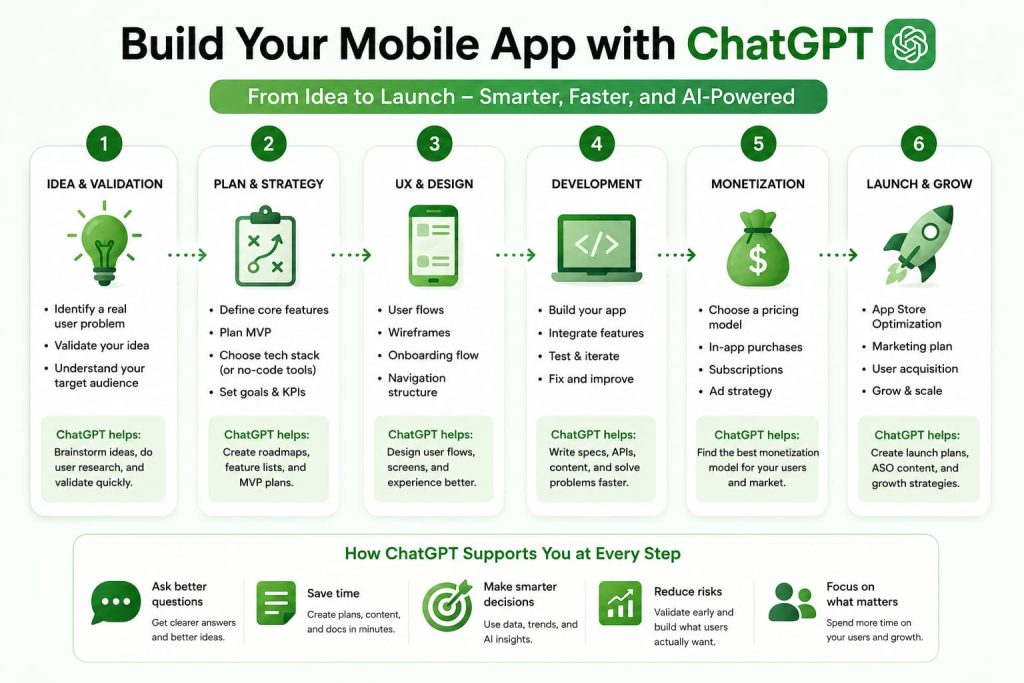
You have a mobile app idea. Maybe it’s a productivity app, a fitness tracker, a local marketplace, or something completely different. The challenge isn’t having an idea. The challenge is figuring out what to do next.
Most people get stuck right here. They open a blank doc, write “app idea” at the top, and then… nothing. No clear features. No sense of who the app is actually for. No plan for what to build first.
That’s where ChatGPT can help. Not as a magic app-builder that spits out a finished product, but as a thinking partner that helps you turn a fuzzy idea into a real plan — the kind you could hand to a developer, a designer, or a no-code tool and actually start building.
This guide gives you the exact prompts to do that, from your first “what should this app even do” moment all the way to launch day.
Can ChatGPT Help You Build a Mobile App?
Yes — with the right expectations.
ChatGPT is excellent at the thinking work that usually eats the most time:
- Generating and refining app ideas
- Identifying who your app is actually for
- Planning features and prioritizing what matters most
- Mapping out user flows and onboarding
- Scoping a realistic MVP
- Suggesting monetization models
- Drafting a launch and marketing plan
Here’s where most people get stuck without it: they either overbuild (adding 30 features before validating anything) or underplan (jumping straight to code with no clear user in mind). ChatGPT is good at pulling you out of both traps, because it forces you to answer the questions you’d otherwise skip.
What it won’t do is replace an actual developer. It can write React Native or Flutter snippets and help you debug, but a real, polished, app-store-ready mobile app still needs engineering skill — whether that’s yours, a freelancer’s, or a no-code platform doing the heavy lifting. Think of ChatGPT as your product manager and strategist, not your entire dev team.
The Best ChatGPT Prompt to Build a Mobile App
If I were building a mobile app today and only had time for one prompt, this is the one I’d use. It covers concept, users, features, MVP, monetization, and launch in a single pass.
Prompt:
“Act as a senior product manager and mobile app strategist. I want to build a mobile app for [describe your idea in 1-2 sentences]. Help me define: (1) the core problem this app solves, (2) my primary target user and their biggest pain point, (3) 5-7 must-have features versus nice-to-have features, (4) a realistic MVP scope I could build and launch in 8-12 weeks, (5) two or three monetization options that fit this type of app, and (6) a simple launch plan for getting my first 100 users. Ask me clarifying questions before you answer if you need more context.”
Why It Works
It gives ChatGPT a role, a clear scope, and a numbered output structure — so instead of a vague essay, you get a usable plan broken into the exact sections you need to move forward.
When To Use It
Use this at the very start, before you’ve written a single line of code or hired anyone. It’s your planning session in a box.
How To Customize It
Swap in your specific niche (fitness, local services, education, B2B) and mention any constraints you already know — budget, timeline, or whether you’re going no-code or custom-built.
Pro Tip
Actually answer ChatGPT’s clarifying questions instead of skipping them. The more specific your answers, the more useful the plan.
The Mobile App Planning Framework
Every prompt in this guide fits into one simple framework: Problem + User + Features + MVP + UX + Launch.
- Problem — What specific frustration or gap are you solving? Not “people need a better way to track habits,” but “busy parents forget to log their kids’ medication doses.”
- User — Who exactly deals with that problem? The more specific, the better your feature decisions get.
- Features — What does the app need to actually do to solve that problem? Not everything you can imagine — just what’s necessary.
- MVP — What’s the smallest version you could ship that still delivers real value?
- UX — How does a first-time user get from “just downloaded this” to “this makes sense” in under a minute?
- Launch — How do your first real users find out this exists?
Most successful apps — think Calm, Duolingo, Venmo — started by nailing one problem for one type of user extremely well, not by trying to do everything at once. Keep coming back to this framework whenever a prompt’s output feels too broad.
ChatGPT Prompts for Mobile App Ideas
App Ideas Based on Problems
Prompt
“I want to build a mobile app but don’t have a specific idea yet. Ask me about my interests, industry experience, and the daily frustrations I notice in my own life or work. Based on my answers, suggest 5 mobile app concepts that solve a real, specific problem.”
What It Does
Turns a vague “I want to build something” into a shortlist of ideas rooted in problems you actually understand.
Example
If you work in real estate, ChatGPT might suggest an app that helps agents track follow-ups with cold leads automatically.
Pro Tip
Pick the idea where you already understand the user, even if it feels less “exciting” than a trendy niche.
App Ideas Based on Trends
Prompt
“What are 5 emerging mobile app opportunities in [industry or interest] right now, based on shifts in consumer behavior, new technology, or gaps in existing apps? For each, explain the opportunity and who the ideal early user would be.”
What It Does
Surfaces ideas tied to what’s actually changing in a space, not just generic app categories.
Example
In wellness, this might surface a gap around apps for perimenopause tracking — an underserved niche compared to general period trackers.
Pro Tip
Cross-check anything ChatGPT suggests here with quick real-world research before committing. Trend-spotting is a starting point, not proof.
Industry-Specific App Ideas
Prompt
“I work in [industry]. What mobile app ideas would genuinely save time or money for people in this industry? Focus on problems that are annoying but haven’t been solved well yet.”
What It Does
Uses your existing expertise as a shortcut to more defensible, less obvious app ideas.
Example
A prompt from someone in landscaping might surface a simple quoting-and-scheduling app for small crews — unglamorous, but genuinely useful.
Pro Tip
Industry insiders spot problems outsiders miss. Lean into what annoys you at work.
Mobile Startup Ideas
Prompt
“Act as a startup advisor. Suggest 5 mobile app startup ideas that could realistically be built by a solo founder or small team in under 6 months, with low upfront cost. Prioritize ideas with a clear monetization path.”
What It Does
Filters ideas for feasibility, not just novelty — important if you’re building without a big team or budget.
Example
This often surfaces niche marketplace or subscription-utility apps rather than ambitious social platforms, which take longer and more capital to gain traction.
Pro Tip
Ask a follow-up: “Which of these has the lowest technical complexity?” to sort by build difficulty.
ChatGPT Prompts for Mobile App Features
Feature Brainstorming
Prompt
“My app concept is [describe app]. Brainstorm 15 possible features across onboarding, core functionality, engagement, and monetization. Don’t filter yet — just generate ideas.”
What It Does
Gets a wide net of options on the table before you start cutting anything.
Example
For a to-do list app, this might surface ideas from recurring tasks to voice input to a “focus mode” that hides everything but today’s list.
Pro Tip
Do this brainstorm before the prioritization prompt below — separating idea generation from decision-making leads to better lists.
Feature Prioritization
Prompt
“Here’s my feature list: [paste list]. Sort these into Must-Have, Should-Have, and Nice-to-Have for a first version, based on what’s essential to solve the core problem versus what adds polish later.”
What It Does
Forces the hard cuts — the step most people skip, leading to bloated, delayed first versions.
Example
A must-have for a to-do app might be “add and complete tasks.” A nice-to-have might be “AI-suggested daily priorities” — valuable, but not essential to launch.
Pro Tip
If your Must-Have list has more than 7 items, ask ChatGPT to help you cut it further. That’s usually a sign of scope creep.
MVP Planning
Prompt
“Based on my Must-Have features, help me scope an MVP I could realistically build and test with real users in 8-12 weeks. Flag anything that seems too ambitious for a first version.”
What It Does
Keeps your MVP honest instead of aspirational.
Example
It might suggest launching with manual notifications before building a full custom push-notification system.
Pro Tip
An MVP that embarrasses you a little is usually sized correctly. If you’re proud of the whole feature set, it’s probably too big.
User Experience Improvements
Prompt
“Here’s my current feature list and MVP scope: [paste]. Suggest 3-5 small UX improvements that would make the app feel more polished without adding significant build time.”
What It Does
Finds low-effort, high-impact UX wins — the details that make an app feel thoughtful rather than rushed.
Example
Adding a simple empty-state message (“No tasks yet — add your first one”) instead of a blank screen.
Pro Tip
Small UX touches like this often matter more for first impressions than an extra feature would.
ChatGPT Prompts for Mobile App UX Design
User Flow Creation
Prompt
“Map out the core user flow for my app from first open to completing the main action, step by step. My app does [describe core function]. Include what the user sees and does at each step.”
What It Does
Gives you a clear, screen-by-screen path before any design work starts.
Example
For a habit tracker: open app → see today’s habits → tap to mark complete → see a small progress update.
Pro Tip
If any flow takes more than 5-6 steps to reach the core action, ask ChatGPT to help you shorten it.
Onboarding Design
Prompt
“Design a simple onboarding flow (3-4 screens max) for my app that helps a new user understand the value quickly, without overwhelming them with setup steps.”
What It Does
Prevents the common mistake of front-loading too much setup before a user sees any value.
Example
Instead of asking for 6 preferences upfront, onboarding might let users try the core feature immediately with sensible defaults.
Pro Tip
Ask ChatGPT to identify which onboarding steps could be deferred to “later, inside the app” instead of asked upfront.
Navigation Planning
Prompt
“Suggest a simple navigation structure (tab bar or menu) for my app based on its core features: [list features]. Keep it to 3-5 main sections.”
What It Does
Keeps your app’s structure intuitive instead of trying to surface every feature equally.
Example
A fitness app might land on: Home, Workouts, Progress, Profile — not eight scattered menu items.
Pro Tip
If you can’t decide between two navigation structures, ask ChatGPT to argue for each one, then pick based on which core action it makes fastest to reach.
Retention Features
Prompt
“What are 3-5 realistic ways to encourage users to come back to my app regularly, appropriate for a [type of app] app? Avoid manipulative or spammy tactics.”
What It Does
Focuses retention ideas on genuine value rather than dark patterns that damage trust.
Example
A journaling app might suggest a gentle weekly reflection prompt rather than aggressive daily push notifications.
Pro Tip
Retention built on real value outlasts retention built on notification pressure. Users churn fast from apps that nag them.
Retention and monetization go hand in hand — an app people don’t want to open twice won’t hold onto paying users for long. If you’re weighing this alongside a non-mobile version of your idea, our broader ChatGPT prompt to build an app guide covers the same monetization and retention thinking for web and SaaS products.
ChatGPT Prompts for Mobile App Monetization
Subscription Models
Prompt
“My app is [describe app]. Would a subscription model make sense here? If so, suggest 2-3 subscription tier structures with example pricing and what features would sit behind the paywall.”
What It Does
Matches your monetization model to your app type instead of defaulting to subscriptions just because they’re common.
Example
For a niche productivity app, this might suggest a single $4.99/month tier rather than a confusing multi-tier structure.
Pro Tip
Simpler pricing usually converts better for early-stage apps. Don’t over-engineer tiers before you have users.
Freemium Strategies
Prompt
“Design a freemium structure for my app: what should be free forever, and what should be locked behind a paid upgrade, in a way that still lets free users get real value?”
What It Does
Balances generosity (to drive adoption) with a clear reason to upgrade.
Example
A note-taking app might offer unlimited notes for free but lock cloud sync behind the paid tier.
Pro Tip
If your free tier feels useless on its own, it will hurt word-of-mouth. Make sure free users still get something real.
In-App Purchases
Prompt
“Suggest 3-5 in-app purchase ideas that would feel natural for my app, rather than forced. My app is [describe app].”
What It Does
Finds monetization that fits the app’s use case instead of tacked-on purchases that feel like a cash grab.
Example
A recipe app might sell themed recipe packs rather than generic “coins” that don’t map to anything meaningful.
Pro Tip
Ask which purchases align with something the user was already going to want, not something you’re inventing just to charge for it.
Pricing Recommendations
Prompt
“Based on apps similar to mine in [category], what pricing range is typical, and what would you recommend as a starting price point for my MVP? Explain your reasoning.”
What It Does
Gives you a realistic pricing anchor instead of guessing.
Example
It might point out that most habit-tracking apps sit between $2.99-$6.99/month, helping you avoid pricing yourself out of the category.
Pro Tip
Start slightly lower than you think, validate demand, then raise prices for new users once you have testimonials and traction.
ChatGPT Prompts for Launching a Mobile App
Launch Planning
Prompt
“Create a simple 4-week launch plan for my mobile app, [describe app], aimed at getting my first 100 real users. Assume I have a small existing audience of [describe your audience, or say ‘none’].”
What It Does
Breaks launch into manageable weekly actions instead of one overwhelming “go live” moment.
Example
Week 1 might focus on a waitlist and teaser content; Week 4 on a public launch post and outreach to relevant communities.
Pro Tip
Your first 100 users matter more for feedback than growth. Optimize this plan for learning, not virality.
App Store Optimization
Prompt
“Write an App Store / Google Play listing for my app: [describe app]. Include a title, subtitle, short description, and 5 relevant keywords, optimized to attract the right early users.”
What It Does
Handles the often-neglected listing copy that directly affects discoverability and download rate.
Example
Instead of a generic title like “TaskApp,” it might suggest something more specific and keyword-rich, like “TaskApp: Simple Daily To-Do List.”
Pro Tip
Ask for 2-3 title variations and test which one gets better click-through once your app is live.
User Acquisition
Prompt
“Suggest 5 low-cost or free ways to find my first real users for [describe app]. Assume a small budget and no existing following.”
What It Does
Prioritizes scrappy, realistic acquisition channels over paid ads you may not be ready to run.
Example
For a niche B2B app, this might point toward relevant subreddits, LinkedIn outreach, or founder communities rather than broad social ads.
Pro Tip
Pick 1-2 channels and go deep rather than spreading thin across five at once.
Marketing Campaign Ideas
Prompt
“Give me 3 marketing campaign ideas for launching [describe app], each built around a different angle: one for social proof, one for urgency, and one for education about the problem it solves.”
What It Does
Gives you campaign variety so you’re not relying on a single message to carry the whole launch.
Example
An education-angle campaign might explain the problem (“Why most to-do apps make you feel behind”) before introducing the app as the fix.
Pro Tip
Lead with the problem, not the app. People respond to feeling understood before they respond to features.
Common Mistakes When Using ChatGPT to Build a Mobile App
Starting with too many features. It’s easy to get ChatGPT to generate 30 great feature ideas. It’s much harder — and more important — to cut that list down to what actually matters for version one.
Ignoring user research. ChatGPT can help you think through who your user is, but it can’t replace actually talking to a handful of real people who’d use your app. Use it to prepare better questions, not to skip asking them.
Building before validating. If you jump straight from idea to full build, you risk spending months on something nobody wanted. Use ChatGPT to help you design a quick way to test the idea first — a landing page, a waitlist, a handful of user interviews.
Overcomplicating the MVP. The temptation is always to add “just one more feature” before launch. Every prompt in the MVP section above is designed to fight that instinct.
Trusting AI recommendations without testing. ChatGPT’s pricing suggestions, feature priorities, and UX ideas are a strong starting point — not gospel. Treat its output as a smart first draft, then validate against real user behavior.
How I Would Use ChatGPT If I Were Launching a Mobile App Today
If I were starting from scratch, here’s the order I’d actually work through this:
First, idea validation. I’d use the “App Ideas Based on Problems” prompt, but I wouldn’t stop at ChatGPT’s suggestions — I’d talk to 5-10 people who fit the target user description and see if the problem actually resonates.
Second, user research. I’d ask ChatGPT to help me draft interview questions focused on how people currently deal with the problem, not just whether they “like the idea” (people are polite; behavior doesn’t lie).
Third, MVP planning. I’d run the brainstorming prompt, then immediately follow it with the prioritization prompt, so I’m not tempted to fall in love with a feature list that’s too big.
Fourth, feature prioritization. I’d specifically ask ChatGPT to challenge my Must-Have list — “which of these could I actually launch without?” — because founders are usually too attached to their own ideas to cut ruthlessly on their own.
Fifth, launch preparation. I’d build the 4-week launch plan early, not after the app is done, so marketing isn’t an afterthought bolted on at the last minute.
The through-line here: ChatGPT is fastest at helping you think clearly. It’s still on you to test that thinking against real people.
Frequently Asked Questions
Can ChatGPT help build a mobile app?
Yes. ChatGPT can help you plan the concept, define your target user, prioritize features, scope an MVP, and even generate code snippets for simple functionality. For a fully polished, production-ready app, you’ll still typically need a developer or a no-code platform to handle the actual build.
What is the best ChatGPT prompt for building a mobile app?
A strong starting prompt asks ChatGPT to act as a product manager and cover your core problem, target user, must-have features, MVP scope, monetization, and launch plan in one structured response — like the universal prompt provided earlier in this guide.
Can ChatGPT create app features?
ChatGPT can’t build features directly inside your app, but it can brainstorm feature ideas, help you prioritize them, and even generate front-end or back-end code snippets you or a developer can implement.
Can ChatGPT help design a mobile app?
Yes, at the planning level. ChatGPT can help map user flows, suggest onboarding structures, and recommend navigation patterns. For actual visual design, you’ll still want a design tool like Figma or a designer to execute the details.
Can ChatGPT help launch an app?
Yes. ChatGPT can help you write App Store listings, plan a launch timeline, brainstorm user acquisition channels, and draft marketing campaign angles — all useful groundwork for getting your first real users.
Conclusion
ChatGPT won’t build your mobile app for you, but it will help you think like a product manager instead of guessing your way through it. It’s genuinely useful for turning a fuzzy idea into a clear plan — one with a defined user, a realistic MVP, and an actual path to launch.
Validation still matters more than most people expect. The simplest apps, built around one problem solved well, tend to beat the overbuilt ones that tried to do everything at once.
Your next step: pick one prompt from this guide — probably the universal planning prompt near the top — and actually run it with your real idea. See what comes back, then start cutting.