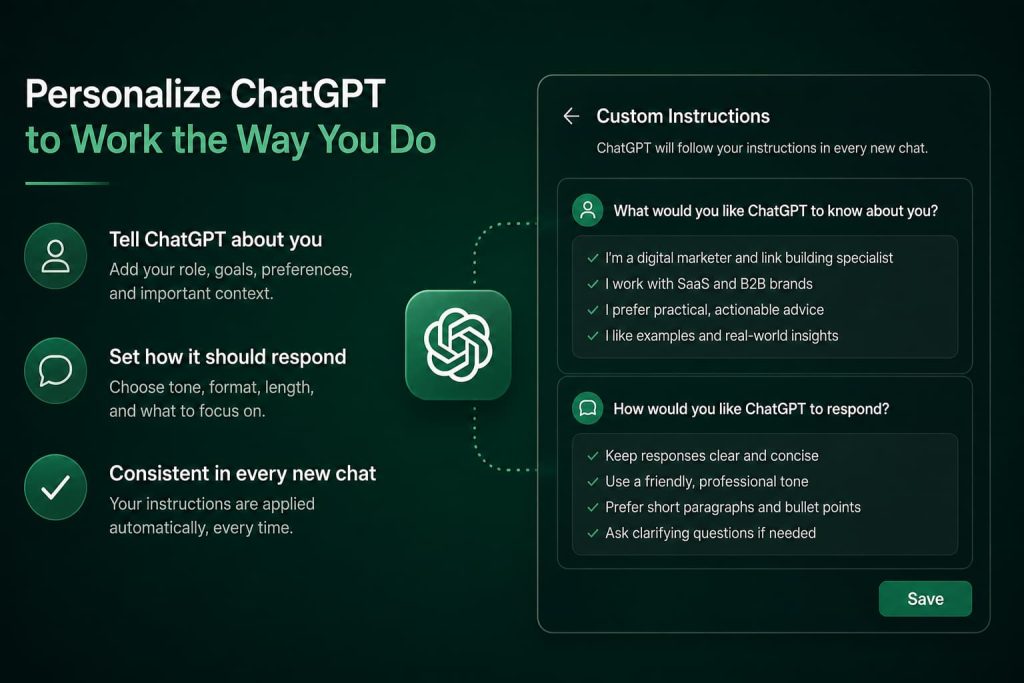
Most people use ChatGPT for months before they realize they’ve been re-explaining themselves in every single chat.
“Keep it short.” “Don’t use bullet points unless I ask.” “I’m a beginner, explain like I don’t know the jargon.”
You type it once. Then you type it again tomorrow. And again next week. Custom ChatGPT instructions exist to end that cycle. They let you tell ChatGPT, one time, how you want it to behave and it applies that behavior to every new conversation from then on.
This guide covers what custom instructions actually are, how they’re different from prompts and Memory, and what to write in them so ChatGPT finally stops sounding like a generic assistant and starts sounding like it was built for you.
What Are Custom ChatGPT Instructions
Custom instructions are a settings-level feature that lets you give ChatGPT standing context about who you are and how you want it to respond — before you’ve typed a single word in a new chat.
They live outside the conversation itself. You’re not prompting ChatGPT in the moment. You’re configuring it in advance, the same way you’d set up a filter once instead of sorting your inbox by hand every day.
You’ll find them under Settings → Personalization → Custom Instructions in ChatGPT (the exact wording has shifted slightly across updates, but it’s always inside Personalization).
There are two boxes:
- What would you like ChatGPT to know about you?
- How would you like ChatGPT to respond?
That’s the whole interface. Two text fields. But what you put in them changes almost everything about how the model behaves.
How Custom Instructions Actually Work
Here’s what most explanations skip: custom instructions aren’t inserted into the chat as a visible message. They’re added as hidden context that sits above every conversation you start, similar to a system prompt.
That distinction matters because it explains their biggest strength and their biggest limitation.
The strength: you never have to repeat yourself. Every new chat starts already knowing your context.
The limitation: custom instructions are static. They don’t grow or change based on what happens inside a conversation. If you tell ChatGPT in the middle of a chat that you’ve switched jobs, custom instructions won’t update themselves. You’d need to go back into settings and edit them manually.
That’s the trade-off. Custom instructions give you consistency. They don’t give you adaptability. For that, you need Memory — more on that shortly.
How to Use ChatGPT Custom Instructions
Setting them up takes about two minutes, but writing them well takes more thought than most people give it.
Step 1: Open Personalization settings. Click your profile in the bottom corner, go to Settings, then Personalization, then Custom Instructions.
Step 2: Fill in “What would you like ChatGPT to know about you?” This is background, not personality. Your role, your industry, your goals, your constraints. Think of it as the paragraph you’d want a new freelance hire to read before starting work with you.
Step 3: Fill in “How would you like ChatGPT to respond?” This is behavior. Tone, format, length, what to avoid, how much explanation you want. This box does more heavy lifting than people expect.
Step 4: Save, then test it. Start a brand-new chat and ask something unrelated to your instructions — a random question. Watch whether the tone and format match what you asked for. If it doesn’t, your instructions were probably too vague.
Step 5: Revisit every few months. Your work changes. Your preferences change. Custom instructions that fit you in January can feel stale by summer.
One thing I’ve noticed working with these regularly: people write step one carefully and rush step two. That’s backwards. The “how to respond” box is usually where the real improvement in output quality comes from.
Custom Instructions vs. Prompts
These get confused constantly, and the confusion causes real frustration, because people expect custom instructions to do a prompt’s job.
A prompt is a request. It’s specific, situational, and disposable. “Write a cold email to a SaaS founder about our analytics tool” is a prompt. It applies to one task.
Custom instructions are a standing preference. They’re general and persistent. “Keep responses under 150 words unless I ask for more detail” is a custom instruction. It applies to everything.
Here’s the mental model that makes this click: prompts answer what do I want right now. Custom instructions answer who am I, and how do I want to be talked to, generally.
You still need both. Custom instructions won’t write your cold email for you. But they will make sure the cold email ChatGPT writes doesn’t come back sounding like a corporate blog post when you actually wanted something punchy and direct.
Custom Instructions vs. ChatGPT Memory
This is the comparison people search for most, and it’s also the one where the answer is genuinely “it depends,” so let’s be honest about that instead of pretending there’s a clean winner.
Custom instructions are instructions you write yourself, once, in a settings box. You control every word. Nothing is added unless you type it there.
Memory is different. ChatGPT builds it automatically, based on details you mention across conversations — your job, a project you’re working on, a preference you stated once in passing. It grows on its own, without you managing a text field.
The practical difference shows up like this:
Custom instructions are explicit and stable. You know exactly what’s in them because you wrote every line.
Memory is implicit and evolving. It picks things up organically, sometimes things you didn’t consciously decide to “set” — which is convenient, but also less predictable if you want tight control over what ChatGPT assumes about you.
In practice, the two work best together, not as alternatives. Use custom instructions for the things that should never change without your say-so — tone, format, your role, hard rules like “never use emojis.” Let Memory handle the situational, evolving context — your current project, a client you mentioned last week, a detail that’s true for now but might not be true in three months.
If you want full control and predictability, lean on custom instructions. If you want ChatGPT to feel like it’s paying attention over time without you managing anything, Memory does that job better.
Best ChatGPT Custom Instructions Examples
Generic advice like “be concise and professional” doesn’t actually change much. Specificity does. Below are instructions organized by who’s using them, written the way you’d actually paste them in.
For Content Creators and Marketers
I write blog content and marketing copy for a mid-sized SaaS company. Assume an intelligent but non-technical reader. Avoid corporate buzzwords like “leverage,” “synergy,” and “unlock.” Write in active voice. When I ask for drafts, give me one strong version rather than three options — I’ll ask for alternatives if I want them.
For Developers and Programmers
I’m a backend developer working primarily in Python and Go. Skip explanations of basic syntax. When debugging, ask for the full error trace before guessing at a fix. Default to production-ready code with error handling, not simplified teaching examples, unless I explicitly say I’m learning.
For Freelancers
I’m a freelance graphic designer who also handles my own client communication, invoicing, and proposals. When I ask for emails, keep them warm but efficient — no filler. When I ask for pricing or contract language, flag anything that sounds legally risky, but don’t act as a substitute for a lawyer.
For Business Owners
I run a small e-commerce business with four employees. I think in terms of margins, time cost, and what I can realistically implement without a dev team. When suggesting tools or strategies, prioritize ones that don’t require technical setup. Be direct about what’s likely to work versus what’s theoretical.
For AI Power Users
Push back on my ideas if you see a flaw — don’t just validate them. When there’s genuine uncertainty or multiple valid approaches, tell me that instead of picking one and presenting it as the only answer. I’d rather have an honest “it depends” than false confidence.
Notice what these all have in common. None of them are vague. Each one gives ChatGPT a role, a constraint, and a reason for the constraint. That’s what separates instructions that actually change behavior from ones that get quietly ignored.
A ChatGPT Custom Instructions Template
If you’d rather build your own from scratch, this fill-in-the-blank structure covers what actually matters.
For “What should ChatGPT know about you”:
I work as a [role] in [industry/field]. My main goals when using ChatGPT are [goal 1] and [goal 2]. Context that matters: [any recurring project, audience, or constraint worth knowing].
For “How would you like ChatGPT to respond”:
Tone: [e.g., direct, warm, formal, casual] Length: [e.g., short by default, detailed only when I ask] Format: [e.g., avoid bullet points unless requested, use plain paragraphs] Things to avoid: [e.g., hedging language, excessive caveats, emojis] When uncertain: [e.g., ask a clarifying question instead of guessing]
You don’t need to fill in every line with something elaborate. A short, specific answer beats a long, vague one every time.
How to Personalize ChatGPT Response Style Beyond the Basics
Once the basics are set, a few less obvious adjustments make a noticeable difference.
Tell it what “good” looks like, not just what to avoid. “Don’t be repetitive” is vague. “Get to the point in the first sentence” is something the model can actually act on.
Give it a persona anchor, not a personality description. Instead of “be friendly,” try “respond like a colleague I trust, who gives me their honest opinion, not just agreement.” Models respond better to relational framing than adjective lists.If you want more granular control over tone on a case-by-case basis beyond what custom instructions set as your default — here’s a deeper breakdown of getting ChatGPT to sound more human and less robotic, prompt by prompt.
Set explicit boundaries around confidence. If you want honesty over agreeableness, say so directly. Something like “if you’re not sure, say so — don’t guess and present it as fact” changes output more than most people expect.
Specify format defaults once, so you stop specifying them every time. If you almost always want plain text instead of headers and bullets, say that in custom instructions instead of adding “no bullet points, please” to every single prompt.
Common Mistakes People Make With Custom Instructions
Writing instructions that are too broad to act on. “Be helpful and smart” gives the model nothing concrete to change. Every instruction should be specific enough that you could tell, from the output, whether it was followed.
Treating the boxes as one field. The “about you” box and the “how to respond” box do different jobs. Mixing background information into the response-style box (or vice versa) dilutes both.
Setting instructions once and never revisiting them. What worked for you six months ago might now be actively working against you — especially if your role, tools, or writing needs have changed.
Overloading them with too many rules. Ten competing instructions often produce worse output than three clear ones. Prioritize the constraints that matter most and drop the rest.
Forgetting they don’t apply per-project. If you switch between very different types of work — say, technical writing one day and casual social captions the next — a single static instruction set can’t serve both well. In that case, project-specific prompts still have a role to play, even with strong custom instructions in place.
The Real Value Isn’t Convenience
It’s tempting to think of custom instructions as a shortcut — a way to type less. That’s true, but it’s not the real value.
The real value is consistency. When ChatGPT’s tone, format, and judgment stay stable across every conversation, you stop having to mentally re-calibrate each time you open a new chat. You start trusting the output faster, because you already know roughly what shape it’s going to take.
Set them once, with real specificity. Revisit them when your work changes. That’s the whole system — and it’s the difference between using ChatGPT as a generic tool and using it as one that’s actually configured for you.