Account management is a lot of small tasks that add up. Emails. Meeting prep. Reports. Renewal calls. Follow-ups you meant to send yesterday.
AI won’t do your job for you. But it can take the busywork off your plate so you have more time for the part that actually matters: the relationship.
This guide gives you prompts you can use today. Not a giant list to scroll through. A real framework you can build a workflow around.
We’ll go through it in the order it actually happens: Onboard → Support → Communicate → Retain → Expand.
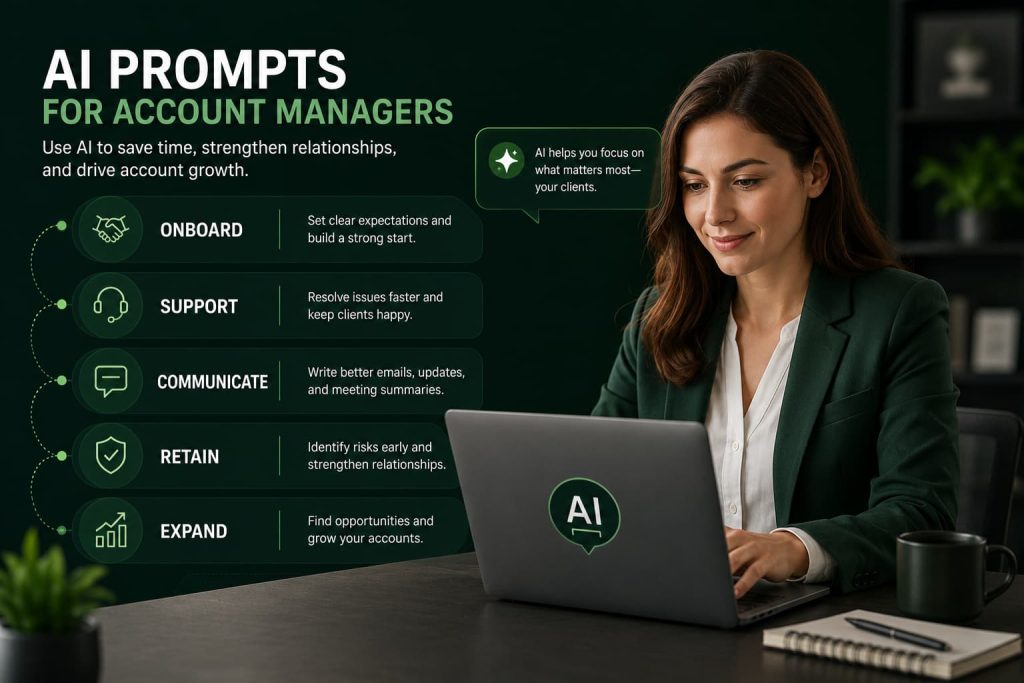
How Account Managers Can Use AI
Short answer: AI helps you write faster, prep faster, and spot problems earlier.
Here’s where it fits into your day:
- Client communication — drafting emails, replies, and updates in your voice
- Meeting preparation — turning notes into agendas and talking points
- Reporting — turning raw data into a summary a client will actually read
- Renewals — building the case for why a client should stay
- Upselling — spotting where a client has room to grow
- Relationship management — tracking client history so nothing falls through the cracks
None of this replaces judgment. You still know your client better than any AI tool does. AI just handles the first draft so you’re not starting from a blank page.
The Best AI Prompt for Account Managers
If you only save one prompt from this article, save this one. It works as a starting point for almost any account review.
Act as an experienced account manager. Here is background on my client: [paste client details, goals, recent activity, and any known issues]. Based on this, tell me: 1) What are this client’s top 3 goals right now? 2) What risks or warning signs do you see? 3) What opportunities for growth exist? 4) What should my next 3 action steps be? Keep your answer direct and practical, no fluff.
Why It Works
It forces the AI to think through goals, risk, and opportunity in one pass. That’s the same mental checklist a good account manager runs before any client call.
When To Use It
Before a QBR. Before a renewal conversation. Any time you feel like you’ve lost track of where an account actually stands.
Pro Tip
Paste in real notes, not just a client name. The more context you give, the less generic the output.
AI Prompts for Client Communication
Most of your day is writing. These prompts speed that up without making your emails sound robotic.
Client Update Emails
Write a short client update email. The update is: [what happened]. Keep the tone professional but warm, get to the point in the first line, and end with a clear next step.
What It Does
Turns a rough update into something a busy client can read in 15 seconds.
Example
You just finished a project phase. Paste in the details, get a clean email back with the win up top and the next step at the bottom.
Pro Tip
Always edit the opening line yourself. AI tends to default to “I hope this email finds you well” — cut it.
We have a well-researched article on ChatGPT prompts for business email. You can check it out:)
Follow-Up Emails
Write a follow-up email to a client who hasn’t responded in [X days]. Reference our last conversation about [topic]. Keep it light, not pushy, and give them an easy way to reply.
What It Does
Keeps you top of mind without sounding like you’re chasing them.
Example
Client went quiet after a proposal. This prompt gives you a nudge that feels human, not automated.
Pro Tip
Ask for a short “no fluff” version. Long follow-ups get ignored.
Difficult Conversations
Help me prepare for a difficult conversation with a client about [the issue]. Give me an opening line, 3 talking points, and how to respond if they push back.
What It Does
Gives you a script so you’re not improvising when stakes are high.
Example
A client is upset about a missed deadline. This prompt helps you own it without over-apologizing or getting defensive.
Pro Tip
Practice saying it out loud once before the call. Reading it silently isn’t the same.
Stakeholder Communication
Write an update for [executive stakeholder] summarizing [project/account] status. They care about business outcomes, not day-to-day details. Keep it under 150 words.
What It Does
Filters out the operational noise so senior stakeholders get what they actually want: results.
Example
Your day-to-day contact needs details. Their boss needs the headline. This prompt writes for the second audience.
Pro Tip
Lead with the outcome, not the process. Executives skim.
AI Prompts for Client Onboarding
First impressions set the tone for the whole account. These prompts help you start strong.
Kickoff Meetings
Create a kickoff meeting agenda for a new client in [industry]. Include introductions, goal alignment, timeline overview, and next steps. Keep it to 5 items max.
What It Does
Gives new clients a clear picture of what to expect, right from meeting one.
Example
New client signs on. This prompt gives you a tight agenda instead of a rambling first call.
Pro Tip
Send the agenda ahead of time. It shows you’re organized before the meeting even starts.
Onboarding Plans
Build a 30-60-90 day onboarding plan for a new client focused on [main goal]. Break it into milestones with clear owners for each step.
What It Does
Turns a vague “let’s get started” into a plan the client can actually follow.
Example
Client wants to know what the first three months look like. This prompt gives you a plan you can share on day one.
Pro Tip
Keep milestones specific. “Improve engagement” is vague. “Launch first campaign by day 30” is not.
Expectation Setting
Write a short message setting expectations with a new client about communication frequency, response times, and how we’ll measure success.
What It Does
Prevents the misunderstandings that cause friction three months down the line.
Example
Client assumes you’re available 24/7. This prompt helps you set the rules early, politely.
Pro Tip
Frame limits as structure, not restriction. “Here’s how we’ll stay in sync” lands better than “here’s what I won’t do.”
Success Planning
Based on this client’s stated goals: [paste goals], write a simple success plan with 3 measurable outcomes we’ll track over the next 6 months.
What It Does
Gives both sides a shared definition of what “success” actually means.
Example
Client says they want “better results.” This prompt turns that into 3 numbers you can both track.
Pro Tip
Get the client to confirm these outcomes in writing. It protects you later.
AI Prompts for Reporting and Reviews
Reporting eats hours. These prompts cut that down without cutting quality.
Monthly Reports
Turn this raw data into a monthly client report: [paste data]. Summarize key wins, flag any issues, and keep it under one page.
What It Does
Converts spreadsheets into something a client will actually read.
Example
You have a table of numbers. This prompt turns it into 3 short paragraphs with the important parts highlighted.
Pro Tip
Always double-check the numbers yourself. AI can restate data wrong if the input is messy.
Quarterly Business Reviews
Build a QBR outline for [client name] covering performance vs. goals, key wins, challenges, and next quarter’s plan. Keep each section to 3 bullet points.
What It Does
Gives you a clean structure so you’re not building a QBR deck from scratch every time.
Example
QBR is in two days. This prompt gets you a skeleton to fill in fast.
Pro Tip
Save this outline as a template. Reuse the structure, swap the content each quarter.
Performance Summaries
Summarize this account’s performance over [time period] in plain language. Avoid jargon. Explain what the numbers mean for the client’s business.
What It Does
Translates metrics into meaning. Clients care about impact, not raw stats.
Example
Traffic is up 20%. This prompt explains what that actually means for their revenue or goals.
Pro Tip
Always answer “so what?” for every number you report.
Executive Updates
Write a one-paragraph executive summary of this account’s status, written for someone with 30 seconds to read it.
What It Does
Respects the reader’s time while still covering what matters.
Example
CEO wants the headline, not the details. This prompt gives you exactly that.
Pro Tip
If you can’t fit it in one paragraph, you haven’t found the actual headline yet.
AI Prompts for Client Retention
This is where AI earns its keep. Catching a problem early is far cheaper than fixing it after a client walks.
Identifying Risk Accounts
Based on this account activity: [paste usage data, response times, sentiment, complaints], tell me if this client shows signs of churn risk. List the specific warning signs you see.
What It Does
Gives you an outside read on signals you might be too close to notice.
Example
A client’s replies have gotten shorter and slower. This prompt names it as a possible risk factor instead of you second-guessing yourself.
Pro Tip
Run this monthly on your top accounts, not just the ones already worrying you. Risk often shows up quietly first.
Improving Engagement
Suggest 5 ways to re-engage a client who has gone quiet over the last [X weeks], without seeming pushy or desperate.
What It Does
Gives you options beyond “just check in,” which clients can smell coming.
Example
Client used to reply same-day, now takes a week. This prompt gives you fresh angles to reconnect.
Pro Tip
Lead with value, not a check-in. Share something useful before asking for their time.
Renewal Preparation
Help me build a renewal case for [client name]. Include their key wins this year, ROI where possible, and 2-3 reasons to continue the partnership.
What It Does
Builds your argument before the renewal conversation, not during it.
Example
Renewal is in 30 days. This prompt turns a year of scattered wins into one clear case.
Pro Tip
Lead with their wins, not your effort. Clients renew based on their results, not your hours worked.
Client Health Reviews
Create a simple client health scorecard covering engagement, satisfaction, and results. Score this client based on: [paste details]. Explain the score.
What It Does
Gives you a repeatable way to check account health instead of relying on gut feel alone.
Example
You manage 15 accounts. This prompt helps you triage which ones need attention first.
Pro Tip
Track the score over time, not just once. A single snapshot tells you less than a trend line.
AI Prompts for Upselling and Account Growth
Growth conversations feel easier when you walk in with a plan, not a pitch.
Expansion Opportunities
Based on this client’s current usage and goals: [paste details], suggest 3 realistic expansion opportunities. Explain the benefit to the client for each one.
What It Does
Keeps the suggestion client-focused instead of sales-focused.
Example
Client is only using one part of your service. This prompt highlights what they’re missing out on, framed around their goals.
Pro Tip
Only suggest what actually fits their goals. A forced upsell damages trust fast.
Additional Services
Write a short pitch for [additional service] tailored to a client whose main goal is [goal]. Keep it under 100 words and focused on their outcome, not the feature list.
What It Does
Keeps the pitch about their result, not your product.
Example
You want to introduce a new service tier. This prompt frames it as solving their problem, not selling them something extra.
Pro Tip
Cut any sentence that starts with “our platform.” Start with their problem instead.
Strategic Recommendations
Act as a strategic advisor. Based on this client’s goals and current results, recommend one high-impact change they should make in the next quarter.
What It Does
Positions you as a strategic partner, not just an order-taker.
Example
Client is hitting steady but unremarkable results. This prompt gives you one sharp recommendation instead of a vague list.
Pro Tip
One strong recommendation lands better than five weak ones. Cut it down.
Growth Planning
Build a 6-month growth plan for [client name] based on their current results and stated goals. Include 3 milestones and what success looks like at each stage.
What It Does
Gives the client a roadmap that makes the relationship feel forward-looking, not maintenance-only.
Example
Client asks “what’s next for us?” This prompt gives you a real answer instead of “more of the same.”
Pro Tip
Share this plan in a QBR. It’s a natural bridge into the next renewal conversation.
Common Mistakes Account Managers Make With AI
A few habits will undercut everything above.
- Using generic prompts. “Write a client email” gives you a generic email. Add real context, get a real draft.
- Sending AI content without editing. Every draft needs your voice and a second read. Clients notice when something feels off.
- Ignoring client context. AI doesn’t know your client’s history unless you tell it. Paste in the details every time.
- Over-automating communication. Clients can tell when something wasn’t written for them specifically. Use AI for speed, not to skip the relationship part entirely.
How I Would Use AI as an Account Manager Today
Here’s what a realistic day looks like with AI in the mix.
Morning planning. Paste yesterday’s notes into a prompt and ask for today’s top 3 priorities across your accounts.
Client communication. Draft your first few emails with AI, then edit each one so it sounds like you, not a template.
Meeting prep. Before any call, run the client’s recent activity through a quick prompt to flag risks or wins you might’ve missed.
Reporting. Turn raw numbers into a one-page summary before you touch a slide deck.
Account reviews. Once a week, run your top accounts through a quick health check prompt. Catch the quiet ones before they go silent.
None of this takes more than 20-30 extra minutes a day. It just moves that time from busywork into actual client strategy.
Frequently Asked Questions
Can account managers use AI?
Yes. AI works well for drafting emails, prepping meetings, building reports, and spotting account risk early. It’s a time-saver, not a replacement for relationship skills.
What are the best AI prompts for account managers?
The most useful prompts cover client updates, renewal prep, risk identification, and QBR outlines. Start with a master prompt covering goals, risks, and next steps for any account.
Can AI help with client communication?
Yes. AI can draft update emails, follow-ups, and difficult-conversation talking points. Always edit the output so it matches your voice before sending.
Can AI help with renewals?
Yes. AI can help you organize a client’s wins and ROI into a clear renewal case, so you walk into the conversation prepared instead of scrambling.
Can AI improve client retention?
Yes, when used to spot risk signals early. AI can flag warning signs in engagement and sentiment data before a client formally raises a concern.
Conclusion
AI won’t replace the relationship part of account management. It never should.
What it does is give you back time. Time you can spend actually talking to clients instead of drafting the tenth version of the same update email.
Start small. Pick two or three prompts from this list. Use them on your next few client interactions. Build from there.
The account managers who win with AI aren’t the ones using the most prompts. They’re the ones who use a few well, consistently, and never skip the editing step.