Planning a trip sounds exciting until you open ten browser tabs, compare hotel options, research attractions, and try to fit everything into a realistic schedule. By hour two you’re not planning a vacation anymore. You’re doing unpaid research for a travel blog you’ll never read again.
Every traveler has experienced this. You start with good intentions — “I’ll just spend twenty minutes finding a few things to do” and somehow end up cross-referencing museum hours with restaurant reservations while your actual trip dates get closer and closer.
This is where ChatGPT becomes useful. Not as a replacement for your judgment, but as a planning partner that can take a messy pile of preferences (dates, budget, interests, pace) and turn it into an actual, usable itinerary in minutes instead of hours.
This guide isn’t another list of forty travel prompts you’ll skim once and forget. It’s a system. By the end, you’ll know exactly how to structure a request so ChatGPT gives you a itinerary that fits your trip, not a generic “Top 10 Things To Do” list copied from a travel blog.
Can ChatGPT Create a Travel Itinerary?
Yes. ChatGPT can build a day-by-day travel itinerary, and it’s genuinely good at it when you give it the right inputs. Here’s where it actually helps:
- Destination research — comparing neighborhoods, regions, or even countries based on what you want out of the trip
- Activity planning — suggesting attractions, experiences, and things to do that match your interests, not just the most popular tourist spots
- Route optimization — grouping activities by location so you’re not crisscrossing a city and wasting half your day in transit
- Budget planning — breaking down rough costs for accommodation, food, transportation, and activities
- Packing preparation — building packing lists based on destination, season, and trip type
- Travel schedules — turning a rough idea (“five days in Lisbon”) into an actual hour-by-hour plan
Here’s where travel planning becomes stressful for most people: they know what they want in a general sense, but turning that into a structured plan takes real effort. ChatGPT closes that gap fast.
But it has real limitations, and you should know them going in.
ChatGPT doesn’t have live access to current prices, real-time availability, or today’s opening hours unless you’re using a version connected to live browsing. It can be confidently wrong about things like whether a specific restaurant is still open or what a museum currently charges for admission. Local events, seasonal closures, and sudden changes (a renovation, a strike, a road closure) won’t always show up in its answers.
The smart approach: use ChatGPT to build the structure and logic of your trip, then verify time-sensitive details — hours, prices, reservations — through official sources before you travel. Treat it like a well-traveled friend who knows the destination well but hasn’t checked the news this week.
The Best ChatGPT Travel Itinerary Prompt
If you only use one prompt from this entire article, use this one. It’s built to gather everything ChatGPT needs to create a genuinely tailored itinerary instead of a generic one.
Act as an experienced travel planner. I’m planning a trip to [destination] for [number] days, traveling in [month/season]. My budget is [budget level or amount]. I’m traveling with [solo / partner / family / friends]. My main interests are [interests — food, history, nature, nightlife, art, relaxation, adventure, etc.]. My travel pace preference is [relaxed / balanced / packed]. Please create a day-by-day itinerary that includes morning, afternoon, and evening activities, groups activities by location to minimize travel time, includes a mix of well-known attractions and local experiences, suggests meal options that fit my budget, and includes one flexible/backup activity per day in case of bad weather or closures. Ask me clarifying questions before you begin if you need more information.
Why It Works
This prompt works because it front-loads the exact variables ChatGPT needs — destination, duration, season, budget, group type, interests, and pace — instead of leaving them for ChatGPT to guess. Vague prompts get vague itineraries. Specific prompts get specific ones.
It also tells ChatGPT to group activities geographically, which is the single biggest difference between an itinerary that feels effortless and one where you’re spending half your vacation on trains and rideshares.
When To Use It
Use this prompt at the very start of your planning process, right after you’ve picked a destination and locked in your travel dates. It works best as your foundation — you’ll refine it with the more specific prompts later in this article.
How To Customize It
Swap out the bracketed sections for your actual trip details. If you have a hard must-do (a specific concert, a friend’s wedding, a flight you need to catch), add it as a fixed point: “I have a dinner reservation on day 3 at 7pm that the schedule needs to work around.”
Pro Tip
Tell ChatGPT to ask clarifying questions before building the itinerary. This one instruction changes the entire quality of the output. Instead of guessing your preferences, it asks and you end up with something closer to what you actually want on the first try.
If you find yourself re-entering the same budget and interests every time you plan a trip, setting up custom instructions means ChatGPT already knows your travel style before you even ask.
The Travel Planning Framework Smart Travelers Use
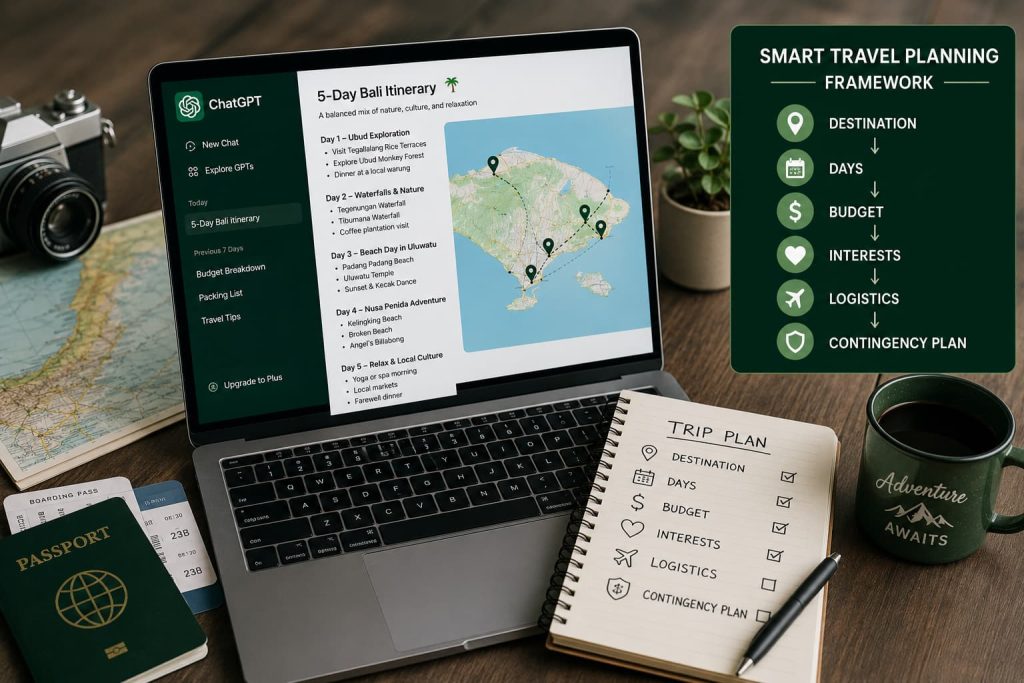
Most people approach ChatGPT the way they’d approach a search engine — one question, one answer, done. That’s why they get mediocre results.
Here’s the smarter approach: think of trip planning as six connected stages, and work through them in order.
DESTINATION → DAYS → BUDGET → INTERESTS → LOGISTICS → CONTINGENCY PLAN
Destination. Where are you going, and why? Even if you already know the answer, telling ChatGPT the reason (a milestone birthday, a work trip you’re extending, a bucket-list location) helps it calibrate tone and suggestions.
Days. How much time do you actually have, including arrival and departure days? A common mistake is planning a “5-day trip” that’s really 3.5 usable days once you account for flight times. Be honest about this with ChatGPT so it doesn’t overpack your schedule.
Budget. Not just a total number — a budget level. “Budget,” “mid-range,” or “luxury” changes the entire character of the recommendations, from where you’ll eat to how you’ll get around.
Interests. This is where most people are too vague. “I like culture” tells ChatGPT almost nothing. “I want to see contemporary art and try street food, but I’m not interested in nightlife” gives it something to actually work with.
Logistics. How will you get around? Are you renting a car, relying on public transit, or mostly walking? Do you have mobility considerations? This shapes how realistic the schedule is.
Contingency plan. What happens if it rains, a museum is closed, or you’re just too tired for the packed afternoon you planned? Building in backup options up front means your itinerary survives contact with reality.
If I were planning a trip today, I’d literally work through these six stages one at a time in a single conversation with ChatGPT, refining the itinerary as I go rather than trying to get a perfect result from one giant prompt.
ChatGPT Prompts for Vacation Planning
Different trip types need different framing. A weekend trip and a two-week international trip aren’t the same planning problem — they need different levels of detail and different priorities.
Weekend Trips
I have a 2-day weekend trip to [destination]. I’ll arrive Friday evening and need to leave Sunday by [time]. My priority is [relaxation / exploring / a specific interest]. Build me a compact itinerary that makes the most of limited time without feeling rushed, including one standout experience each day.
What It Does: Forces ChatGPT to respect a tight, realistic timeframe instead of cramming in more than is physically possible.
Example: For a weekend in New Orleans, this might produce a plan built around one big Friday-night meal, a Saturday split between the French Quarter and a nearby neighborhood, and a relaxed Sunday morning before departure — rather than trying to see six neighborhoods in two days.
Pro Tip: Add “no more than 3 major activities per day” if you tend to overbook yourself. This single constraint prevents itinerary burnout.
Family Vacations
I’m planning a [number]-day family trip to [destination] with kids ages [ages]. We need a pace that isn’t exhausting for children, with activities that work for the whole age range. Include kid-friendly meal options, downtime built into each day, and note which attractions might need advance tickets.
What It Does: Adjusts pacing and activity selection for a family’s actual constraints — shorter attention spans, nap schedules, and the need for downtime.
Example: For a family trip to Orlando with a 5-year-old and a 10-year-old, this produces a schedule with mid-day breaks instead of back-to-back theme park hours.
Pro Tip: Mention specific triggers — “no activities over 2 hours without a break” or “our youngest naps from 1-3pm” — and ChatGPT will actually build around them.
Couples Trips
Plan a [number]-day romantic getaway to [destination] for me and my partner. We want a mix of [relaxation / adventure / culture], with at least one special experience per day (a nice dinner, a scenic viewpoint, something memorable). Our budget is [budget level].
What It Does: Prioritizes shared, memorable moments over just checking attractions off a list — which is usually what couples actually want from a trip together.
Example: For a couples trip to Santorini, this could surface a sunset dinner reservation suggestion, a private boat tour option, and a slower-paced final day instead of nonstop sightseeing.
Pro Tip: Specify “no more than one big activity per day, with room for spontaneity” if the goal is connection over a checklist.
International Travel
I’m traveling internationally to [country/city] for [number] days for the first time. Include cultural etiquette tips, common scams or tourist traps to avoid, approximate costs in local currency, and any travel documents or vaccinations I should double-check before booking. Then build the day-by-day itinerary.
What It Does: Adds a first-time-traveler safety net on top of the itinerary — the kind of practical context locals know but guidebooks often skip.
Example: For a first trip to Vietnam, this surfaces things like typical taxi scams near tourist areas and appropriate dress for temple visits, alongside the daily plan.
Pro Tip: Always verify visa, vaccination, and entry requirement details on official government or embassy sites. Use ChatGPT’s answer as a starting checklist, not a final source.
Once you’ve got a first draft from one of these, it’s worth pairing it with a ChatGPT Prompt for Travel Research pass to sanity-check anything that sounds time-sensitive.
ChatGPT Prompts for Travel Budget Planning
Budget stress ruins more trips than bad weather does. These prompts turn budgeting from a source of anxiety into a simple planning input.
Accommodation Budgeting
I’m looking for accommodation in [destination] for [number] nights, [number] people, budget level [budget/mid-range/luxury]. What neighborhoods should I look at for the best balance of safety, convenience, and price? What’s a realistic nightly rate range for my budget level in this destination?
What It Does: Gives you a realistic price range and neighborhood shortlist before you start browsing booking sites, so you’re not scrolling blind.
Example: For mid-range accommodation in Barcelona, this might point you toward Gràcia or El Born as better value-for-location than staying directly on Las Ramblas.
Pro Tip: Ask “which neighborhoods should I avoid for safety or noise reasons” as a direct follow-up — ChatGPT will often give you honest answers when asked plainly.
Transportation Planning
I’ll be in [destination] for [number] days. Compare the cost and convenience of renting a car versus public transit versus rideshares for getting around. Factor in [any day trips or specific destinations planned]. Recommend the most cost-effective option for my itinerary.
What It Does: Removes the guesswork from a decision that can swing your budget significantly — a rental car isn’t always cheaper, and public transit isn’t always more convenient.
Example: For a week in Tuscany with day trips to hill towns, this usually favors a rental car over trains, while a week in Tokyo strongly favors transit passes.
Pro Tip: Ask for the breakeven point — “at what point does renting a car become cheaper than rideshares for this trip” gives you a concrete number to plan around.
Daily Spending Estimates
Give me a realistic daily budget breakdown for [destination] at a [budget/mid-range/luxury] level, covering food, local transportation, and activities. Separate this into a low estimate and a comfortable estimate so I know the range I’m working with.
What It Does: Turns a vague sense of “this destination is expensive” into an actual daily number you can multiply out and plan around.
Example: For mid-range travel in Thailand versus mid-range travel in Switzerland, the daily estimates will look dramatically different — which is exactly the point of asking.
Pro Tip: Cross-check any specific dollar figures against a recent source before finalizing your trip budget, since costs shift with inflation and season.
Cost Reduction Strategies
I want to reduce the cost of my [number]-day trip to [destination] without sacrificing the experience. Suggest specific ways to save on accommodation, food, and activities, and flag anything I should absolutely not cut corners on.
What It Does: Focuses on smart trade-offs instead of blanket cost-cutting that could ruin the trip — the difference between skipping an overpriced tourist restaurant and skipping travel insurance.
Example: For a trip to Iceland, this might suggest grocery-store breakfasts and a rental car over guided tours, while flagging that skimping on cold-weather gear isn’t worth the savings.
Pro Tip: Ask “what’s worth splurging on for this specific destination” as a companion question — sometimes the smart budget move is spending more in one specific area.
ChatGPT Prompts for Building Better Itineraries
This is where the framework really pays off — turning a rough plan into something detailed enough to actually follow.
Daily Travel Schedules
Take my [number]-day itinerary for [destination] and turn it into an hour-by-hour daily schedule, including estimated travel time between locations, suggested start times, and buffer time so I’m not rushing between activities.
What It Does: Converts a loose plan into something with real timing, which is where most self-planned itineraries fall apart.
Example: A rough plan that says “morning: Colosseum, afternoon: Trastevere” becomes a schedule with actual departure times and a 30-minute walk buffer instead of an optimistic guess.
Pro Tip: Ask ChatGPT to flag any day that looks overpacked based on realistic travel times — it will usually tell you honestly if you’re trying to do too much.
Attraction Planning
Based on my interest in [specific interest], recommend attractions in [destination] beyond the obvious tourist spots. Rank them by how well they match my interest, and note which ones need advance booking.
What It Does: Pushes past the generic “top 10” list toward attractions that actually match what you care about.
Example: For someone interested in architecture visiting Chicago, this surfaces specific building tours and neighborhoods over the standard tourist checklist.
Pro Tip: Explicitly ask it to exclude anything “extremely crowded or overrated” if you want to avoid the most tourist-saturated spots.
Restaurant Suggestions
Suggest restaurants in [destination] for [budget level] that locals actually go to, organized by neighborhood and near my planned activities. Include a mix of a few must-try dishes for the region.
What It Does: Ties food recommendations to your actual route instead of giving you a disconnected list you’d have to travel across town for.
Example: For a food-focused trip to Mexico City, this could surface neighborhood-specific taco stands and market stalls near your planned stops, not just the most-reviewed restaurants online.
Pro Tip: Always verify a restaurant is still open and check recent reviews before showing up — restaurant recommendations are one of the most likely things to be outdated.
Local Experience Discovery
What are some lesser-known local experiences in [destination] that most tourists miss, related to [interest — food, music, nature, history]? I want at least one or two things that feel genuinely local, not touristy.
What It Does: Surfaces the kind of experience that makes a trip memorable instead of interchangeable with every other tourist’s trip to the same place.
Example: For a trip to Kyoto, this might suggest a neighborhood morning market over a heavily touristed temple, or a smaller shrine without the crowds.
Pro Tip: Follow up with “how would a local actually get there” — ChatGPT will often give you practical transit or timing details that make the experience realistic to pull off.
ChatGPT Prompts for Travel Problem Solving
This is the part of travel planning almost nobody prepares for — and it’s exactly where ChatGPT is most useful in the moment, not just during planning.
Rainy Day Alternatives
My plans for [destination] on [day] included [outdoor activities], but the forecast shows rain. Suggest indoor alternatives near the same area that still fit my interests in [interest].
What It Does: Gives you a fast pivot without losing the geographic logic of your original plan.
Example: A rained-out walking tour of a historic district could pivot to a nearby museum or covered market in the same neighborhood, keeping your day’s logistics intact.
Pro Tip: Build this into your itinerary in advance for at least one day per trip, rather than scrambling in the moment.
Missed Flights
I missed my flight to [destination] and my next available option is [time/date]. Help me figure out what to adjust in my itinerary — what should I cut, and what’s worth rebooking or extending for?
What It Does: Helps you triage a disrupted schedule calmly instead of trying to cram the original plan into less time.
Example: Losing a travel day on a 4-day trip might mean cutting a day-trip entirely rather than compressing every remaining activity.
Pro Tip: Contact your airline and accommodation directly as your first step — use ChatGPT for the itinerary triage, not for rebooking logistics.
Schedule Changes
Something came up and I need to compress my [number]-day itinerary for [destination] into [fewer number] days. What should I prioritize cutting, and how do I rearrange the rest to keep it realistic?
What It Does: Helps you make prioritization decisions quickly instead of trying to keep everything and ending up exhausted.
Example: Compressing a 5-day Paris itinerary into 3 days might mean choosing one major museum instead of three, and grouping remaining activities into tighter geographic clusters.
Pro Tip: Ask it to rank your original activities by “how replaceable” they are — this makes cutting decisions much less stressful.
Last-Minute Planning
I’m leaving for [destination] in [number] days and haven’t planned anything yet. Help me build a realistic itinerary fast, focused on the highest-value experiences for [interest], assuming I have limited time to research.
What It Does: Compresses the entire planning process into a single fast pass, prioritizing high-impact decisions over exhaustive research.
Example: For a last-minute long weekend in Vegas, this focuses on booking the one or two things that actually need advance reservations first, then fills in the rest.
Pro Tip: Ask “what needs to be booked today versus what can wait” — this tells you exactly where your limited planning time should go first.
How I Would Use ChatGPT to Plan a Trip Today
Here’s the actual process I’d walk through, start to finish.
Choosing a destination. If I haven’t already decided, I’d ask ChatGPT to compare 2-3 destinations against what I actually want out of the trip — pace, interests, budget, time of year — instead of asking “where should I go” with no context.
Planning activities. I’d start with the flagship master prompt from earlier in this article, then follow up with the more specific attraction and local-experience prompts to fill in the details.
Budgeting. I’d run the daily spending estimate prompt early, before I get attached to a plan I can’t actually afford, then use the cost reduction prompt if the numbers don’t work.
Scheduling. I’d take the rough day-by-day plan and ask for the hour-by-hour version with travel time built in, so I can see exactly how realistic the pace actually is.
Preparing backup plans. Before finalizing anything, I’d ask for at least one contingency option per day — a rainy day alternative, a lower-energy alternative, something that keeps the trip flexible.
The whole process takes a fraction of the time it would take researching from scratch, and the result is something I can actually follow instead of a folder of disconnected bookmarks.
Frequently Asked Questions
Can ChatGPT create travel itineraries?
Yes. ChatGPT can build a full day-by-day travel itinerary based on your destination, trip length, budget, and interests. It works best when you give it specific details rather than a general request.
What is the best ChatGPT travel itinerary prompt?
The most effective prompt includes your destination, trip length, travel dates, budget level, group type, interests, and preferred pace, and asks ChatGPT to group activities by location and include backup options.
Can ChatGPT plan a vacation?
Yes, ChatGPT can plan an entire vacation from destination research through daily scheduling, budgeting, and packing. It’s best used as a planning assistant, with time-sensitive details verified before booking.
Can ChatGPT create a travel budget?
Yes. ChatGPT can break down estimated costs for accommodation, transportation, food, and activities based on your destination and budget level, though exact prices should be confirmed against current sources.
Can ChatGPT recommend attractions?
Yes, and it can go beyond generic top-10 lists when you specify your actual interests, giving recommendations that match what you care about rather than the most generically popular spots.
Conclusion
ChatGPT won’t replace the judgment you bring to your own trip, but it can save you hours of scattered research and turn a vague idea into an actual, workable plan. The key is treating it like a planning partner you brief properly — destination, days, budget, interests, logistics, and a contingency plan — rather than a search engine you ask one vague question.
Start with the master prompt from this article, work through the framework stage by stage, and verify anything time-sensitive before you go. That’s the difference between an itinerary that looks good on paper and one that actually gets you through your trip.