Sales teams are under more pressure than ever to hit targets, shorten deal cycles, and personalize outreach at scale — all while managing a mountain of administrative work. That’s exactly why AI tools like ChatGPT are becoming a fixture in modern sales workflows.
ChatGPT doesn’t replace great salespeople. Instead, it acts as a force multiplier, handling the time-consuming groundwork so reps can focus on what actually closes deals: building trust, reading the room, and creating genuine value for prospects.
In this guide, you’ll learn exactly how ChatGPT improves sales performance, which tasks it handles best, the prompts that get real results, and where its limits lie.
Can ChatGPT Really Improve Sales Performance?
Yes — but with the right expectations.
ChatGPT won’t make cold calls for you or build relationships on its own. What it does exceptionally well is accelerate the work that surrounds selling: research, writing, structuring, and responding.
Here’s what that looks like in practice:
- Productivity: Reps spend up to 65% of their time on non-selling activities. ChatGPT cuts research and writing time dramatically.
- Faster communication: Draft cold emails, follow-ups, and LinkedIn messages in seconds instead of minutes.
- Better research: Summarize a prospect’s company, industry, and pain points before a call — in under two minutes.
- Personalization at scale: Generate tailored messaging for different personas, industries, or deal stages without starting from scratch each time.
- Consistency: Ensure your team uses proven frameworks and messaging, not whatever each rep decides to improvise.
The reps who win with ChatGPT aren’t those who automate everything — they’re the ones who use it to show up more prepared, more often.
How ChatGPT Improves Sales Performance
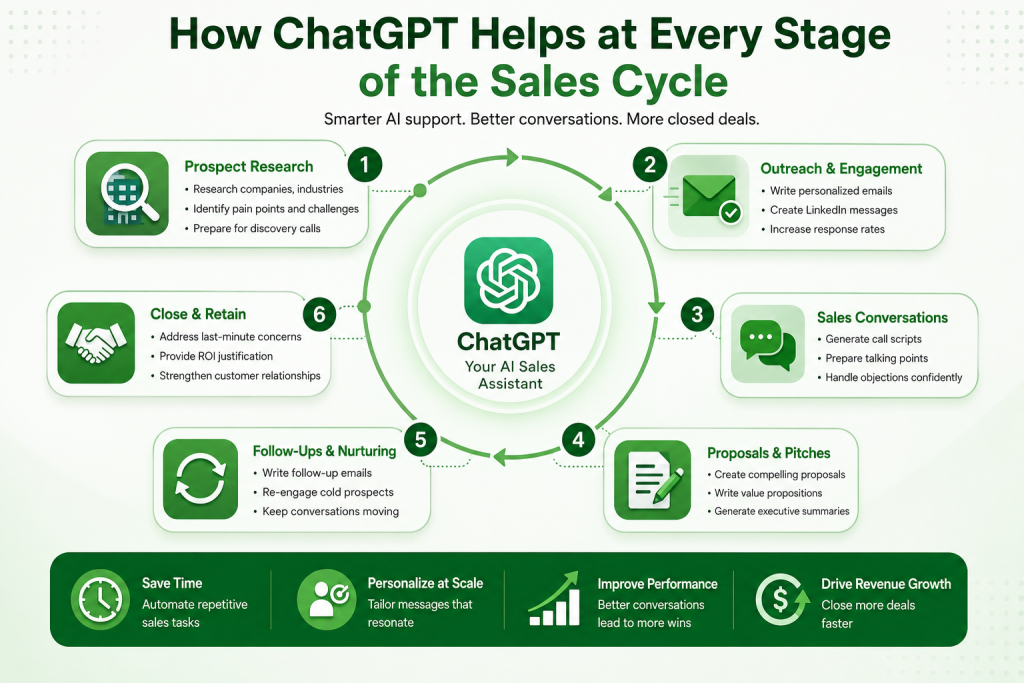
Prospect Research
Before any outreach, you need to understand who you’re talking to, what they care about, and why your solution is relevant to them. ChatGPT turns this into a fast, structured process.
What you can do:
- Summarize a company’s business model, recent news, and competitive position
- Identify likely pain points based on industry, company size, and growth stage
- Surface talking points tied to the prospect’s role (VP Sales vs. CFO vs. IT Director)
- Prepare intelligent questions for discovery calls
Example: Paste a company’s LinkedIn “About” section and their latest press release into ChatGPT and ask: “What are the top 3 business challenges this company is likely facing, and how would a CRM platform help address each?”
You get a tailored research brief in seconds — not a generic summary.
Writing Personalized Cold Emails
Cold email is still one of the highest-ROI outbound channels when done right. The problem is personalization takes time, so most teams default to generic templates that get ignored.
ChatGPT solves the personalization bottleneck.
What changes:
- You go from one template to multiple variations tailored by industry, pain point, or trigger event
- Emails feel written for the individual, not blasted to a list
- A/B testing becomes easy — generate five subject line variants and test them
Example prompt:
“Write a cold email to a VP of Sales at a 200-person SaaS company. They recently expanded their sales team. Position our sales coaching platform around reducing ramp time for new hires. Keep it under 100 words, conversational, and end with a soft CTA.”
Result: a sharp, relevant, ready-to-personalize email in under 30 seconds.
Creating LinkedIn Outreach Messages
LinkedIn outreach gets ignored when it sounds like everyone else’s message. ChatGPT helps craft connection requests and follow-ups that feel human and relevant.
Use cases:
- Personalized connection requests referencing a shared interest or the prospect’s recent post
- Follow-up messages after connecting that offer value before asking for anything
- Re-engagement messages for cold connections who went quiet
Example: Feed ChatGPT the prospect’s recent LinkedIn post and ask it to draft a connection request that references their point of view and introduces a relevant insight — not a pitch.
Generating Sales Call Scripts
Discovery and demo calls require structure, but they can’t feel scripted. ChatGPT helps you build flexible frameworks that guide the conversation without reading from a teleprompter.
What to build:
- Discovery call question sets organized by theme (current state, pain, impact, timeline)
- Demo talk tracks that connect features to specific use cases
- Objection handling responses for the most common pushbacks
Example: Ask ChatGPT to generate 10 discovery questions for a CFO at a mid-market manufacturing company exploring ERP software. The output gives you a starting framework you refine based on what you know about the account.
Preparing for Meetings
Walking into a meeting without preparation is a fast way to lose credibility. ChatGPT compresses meeting prep from 30 minutes to 5.
Ask ChatGPT to generate:
- A one-page research brief on the company and key stakeholders
- Likely objections based on their business type and deal stage
- A structured agenda with time-boxed sections
- Three “insight-led” talking points that position you as a strategic partner, not just a vendor
Follow-Up Email Automation
Most deals are lost in the follow-up phase — not because the prospect wasn’t interested, but because the follow-up was generic, late, or missing entirely.
ChatGPT can draft:
- Post-meeting summaries with agreed next steps
- Proposal follow-ups that reinforce key value points and handle anticipated hesitations
- Re-engagement emails for deals that went cold after 30–90 days
Tip: After each meeting, paste your notes into ChatGPT and ask it to write a follow-up email that summarizes the conversation, confirms next steps, and adds one insight relevant to the prospect’s goals.
Handling Sales Objections
Objections are opportunities — if you respond with confidence and relevance. ChatGPT helps you prepare responses in advance so you’re never caught flat-footed.
Common objections ChatGPT can help address:
- “We’re already using a competitor.”
- “This isn’t in the budget right now.”
- “We need to loop in IT/legal/finance before moving forward.”
- “We tried something like this before and it didn’t work.”
Example: Ask ChatGPT: “A prospect says our price is 30% higher than the competitor they’re currently evaluating. Give me three ways to reframe this objection around total cost of ownership and implementation risk.”
Use the output as a starting point, then layer in your specific product’s differentiators.
Proposal and Pitch Creation
Proposals take hours to write and often follow the same structure regardless of the prospect. ChatGPT accelerates first drafts significantly.
What to generate:
- Executive summaries tailored to the buyer’s stated priorities
- Value proposition statements by stakeholder (executive, end user, finance)
- ROI framing tied to the prospect’s business metrics
- Competitive differentiation sections
Paste your product’s core messaging and the prospect’s key requirements, then ask ChatGPT to draft a proposal outline. Refine from there — dramatically faster than starting from blank.
Best ChatGPT Prompts for Sales Teams
Prospect Research Prompt
Prompt:
“You are a B2B sales researcher. Based on the following company description: [paste About Us / LinkedIn description], identify: (1) their top 3 likely business challenges, (2) the type of buyer persona most likely to evaluate our solution, and (3) two recent industry trends that create urgency for them to act now.”
Why it works: Forces ChatGPT to tie research to sales-relevant insights, not generic summaries.
Customization tip: Add a line about your specific product category so the pain points are scoped correctly.
Cold Email Prompt
Prompt:
“Write a cold email to [job title] at a [company size] [industry] company. They recently [trigger event, e.g., raised Series B / expanded to new markets / posted a job for X role]. Position [your product] around solving [specific pain point]. Keep it under 100 words, avoid jargon, and close with a low-friction CTA asking for a 15-minute call.”
Why it works: Every variable is prospect-specific. The result is an email that reads as individual, not mass-sent.
Customization tip: Include the prospect’s first name and one detail from their LinkedIn profile for an added personal layer.
LinkedIn Outreach Prompt
Prompt:
“Write a LinkedIn connection request from a [your role] to a [prospect role] at a [industry] company. Reference their recent post about [topic]. Keep it under 300 characters, and don’t pitch anything — just open the door to a conversation.”
Why it works: Short, relevant, non-salesy messages get accepted and replied to far more often.
Customization tip: Swap in actual quotes or ideas from the prospect’s post to make it feel specific.
Discovery Call Prompt
Prompt:
“Create a discovery call question framework for a [product type] sales rep speaking to a [buyer role] at a [company type]. Organize questions into four sections: current state, business impact of the problem, evaluation criteria, and decision process. Include 3 questions per section.”
Why it works: Gives you a repeatable structure that uncovers budget, authority, need, and timeline naturally.
Customization tip: Add your product’s most common use cases so the questions align with where you can actually help.
Objection Handling Prompt
Prompt:
“A prospect told me: ‘[exact objection].’ Give me three responses that acknowledge their concern, reframe it around [specific benefit or risk], and keep the conversation moving forward. Make the tone consultative, not defensive.”
Why it works: Trains you to respond with empathy and confidence instead of going on the defensive.
Customization tip: Feed in your product’s specific differentiators so responses aren’t generic.
Follow-Up Email Prompt
Prompt:
“Write a post-meeting follow-up email based on these notes: [paste meeting notes]. Summarize what we discussed, confirm the next steps we agreed to, and include one relevant insight about [their industry challenge] that reinforces why solving this matters now.”
Why it works: Turns rough notes into a polished, professional email that keeps momentum going.
Customization tip: Ask ChatGPT to vary the subject line between meetings so follow-ups don’t feel templated.
Sales Proposal Prompt
Prompt:
“Write an executive summary for a sales proposal targeting a [company type]. Their stated priorities are: [list 2-3 priorities from the call]. Our solution addresses these by [brief explanation]. Include a short ROI framing that quantifies the value in terms of [time saved / revenue increased / cost reduced].”
Why it works: Proposals that lead with the buyer’s goals — not your product features — win more often.
Customization tip: Add a short competitive differentiation paragraph if you know who else is in the evaluation.
Real-World Sales Tasks ChatGPT Can Automate
The following are practical, daily tasks where ChatGPT delivers consistent time savings:
- Prospect research summaries: Paste a company’s website or LinkedIn page and get a brief covering their business model, size, and likely pain points in seconds.
- CRM note cleanup: Paste raw meeting notes and ask ChatGPT to reformat them into structured CRM fields — summary, next steps, action owner, deal stage update.
- FAQ response drafting: Build a library of responses to common prospect questions your team can pull from and personalize.
- Sales content creation: Blog posts, one-pagers, case study summaries, and battle cards can all be drafted faster with ChatGPT as a writing partner.
- Email sequence drafting: Build a 4–6 email nurture sequence for a specific persona, deal stage, or trigger event.
- Meeting agendas: Generate structured agendas for discovery, demo, and negotiation calls in under a minute.
Benefits of Using ChatGPT in Sales
- More selling time: Reps spend less time writing and researching, more time in conversations that drive revenue.
- Faster response times: Follow up the same day with high-quality emails instead of waiting until you have time to write something good.
- Better personalization: Customize outreach for dozens of prospects without starting from scratch each time.
- Reduced admin burden: CRM notes, meeting summaries, and email drafts get done faster with better output quality.
- Consistent messaging: New reps can execute to the same standard as veterans from day one.
- Continuous improvement: Test, iterate, and improve your prompts as your team learns what works.
Limitations of ChatGPT for Sales
ChatGPT is a powerful tool, but it’s not a silver bullet. Here’s what to watch:
- It doesn’t know your prospect: ChatGPT generates plausible outputs, not verified facts. Always confirm company details, roles, and news before using them in outreach.
- Generic outputs without good prompts: Weak prompts produce weak results. The quality of what ChatGPT generates is directly tied to the specificity of your input.
- No relationship instinct: Building trust, reading emotional subtext, and navigating complex stakeholder dynamics still requires human judgment.
- Privacy considerations: Avoid pasting sensitive CRM data, contract terms, or personal information into ChatGPT, especially if you’re on a shared or free-tier account.
- Over-automation risk: If every email sounds like it was written by the same machine, your outreach will feel that way. Human editing is non-negotiable.
Best Practices for Using ChatGPT in Sales
1. Always add a human layer Never send ChatGPT output directly. Read it, refine it, and make sure it sounds like you — not a chatbot.
2. Build a prompt library Save your best-performing prompts in a shared doc. Standardize them across the team for consistent output quality.
3. Use company-specific context The more context you give ChatGPT — your product, the prospect’s industry, the specific pain point — the better the output.
4. Verify before you use Fact-check any company data, statistics, or industry claims before including them in outreach or proposals.
5. Iterate continuously If a prompt produces weak output, adjust it. Treat prompt refinement like A/B testing — small changes can dramatically improve results.
6. Don’t automate relationships Use ChatGPT to prepare for conversations, not to replace them. The goal is to show up more prepared, not to remove yourself from the process.
ChatGPT vs Traditional Sales Workflows
| Task | Traditional Approach | With ChatGPT |
|---|---|---|
| Prospect research | 20–40 min per account | 3–5 min with targeted prompts |
| Cold email writing | 15–30 min per email | 2–3 min including editing |
| Follow-up emails | Often delayed or skipped | Same-day, draft-ready in minutes |
| Meeting preparation | 30+ min per meeting | 5–10 min with a research brief |
| Proposal creation | Several hours | First draft in 20–30 min |
| Objection handling | Ad-hoc, inconsistent | Prepared responses for every stage |
| CRM note entry | Delayed, inconsistent | Immediate, structured summaries |
The cumulative time savings across a full sales team are significant — and that time goes back into selling.
Frequently Asked Questions
How can ChatGPT improve sales performance?
ChatGPT improves sales performance by accelerating research, writing, and preparation tasks that consume a large portion of a rep’s day. It helps teams personalize outreach faster, prepare better for meetings, respond to objections with confidence, and follow up more consistently — all of which directly impact pipeline and close rates.
Can ChatGPT write sales emails?
Yes. ChatGPT can draft cold emails, follow-up emails, and re-engagement messages in seconds. The key is providing specific context — the prospect’s role, company, pain point, and the action you want them to take. The output still needs a human review before sending.
Is ChatGPT useful for B2B sales?
Absolutely. B2B sales involves longer cycles, multiple stakeholders, and more complex messaging — all areas where ChatGPT adds value. It’s particularly useful for account research, multi-stakeholder outreach, proposal drafting, and building objection handling frameworks.
Can ChatGPT replace salespeople?
No. ChatGPT can handle research, writing, and content generation, but it cannot build genuine relationships, read emotional signals, or make judgment calls during live negotiations. It works best as a productivity tool that supports skilled salespeople, not a replacement for them.
What are the best ChatGPT prompts for sales?
The best sales prompts are specific and context-rich. Include the prospect’s role, company type, and the exact problem you’re solving. Strong categories include: prospect research prompts, cold email prompts, objection handling prompts, discovery call question frameworks, and follow-up email generators. The prompt library in this article provides ready-to-use starting points for each.
Conclusion
ChatGPT won’t close deals for you — but it will help you show up better prepared, more consistently, across more accounts than you could manage on your own.
The reps and teams seeing real results from ChatGPT aren’t using it to automate everything. They’re using it strategically: to compress research time, sharpen their messaging, and free up mental bandwidth for the conversations that actually matter.
Start with one or two use cases — prospect research or cold email drafting are the easiest entry points. Build a prompt library. Refine what works. And never hit send without adding your own voice to what ChatGPT produces.
The competitive advantage in sales isn’t AI versus humans. It’s human salespeople who know how to use AI, versus those who don’t.