If you’ve decided to move on from ChatGPT, you can permanently delete your OpenAI account directly from the platform. Deleting your account removes your access to ChatGPT and all associated data, including your conversation history. Once the process is complete, the deletion is permanent, so it’s worth knowing exactly what you’re doing before you start.
This guide walks you through everything: what happens after deletion, how to do it on desktop and mobile, and answers to the most common questions people have along the way.
What Happens When You Delete Your ChatGPT Account?
Before you hit that delete button, here’s what you should expect:
- Your account is permanently closed. There’s no way to recover it once the deletion is processed.
- All chat history is erased. Every conversation you’ve had with ChatGPT will be deleted and cannot be retrieved.
- You lose access to all OpenAI services. This includes ChatGPT, the OpenAI API, and any other products tied to your account.
- Your ChatGPT Plus subscription does not auto-cancel. You must cancel it separately before deleting your account, or you risk continued charges.
- Your email address can be reused. After deletion, you can sign up for a new OpenAI account with the same email — but you won’t get any of your old data back.
Before You Delete Your ChatGPT Account
Taking a few minutes to prepare will save you from headaches later.
Cancel Your ChatGPT Plus Subscription First
If you’re on a paid ChatGPT Plus plan, canceling your subscription and deleting your account are two separate actions. Deleting your account does not automatically stop billing.
If you skip this step and delete your account while the subscription is still active, you may still get charged for the next billing cycle with no way to manage it afterward.
To cancel ChatGPT Plus:
- Log into ChatGPT
- Click your profile icon in the bottom-left corner
- Go to My Plan
- Select Manage my subscription
- Click Cancel plan and confirm
Once canceled, your Plus access continues until the end of the billing period, and you won’t be charged again.
Export Important Chat Data
ChatGPT lets you download all your conversations before you leave. If there’s anything useful in your chat history — research, drafts, code snippets — export it now.
To export your data:
- Click your profile icon → Settings
- Go to Data controls
- Click Export data
- Confirm the export — OpenAI will email you a download link
The file contains your conversations in a readable format. Download and save it somewhere safe before proceeding.
How to Delete ChatGPT Account on Desktop
This is the most straightforward way to delete your account. The process takes just a few minutes.
- Go to chat.openai.com and log in
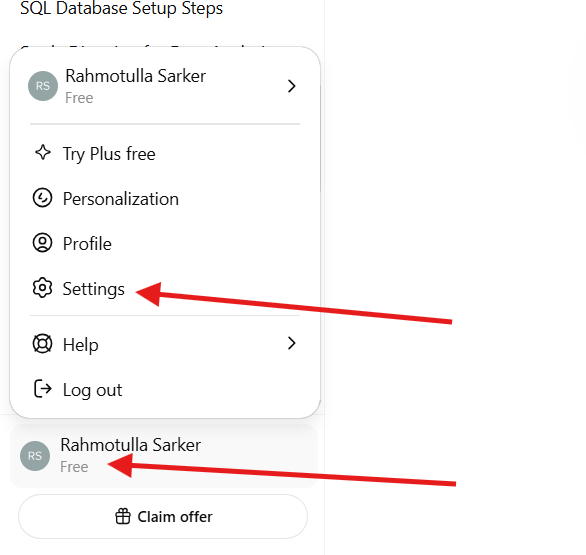
- Click your profile icon in the bottom-left corner of the screen
- Select Settings
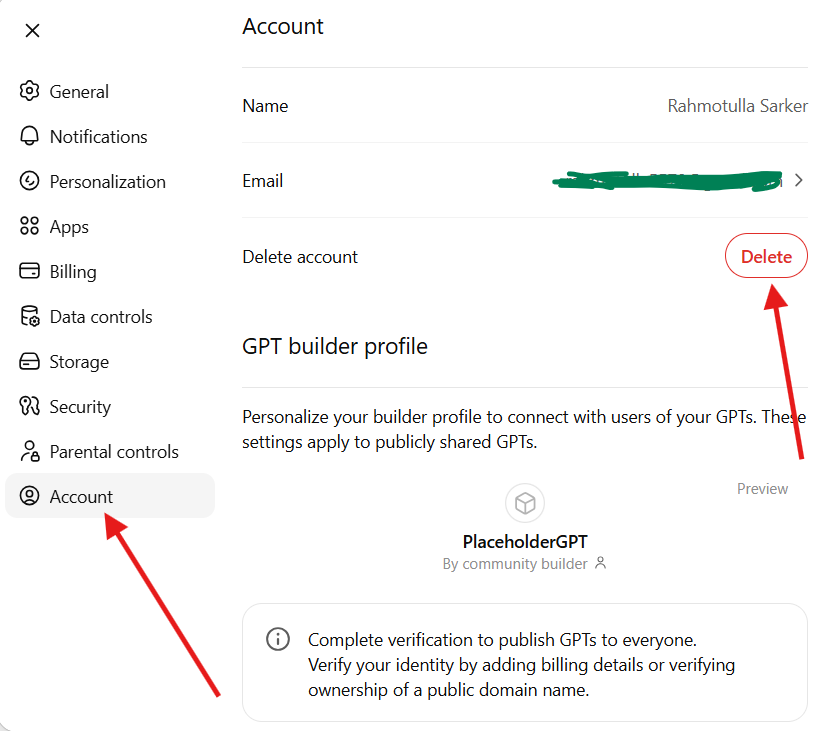
- Click on Account
- Scroll down and click Delete account
- Read the confirmation prompt carefully
- Type your email address or confirmation text as required
- Click Delete account to confirm
After confirming, OpenAI begins processing the deletion request. Your account may remain in a deactivation state for up to 30 days before being fully removed from their systems.
How to Delete ChatGPT Account on Mobile
The steps are slightly different depending on whether you’re on iPhone or Android.
Delete Account on iPhone
- Open the ChatGPT app and log in
- Tap your profile icon in the top-right corner
- Tap Settings
- Scroll to Data controls
- Tap Delete account
- Follow the on-screen prompts to confirm
If you have an active ChatGPT Plus subscription through Apple, you’ll also need to cancel it separately through iPhone Settings → Apple ID → Subscriptions.
Delete Account on Android
- Open the ChatGPT app and log in
- Tap the menu icon or your profile picture
- Go to Settings
- Tap Data controls
- Tap Delete account
- Confirm the deletion when prompted
If you subscribed to ChatGPT Plus through the Google Play Store, cancel that subscription via Google Play → Subscriptions as well.
Can You Recover a Deleted ChatGPT Account?
No — account deletion is permanent. Once OpenAI processes your request, your account, chat history, and all associated data are gone for good. There is no recovery option.
OpenAI typically processes deletion requests within 30 days. During that window, you won’t be able to log in, but the account hasn’t been fully purged yet. If you change your mind, you may be able to contact OpenAI support during this period to request a cancellation of the deletion — but this is not guaranteed.
After the 30-day period, the account is fully deleted and cannot be restored under any circumstances.
Difference Between Deleting and Canceling ChatGPT Plus
This is one of the most common points of confusion, so let’s clear it up.
| Action | What It Does |
|---|---|
| Cancel ChatGPT Plus | Stops future billing. You keep your account and can still use the free version of ChatGPT. |
| Delete your account | Permanently removes your entire OpenAI account, all data, and all access. |
Canceling your subscription does not delete your account. Deleting your account does not automatically cancel your subscription. You need to do both — cancel first, then delete — if your goal is to fully leave the platform without any loose ends.
Troubleshooting Common Problems
Can’t Find the Delete Account Option
If you don’t see a “Delete account” button under Data controls, try accessing it from a desktop browser rather than the mobile app. Some users report that the option is more consistently available on the web version.
Forgot ChatGPT Login Method
ChatGPT supports login via Google, Microsoft, Apple, or email. If you’re unsure how you signed up, try each option on the login screen. If you’re completely locked out, use the “Forgot password” option with your email address, or contact OpenAI support at help.openai.com.
Subscription Still Active After Deletion
If you deleted your account without canceling Plus first, contact OpenAI support immediately. If the subscription was through Apple or Google Play, contact their support teams — OpenAI won’t be able to manage those billing relationships after your account is gone.
Cannot Access Old Chats
Once your account is deleted, chat history is unrecoverable. This is why exporting your data before deletion is so important. If your account is still in the 30-day processing window, you may be able to log in and export — try before it’s too late.
Frequently Asked Questions
Does deleting ChatGPT remove all chats?
Yes. Deleting your ChatGPT account permanently removes all conversation history. The data cannot be recovered after deletion is finalized.
Can I use the same email again?
Yes. After your account is fully deleted, you can create a new OpenAI account using the same email address. However, none of your previous data, chats, or settings will carry over.
How long does ChatGPT account deletion take?
OpenAI typically processes account deletion requests within 30 days. During this time, your account is deactivated and inaccessible.
Do I need to cancel ChatGPT Plus separately?
Yes. Canceling your ChatGPT Plus subscription and deleting your account are two separate steps. Always cancel your subscription first to avoid unexpected charges.
Can I temporarily deactivate ChatGPT instead?
No. OpenAI does not offer a temporary deactivation or account pause option. Your choices are to keep the account active or permanently delete it.
Conclusion
Deleting your ChatGPT account is a straightforward process once you know the steps. The key things to remember: cancel any active subscription first, export your chat data if you need it, and then follow the deletion steps through Settings → Data controls. The process takes just a few minutes, and deletion is finalized within 30 days.
There’s no way to undo it after the fact, so make sure you’ve saved anything important before you confirm.