Writing code is only one part of software development. Sometimes the hardest part is figuring out where to start, finding a bug that’s been sitting in your codebase for three days, or trying to understand someone else’s spaghetti logic without losing your mind.
Let’s be honest — most developers have experienced this. You know the language. You know the syntax. But staring at a blank file trying to architect a feature, or squinting at a stack trace at 11pm, is a different kind of hard.
This is where ChatGPT becomes useful. Not as a replacement for thinking like a developer, but as a tool that speeds up every stage of the process from figuring out what you’re building, to writing it, to fixing it when it breaks.
This guide gives you the actual prompts experienced developers use with ChatGPT, organized around the real software development lifecycle. Not just “write me a function.” The whole process.
Can ChatGPT Help With Coding?
Yes — ChatGPT can meaningfully help with coding, but not in the way most beginners assume.
It’s not going to build your app for you while you sit back. What it’s actually good at is compressing the time you spend on specific, well-defined tasks:
- Learning programming — explaining concepts in plain language, with examples tailored to your current skill level
- Generating code — functions, scripts, boilerplate, API endpoints, database queries
- Debugging — reading error messages and stack traces, spotting logic errors, suggesting fixes
- Architecture planning — helping you think through structure before you write a single line
- Refactoring — cleaning up working code so it’s more readable and maintainable
- Documentation — writing comments, docstrings, README files, and API docs
- Testing — generating unit tests and edge cases you might not have thought of
Here’s where things get tricky, though. ChatGPT doesn’t know your codebase. It doesn’t know your database schema, your team’s conventions, or the weird edge case your product manager mentioned in a meeting three weeks ago. It will confidently generate code that looks correct and still be wrong.
That’s not a reason to avoid it. It’s a reason to use it the way an experienced developer uses a very fast, very knowledgeable junior engineer — you review everything, you test everything, and you never blindly copy-paste into production.
The Best ChatGPT Prompt for Coding
If you only take one prompt from this article, take this one. It’s a master prompt designed to work through an entire coding task from goal to testing strategy, not just spit out code.
Act as a senior software engineer helping me build [describe your project or feature]. My goal is [describe what you’re trying to achieve]. I’m working in [programming language/framework], and my constraints are [list any constraints — performance, existing libraries, team conventions, deadlines].
Walk me through this in stages:
- Clarify the requirements and ask me questions if anything is ambiguous.
- Suggest an architecture or approach, and explain the tradeoffs of any alternatives.
- Write the code in clear, well-commented sections.
- Explain the code as if I’m a competent developer who’s unfamiliar with this specific approach.
- Suggest how I should test this before considering it done.
Ask me clarifying questions before jumping to code if anything is unclear.
Why It Works
This prompt does something most people’s prompts don’t: it forces ChatGPT to slow down. Most people ask for code and get code — often based on assumptions that don’t match what they actually needed. By explicitly asking for clarification, architecture, and testing strategy, you get a response that mirrors how a thoughtful engineer actually works, instead of a guess dressed up as a solution.
When To Use It
Use this prompt at the start of any non-trivial coding task — a new feature, a new project, or anything where “just write the function” would skip over decisions that actually matter.
How To Customize It
Swap in your specific stack (React, Django, Rails, Go, whatever you’re using). If you already have an architecture in mind, say so explicitly and ask ChatGPT to critique it rather than propose its own — you’ll get a more useful second opinion.
Pro Tip
Paste in any existing code, schema, or file structure you already have. ChatGPT’s suggestions get dramatically more useful the moment it has real context instead of guessing at your setup.
The AI Coding Workflow Smart Developers Use
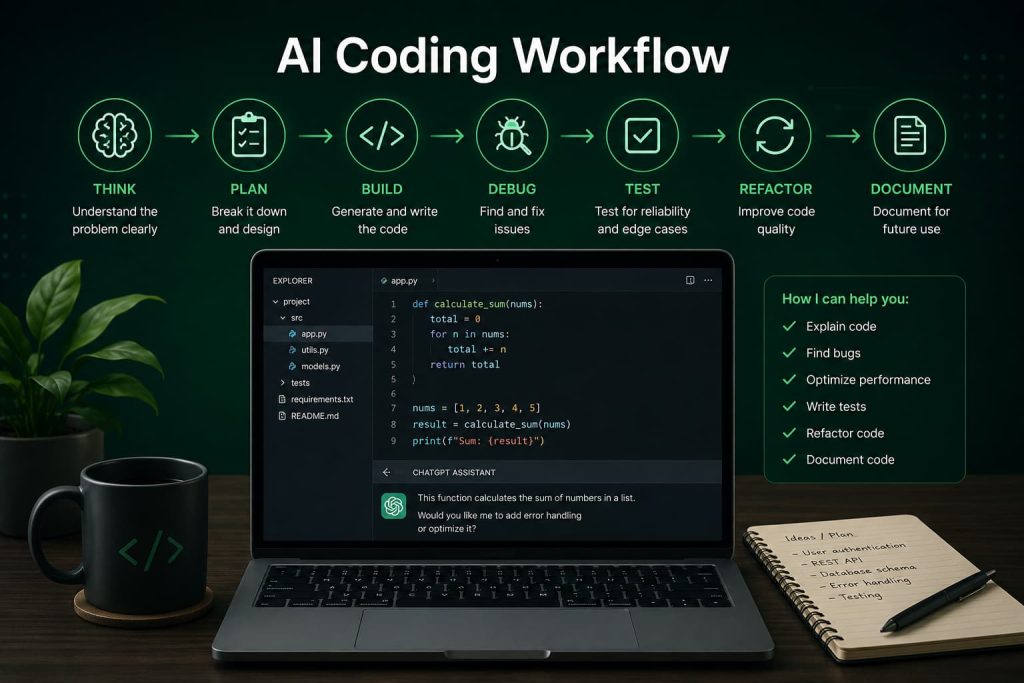
Most people use ChatGPT for one thing: generating code. That’s leaving most of the value on the table.
If I were structuring how I use ChatGPT for a project today, I’d use this framework:
THINK → PLAN → BUILD → DEBUG → TEST → REFACTOR → DOCUMENT
Let’s break down what that actually looks like.
THINK. Before any code gets written, use ChatGPT to pressure-test your idea. Ask it what edge cases you might be missing, what similar problems usually look like, and what questions you haven’t asked yourself yet.
PLAN. Turn the idea into a rough architecture. What are the main components? What’s the data flow? What does the file structure look like? This is where you catch design mistakes while they’re still free to fix.
BUILD. This is the part everyone jumps to first — actually generating the code. It should be the fourth step, not the first, because code written without a plan tends to need to be rewritten anyway.
DEBUG. Something will break. Paste the error, the relevant code, and what you expected to happen. Good debugging prompts are specific, not “this doesn’t work.”
TEST. Before you consider anything done, generate test cases — including the annoying edge cases you didn’t think of. This is where ChatGPT is genuinely great: it’s very good at generating exhaustive test scenarios.
REFACTOR. Working code and good code aren’t the same thing. Once something works, ask ChatGPT to review it for readability, structure, and maintainability.
DOCUMENT. The step everyone skips. Comments, docstrings, README updates — ChatGPT can draft all of it in seconds, which removes the excuse for skipping it.
Most developers only ever use step three. The ones getting the most value out of ChatGPT are using all seven.
ChatGPT Prompts for Learning Programming
If you’re learning to code, ChatGPT is one of the best tutors you’ll ever have — mainly because it never gets impatient and it will explain the same concept five different ways if you ask it to.
Learning Python
Prompt
Explain [Python concept, e.g., list comprehensions] to me like I’m a beginner who understands basic Python syntax but hasn’t used this concept before. Give me a simple example, then a slightly more complex real-world example, then a small exercise I can try on my own.
What It Does
Breaks a concept down progressively instead of dumping a wall of theory on you. You get a mental model, a practical example, and a way to test whether you actually understood it.
Example
Ask this about list comprehensions, decorators, or generators, and you’ll get a much clearer explanation than most textbook chapters — because you can immediately follow up with “wait, why does that work?”
Pro Tip
Always ask for the exercise. Reading an explanation feels like understanding. Writing the code yourself is how you find out whether you actually do.
Learning JavaScript
Prompt
I’m learning JavaScript and I keep getting confused about [concept, e.g., closures, promises, the event loop]. Explain it using an analogy, then show me actual code that demonstrates it, then explain what would happen if I changed one part of the code.
What It Does
JavaScript concepts like closures and async behavior are notoriously hard to grasp from static explanations. Asking “what happens if I change this” forces an explanation of cause and effect, not just definition.
Example
This works especially well for this binding, promise chains, and async/await — concepts that make more sense once you see them break.
Pro Tip
Ask ChatGPT to intentionally introduce a bug related to the concept, then have you find and fix it. Active debugging cements concepts faster than passive reading.
Learning SQL
Prompt
Give me a small sample database schema (2-3 tables) and then teach me [SQL concept, e.g., JOINs, subqueries, window functions] using queries against that schema. Start simple and increase complexity with each example.
What It Does
SQL is much easier to learn against a concrete schema than in the abstract. This prompt builds a consistent example you can keep referring back to.
Example
Ask for a schema with customers, orders, and products tables, then work through INNER JOIN, LEFT JOIN, and GROUP BY using that same schema.
Pro Tip
Once you’re comfortable, ask ChatGPT to give you “broken” queries with subtle bugs and have you spot the issue before it explains it.
Learning Web Development
Prompt
I want to understand how [frontend/backend/full concept, e.g., how a browser renders a webpage, how an API request flows from frontend to backend] actually works end to end. Walk me through it step by step using a simple example project.
If you’re specifically focused on building applications, check out our guide on ChatGPT prompts to build an app for a deeper framework on going from idea to working software.
What It Does
Web development has a lot of moving parts that tutorials often explain in isolation. This prompt asks for the full picture, which is usually where the “aha” moment happens.
Example
Try this with “how does a React app talk to a REST API” or “what actually happens between typing a URL and seeing a page load.”
Pro Tip
Once you have the explanation, ask ChatGPT to help you build a tiny working version of what it just described. Concepts stick when you build them.
If you’re specifically focused on building applications, check out our guide on ChatGPT prompts to build an app for a deeper framework on going from idea to working software.
ChatGPT Prompts for Writing Code
This is the part most people jump straight to — and it’s still useful, as long as you’re specific.
Function Creation
Prompt
Write a [language] function that [describe exact behavior]. Include input validation, handle edge cases like [list edge cases], and add comments explaining any non-obvious logic.
What It Does
Forces you to think through edge cases before you get the code, instead of discovering them in production.
Example
“Write a Python function that takes a list of dictionaries and groups them by a given key, handling missing keys and empty lists gracefully.”
Pro Tip
Always specify what should happen on bad input. “What if the list is empty” and “what if the key doesn’t exist” are the two questions that separate demo code from production code.
API Development
Prompt
Help me build a [REST/GraphQL] API endpoint for [describe functionality] using [framework, e.g., Express, FastAPI, Rails]. Include request validation, appropriate status codes, and error handling. Explain the design decisions as you go.
What It Does
API endpoints have a lot of small conventions — status codes, validation, error shapes — that are easy to get inconsistent across a project. This prompt bakes those conventions in from the start.
Example
“Build a POST endpoint for creating a user in FastAPI, including email validation and duplicate-detection.”
Pro Tip
Paste in your existing endpoints so ChatGPT matches your project’s existing conventions instead of inventing new ones.
Database Queries
Prompt
Write a [SQL/ORM] query that [describe what data you need]. My schema is: [paste schema or describe tables and relationships]. Optimize for readability, and flag if there’s a performance concern with large datasets.
What It Does
Gets you a working query and a heads-up about scaling issues before they bite you in production.
Example
“Write a query that returns the top 5 customers by total order value in the last 90 days,” with your actual schema pasted in.
Pro Tip
Always ask “what would break if this table had 10 million rows.” It’s a great habit that catches N+1 queries and missing indexes early.
For deeper SQL-specific prompting strategies, our ChatGPT prompt for SQL queries guide covers more advanced query patterns.
Automation Scripts
Prompt
Write a script in [language] that automates [describe repetitive task]. It should [list requirements — run on a schedule, handle errors gracefully, log its actions, etc.].
What It Does
Automation scripts are one of the highest-leverage uses of ChatGPT — they’re usually small, self-contained, and exactly the kind of task that’s tedious to write from scratch but easy for ChatGPT to nail on the first try.
Example
“Write a Python script that renames all files in a folder based on their creation date, and logs each rename to a text file.”
Pro Tip
Always ask it to add logging. Automation scripts that fail silently are the ones that cause real problems.
ChatGPT Prompts for Debugging Code
This is where ChatGPT genuinely shines, and where most developers write terrible prompts. “This doesn’t work, please fix” gets you nothing useful. Specificity is everything here.
Error Analysis
Prompt
I’m getting this error: [paste full error message and stack trace]. Here’s the relevant code: [paste code]. What’s causing this, and what are the possible fixes?
What It Does
Gives ChatGPT the two things it actually needs to diagnose a problem: the exact error and the exact code, instead of a vague description of the symptom.
Example
Paste a TypeError: Cannot read properties of undefined along with the function it’s happening in, and you’ll usually get the exact line and reason within seconds.
Pro Tip
Always include the full stack trace, not just the last line. The root cause is often several frames up from where the error actually surfaces.
Bug Investigation
Prompt
This code should [describe expected behavior] but instead it’s [describe actual behavior]. Here’s the code: [paste code]. Walk through the logic step by step and tell me where it diverges from what I expect.
What It Does
This is for bugs without a clean error message — logic bugs where the code runs fine but produces the wrong result. Asking for a step-by-step trace is how you find these.
Example
“This function should return the average of the list, but it’s returning 0 for non-empty lists” is the kind of bug this prompt catches quickly.
Pro Tip
If the bug is intermittent, mention that explicitly. Intermittent bugs are usually about state, timing, or race conditions — a very different category of problem than a straightforward logic error.
Performance Problems
Prompt
This [function/query/endpoint] is running slower than expected. Here’s the code: [paste code]. What are the likely performance bottlenecks, and how would you optimize it?
What It Does
Gets you a structured breakdown of where the slowness is likely coming from, instead of guessing and optimizing the wrong part.
Example
Paste a slow database query along with your table sizes, and you’ll typically get suggestions around indexing, query restructuring, or N+1 issues.
Pro Tip
Mention your actual data scale. “This runs on a table with 50 rows” and “this runs on a table with 50 million rows” need completely different answers.
Code Optimization
Prompt
Review this code for efficiency: [paste code]. Suggest optimizations, and explain the tradeoffs — for example, if a faster approach sacrifices readability.
What It Does
Avoids the trap of “faster at any cost.” Some optimizations aren’t worth the added complexity, and a good answer here should say so.
Example
Ask this on a nested loop that’s O(n²) and you’ll usually get a hash-map-based alternative along with an honest note about when the original approach is actually fine.
Pro Tip
Don’t optimize code you haven’t profiled. Ask ChatGPT to help you identify the actual bottleneck first — premature optimization wastes more time than it saves.
Want a deeper, standalone resource just on this topic? See our full ChatGPT prompt for debugging code guide.
ChatGPT Prompts for Code Review and Refactoring
Working code isn’t the same thing as good code. This is the step most people skip entirely.
Code Quality Reviews
Prompt
Review this code as if you’re a senior engineer doing a code review: [paste code]. Point out anything that’s unclear, risky, inconsistent, or could cause problems later. Be direct.
What It Does
Simulates the kind of honest feedback you’d get from a good senior teammate — the kind that catches issues before they ship, not after.
Example
Paste a function with a hardcoded value buried in the middle of it, and a good review will flag it as a maintainability risk even if the code technically works.
Pro Tip
Add “be direct” or “don’t just tell me it looks good” to your prompt. ChatGPT can default to being overly agreeable unless you explicitly ask for critical feedback.
Refactoring Suggestions
Prompt
Refactor this code to improve readability and maintainability without changing its behavior: [paste code]. Explain each change and why it’s an improvement.
What It Does
Gets you cleaner code plus the reasoning behind each change, so you’re learning better patterns instead of just accepting a rewrite you don’t understand.
Example
A long function doing five different things often gets split into smaller, named functions — each easier to test and reason about independently.
Pro Tip
Ask for the refactor in stages if the function is large. One giant diff is much harder to review than three small, explained ones.
Readability Improvements
Prompt
This code works but is hard to read: [paste code]. Rewrite it for clarity — better variable names, simpler structure, clearer logic flow — while keeping the exact same behavior.
What It Does
Targets pure readability, separate from performance or architecture concerns. This matters because code is read far more often than it’s written.
Example
Cryptic variable names like x, tmp, and flag2 get replaced with names that actually describe what they hold.
Pro Tip
Run this on old code you wrote six months ago. It’s a fast way to see how your standards for readability have (hopefully) improved.
Best Practice Reviews
Prompt
Review this code against [language/framework] best practices. Point out anything that goes against common conventions, and explain what the convention is and why it matters.
What It Does
Catches the kind of small inconsistencies that don’t break anything today but make a codebase harder to maintain as it grows.
Example
Inconsistent error handling patterns across a Python codebase — some functions raising exceptions, others silently returning None — is a common flag here.
Pro Tip
Use this periodically across a whole file, not just new code. It’s a good habit to run on files before a bigger refactor or before onboarding a new teammate.
For a dedicated deep-dive on this exact topic, check out our ChatGPT prompt for code review article.
ChatGPT Prompts for Testing and Documentation
The two steps developers are most likely to rush — or skip entirely.
Unit Testing
Prompt
Write unit tests for this function using [testing framework, e.g., Jest, pytest]: [paste code]. Include normal cases, edge cases, and at least one test for invalid input.
What It Does
Generates a more thorough test suite than most developers write on their first pass, because ChatGPT doesn’t get lazy about edge cases the way tired humans do.
Example
For a function that parses a date string, you’ll typically get tests for valid dates, invalid formats, empty strings, and boundary dates like leap years.
Pro Tip
Always ask specifically for edge cases and invalid input — without that instruction, you’ll often just get the “happy path” tests.
Integration Testing
Prompt
Help me write an integration test for [describe the flow, e.g., user signup through to confirmation email] using [testing tool/framework]. Include setup, the test itself, and teardown.
What It Does
Integration tests are more involved than unit tests because they touch multiple systems. This prompt keeps the structure organized so nothing gets missed.
Example
Testing a checkout flow that touches a cart service, a payment API, and an order database — the prompt helps map out what needs to be mocked versus tested for real.
Pro Tip
Be explicit about what should be mocked (like a third-party payment API) versus what should run for real. This is the detail people forget to specify.
API Documentation
Prompt
Write API documentation for this endpoint: [paste code or describe the endpoint]. Include the request format, response format, possible status codes, and an example request and response.
What It Does
Turns a working endpoint into documentation another developer (or future you) can actually use without reading the source code.
Example
For a /users/{id} GET endpoint, you’ll get the expected path parameters, a sample JSON response, and the relevant error codes like 404 for a missing user.
Pro Tip
Ask for the output in OpenAPI/Swagger format if your project uses it — it saves you from converting the docs manually later.
Developer Documentation
Prompt
Write a README section explaining how to set up and run this project locally. Here’s the project structure and key files: [describe or paste]. Include prerequisites, setup steps, and how to run tests.
What It Does
Produces the kind of onboarding documentation that saves a new developer (or future you, six months from now) hours of confusion.
Example
A clear “Getting Started” section with prerequisites, install commands, environment variable setup, and how to run the test suite.
Pro Tip
Update this every time your setup process changes. Stale setup docs are one of the most common sources of onboarding friction on a team.
Common Mistakes Developers Make With ChatGPT
Most of the problems people run into aren’t about ChatGPT’s limitations — they’re about how it’s being used.
Blindly trusting generated code. ChatGPT can write code that looks completely correct and still has a subtle bug or security issue. Read every line before it goes anywhere near production.
Poor prompt writing. “Fix my code” gets you a worse answer than pasting the actual error, the actual code, and what you expected to happen. Specificity is the difference between a useful answer and a generic one.
Ignoring security concerns. ChatGPT won’t automatically flag SQL injection risks, hardcoded secrets, or missing authentication checks unless you specifically ask it to review for security.
Skipping testing. Generated code still needs to be tested like any other code. “It compiled” is not the same as “it works.”
Using AI as a replacement for learning. If you copy-paste code you don’t understand, you haven’t actually gained a skill — you’ve just outsourced the moment where you would have learned something. Ask “why” as often as you ask “how.”
How I Would Use ChatGPT If I Were Learning Coding Today
If I were starting from scratch, here’s how I’d approach it.
I’d start with fundamentals, but I wouldn’t just read explanations — I’d ask ChatGPT to quiz me and give me small exercises after every new concept. Passive reading feels productive; it isn’t nearly as effective as writing code yourself.
Once I had the basics, I’d start building small, real projects — a to-do list app, a simple scraper, a personal budget tracker. I’d use the THINK → PLAN → BUILD framework from earlier, even on tiny projects, because the habit matters more than the project size.
When I hit bugs — and I would, constantly — I’d resist the urge to just paste the error and ask for a fix. I’d ask ChatGPT to explain why the bug happened, not just how to patch it. Understanding the “why” is what actually makes you a better developer over time.
I’d get in the habit of asking for code reviews on my own work, even when nobody was making me. Getting comfortable with direct, critical feedback early is one of the fastest ways to level up.
And I’d keep a running list of concepts I didn’t fully understand, and revisit them with ChatGPT a few weeks later — explaining a concept back in your own words is one of the best tests of whether you actually learned it.
Frequently Asked Questions
Can ChatGPT write code?
Yes, ChatGPT can write functional code in most popular programming languages, including Python, JavaScript, SQL, and many others. It’s most reliable for well-defined, self-contained tasks and less reliable for large, complex systems without careful review.
What is the best ChatGPT prompt for coding?
The best prompt is specific about your goal, your tech stack, and your constraints, and asks ChatGPT to walk through requirements, architecture, code, explanation, and testing — not just generate code in isolation.
Can ChatGPT debug code?
Yes. ChatGPT is particularly effective at debugging when you provide the exact error message, stack trace, and relevant code, rather than a vague description of the problem.
Can ChatGPT teach programming?
Yes, ChatGPT works well as a programming tutor, especially when you ask it to explain concepts progressively and give you exercises to practice with, rather than just reading passive explanations.
Can ChatGPT review code?
Yes, ChatGPT can review code for readability, best practices, and potential issues. For the most useful feedback, explicitly ask it to be direct and critical rather than simply confirming the code looks fine.
Conclusion
ChatGPT isn’t a replacement for knowing how to code — it’s a tool that removes friction from every stage of the process, from learning a new concept to debugging a stubborn bug at midnight.
The developers getting the most value out of it aren’t the ones generating the most code. They’re the ones using it across the entire workflow — thinking through problems, planning architecture, debugging systematically, testing thoroughly, and documenting what they built.
Critical thinking still matters more than ever. ChatGPT can generate an answer instantly; it can’t tell you whether that answer is actually right for your specific situation. That part is still on you.
If you want a practical next step: pick one prompt from this article — the master prompt at the top is a good place to start — and use it on whatever you’re building right now. The best way to get good at prompting for code is the same way you got good at coding in the first place: by doing it.